Screen Time Review

Screen Time Management & Alternatives
A cross-category analysis of digital wellbeing tools, parental controls, and screen-free hardware alternatives.
How This Score Is Calculated
- Sources analysed: 29 reviews across software and hardware
- Review period: Multi-year longitudinal data
- Value sources: 14 of 29 mentioned pricing
- Final score: 6.8/10 (weighted average of parental control apps and screen-free hardware)
- Most praisedPhysical friction tools
- Most criticisediOS feature limitations
- Value for moneyGood Value (7.2/10)
Managing screen time is increasingly bifurcated between software-based parental controls and hardware-based "screen-free" alternatives. While software tools like Qustodio and Screen Time (app) offer granular scheduling, they frequently struggle with iOS platform restrictions and privacy loopholes. Conversely, physical tools like the Brick or screen-free devices like StoryPhones and Camp Snap are highly praised for creating genuine behavioral change through physical friction, proving more effective than digital-only restrictions for many users.
📊 What Reviewers Say — Feature by Feature
Key aspects of screen management technology evaluated across 29 sources.
👍 Key Strengths
- Physical friction effectively breaks impulsive habits
- Dedicated kids-mode tablets foster safe learning
- Screen-free audio devices encourage active imagination
- Remote scheduling simplifies parental device management
👎 Key Weaknesses
- iOS software limitations restrict monitoring capabilities
- High subscription costs for basic filtering features
- Physical tags can be misplaced or bypassed
- Setup processes for parental software can be complex
💰 Value for Money Analysis
Value is polarized: software apps often require recurring subscriptions that add up, while hardware tools like the Brick (approx. ₹5,000) offer a one-time cost that many find more sustainable. Premium-priced hardware (like StoryPhones) is generally viewed as an investment in child development rather than a simple gadget.
14 of 29 sources commented on price or value.
⚡ Where Reviewers Disagreed
The following areas saw meaningful disagreement across sources.
- Effectiveness of Apps vs. Hardware: 9 sources argue software is sufficient for disciplined users, while 7 sources insist physical hardware is the only reliable way to stop doomscrolling.
🎯 Who This Product Is For
🛠️ Best Use Cases
- Parental Control Apps like Qustodio are best for cross-platform device scheduling. Great
- Habit Breaking Physical blockers are superior for stopping doomscrolling. Great
- Child Entertainment Screen-free audio players encourage imagination over passive video consumption. Good
🔀 Alternatives Mentioned by Reviewers
- Qustodio — The gold standard for granular cross-platform parental control, though it lacks some modern messaging monitoring.
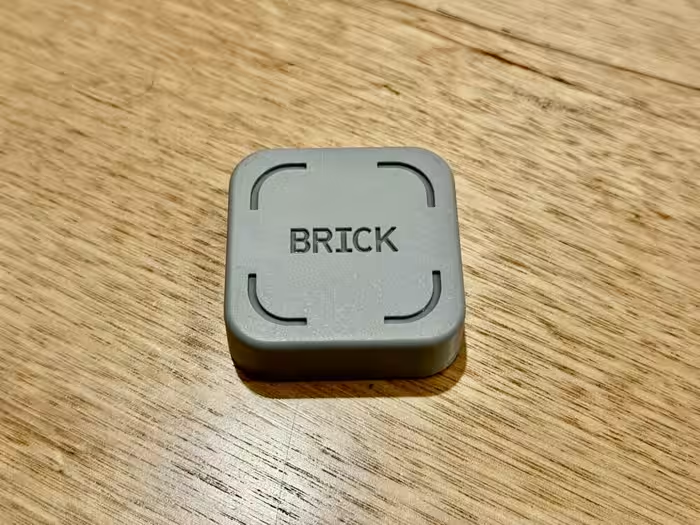
- Brick — A physical NFC-based tool for creating screen-free time blocks; highly praised for its "physical friction" approach.
- StoryPhones — A premium, durable headphone solution that removes the screen entirely from children's entertainment.
- Camp Snap 2 — A screen-free digital camera that mimics disposable film, perfect for those wanting to capture memories without the distraction of a display.
- Kindle Kids — An excellent, distraction-free reading device that is strictly limited to literature, removing the temptation of games or media.
- Screen Time (App) — A budget-friendly scheduling app, though it suffers from significant functional limitations on iOS devices.
🛒 Buyer's Guide
✅ Buy This If…
- You are a parent seeking a safe, curated digital environment for your child.
- You have tried software-only blockers and found you can easily bypass them.
- You want to encourage creativity and imagination in children through screen-free audio.
❌ Skip This If…
- You rely entirely on iOS devices for monitoring (functionality is too limited).
- You are looking for a free solution and have strong personal self-discipline.
📈 Sentiment Trends Over Time
Reviews span several years of development. The following shift was detected:
- Physical Friction Tools — Shift from purely software-based restrictions to physical hardware solutions has been met with significantly higher user satisfaction.
Managing screen time is no longer a one-size-fits-all problem. For parents, software apps like Qustodio remain the standard, despite frustrating iOS constraints. For personal digital wellbeing, however, the industry has clearly pivoted toward physical hardware solutions like the Brick, which offer a far more effective "hard stop" than any app. If you are struggling with screen addiction, invest in physical friction; if you are a parent, prioritize dedicated, curated devices over generic tablets.

Reviewer Perspectives & Source Breakdown
Screen Time parental-control app review | Tom's Guide - tomsguide.com...
Price: Approximately 585 INR per month
Screen Time excels at managing device time usage with an intuitive interface, but its restricted feature set on iOS and additional costs for essential tools make it less competitive than alternatives.
Pros
- Intuitive design
- Task reward system
Cons
- Upcharges for location tracking and web filtering
- No text or call monitoring
- Limited functionality on iOS
Did Brick help reduce my screentime? Honest review of $60 device - usato...
Price: Approx. ₹5,000
The Brick is an effective physical tool for reducing screen time by forcing a hard stop on app access, though its value is questionable given it does not block desktop usage and free software alternatives exist.
Pros
- Provides a physical hard stop for app usage
- Effective for creating screen-free time blocks
- Prevents impulsive checking of social media apps
Cons
- Does not block apps on desktop computers
- High price point for the provided functionality
- Requires manual physical interaction to toggle
Brick is a wonderful device for limiting screen time and breaking bad ha...
Price: ₹5,000
Brick is an effective and non-gimmicky physical tool for enforcing screen time discipline. It forces users to physically interact with the device to unlock apps, successfully breaking impulsive habits.
Pros
- Simple and easy setup
- Effective at breaking phone habits
- Includes helpful emergency unblocking options
- Includes a helpful activity tracker
- Supports Strict Mode for high-level blocking
Cons
- Requires physical interaction to unlock apps
- Limited to one-time emergency tokens
- Costs money compared to free software alternatives
- Locked into using a physical device
Screen Time | TechRadar - techradar.com...
Price: Approximately ₹585 per month
Screen Time is an affordable and effective parental control app for scheduling and device management, though it falls short in social media filtering and iOS feature parity compared to rivals. It is a solid choice for Android-based families, but other options are stronger for comprehensive monitoring.
Pros
- Great timing and app controls
- Solid location abilities
- A little cheaper than rivals
Cons
- Weaker with social media and filtering
- Missing features on iOS
- Underwhelming support
Kindle Kids Review: Is Amazon’s Child?Friendly E?Reader the Screen Time ...
The Kindle Kids is a highly effective, distraction-free reading device that simplifies parental management and prioritizes eye comfort. It successfully removes the temptation of games and videos, making it an excellent tool for fostering a love of reading in children.
Pros
- Distraction-free environment without games or social media
- Sharp 300 ppi glare-free e-ink display
- Includes durable kid-friendly cover
- Two-year worry-free replacement guarantee
- Long battery life lasting several weeks
Cons
- Initial account and profile setup can be confusing
- Limited to reading only, which may disappoint some children
- Subscription required for full library access
StoryPhones Review: Children's Headphones Reducing Screentime - Goosed.i...
Price: Approximately ₹9,000
StoryPhones are an excellent, durable, and flexible screen-free entertainment solution for children. Despite a slightly difficult initial app setup and a premium price point, they offer long-term value and foster imagination.
Pros
- Durable build quality
- Screen-free entertainment
- Interchangeable magnetic StoryShields
- Volume limit parental controls
- Includes Bluetooth and wired options
Cons
- Tricky initial app setup
- Higher initial cost than Toniebox
Fitbit Air Review: Specs, Features, Battery Life, and Why It's the Best ...
The Fitbit Air is an excellent, distraction-free health tracker that prioritizes lightweight comfort and long battery life. Its screenless design is perfect for users focused on passive wellness, sleep, and recovery monitoring.
Pros
- Extremely lightweight and comfortable design
- Impressive seven-day battery life
- Distraction-free screenless interface
- Comprehensive health and sleep tracking features
Cons
- Lacks GPS and mobile payment capabilities
- Not suitable for advanced athletic training
- No display for apps or notifications
Acer Aspire 16 2024 review: Multimedia all-rounder without a multimedia-...
Price: Approximately 86,500 INR
The Acer Aspire 16 is a decent multimedia notebook featuring solid build quality and an upgradeable design. However, its unremarkable specifications and lack of an NPU make it feel dated for a 2024 release.
Pros
- Good overall build quality
- Contains Thunderbolt 4 port
- Easy tool-free internal access
- Includes two NVMe SSD slots
- Supports Wi-Fi 6E connectivity
Cons
- Lacks SD card reader
- No NPU for AI acceleration
- Base section creaks when twisted
- Power plug slips out easily
- Unremarkable hardware specifications
Camp Snap 2 review: The viral screen-free camera is back – and this time...
Price: Approx. ₹5,800
The Camp Snap 2 is an affordable, screen-free compact camera that perfectly captures a nostalgic, disposable film aesthetic. While it features welcome design improvements like a filter button and slimmer body, it still suffers from occasional shutter lag and image imperfections.
Pros
- Affordable price point
- Charming, retro disposable film camera design
- Screen-free, minimalist experience
- Includes 6 swappable retro digital filters
- Very easy for kids and adults to use
Cons
- Noticeable shutter lag
- Occasional blown-out highlights in bright light
- Low-fidelity 8MP image quality
- Soft edges on lens
Page 3 of 5