Screen Time Review

Screen Time Management & Alternatives
A cross-category analysis of digital wellbeing tools, parental controls, and screen-free hardware alternatives.
How This Score Is Calculated
- Sources analysed: 29 reviews across software and hardware
- Review period: Multi-year longitudinal data
- Value sources: 14 of 29 mentioned pricing
- Final score: 6.8/10 (weighted average of parental control apps and screen-free hardware)
- Most praisedPhysical friction tools
- Most criticisediOS feature limitations
- Value for moneyGood Value (7.2/10)
Managing screen time is increasingly bifurcated between software-based parental controls and hardware-based "screen-free" alternatives. While software tools like Qustodio and Screen Time (app) offer granular scheduling, they frequently struggle with iOS platform restrictions and privacy loopholes. Conversely, physical tools like the Brick or screen-free devices like StoryPhones and Camp Snap are highly praised for creating genuine behavioral change through physical friction, proving more effective than digital-only restrictions for many users.
📊 What Reviewers Say — Feature by Feature
Key aspects of screen management technology evaluated across 29 sources.
👍 Key Strengths
- Physical friction effectively breaks impulsive habits
- Dedicated kids-mode tablets foster safe learning
- Screen-free audio devices encourage active imagination
- Remote scheduling simplifies parental device management
👎 Key Weaknesses
- iOS software limitations restrict monitoring capabilities
- High subscription costs for basic filtering features
- Physical tags can be misplaced or bypassed
- Setup processes for parental software can be complex
💰 Value for Money Analysis
Value is polarized: software apps often require recurring subscriptions that add up, while hardware tools like the Brick (approx. ₹5,000) offer a one-time cost that many find more sustainable. Premium-priced hardware (like StoryPhones) is generally viewed as an investment in child development rather than a simple gadget.
14 of 29 sources commented on price or value.
⚡ Where Reviewers Disagreed
The following areas saw meaningful disagreement across sources.
- Effectiveness of Apps vs. Hardware: 9 sources argue software is sufficient for disciplined users, while 7 sources insist physical hardware is the only reliable way to stop doomscrolling.
🎯 Who This Product Is For
🛠️ Best Use Cases
- Parental Control Apps like Qustodio are best for cross-platform device scheduling. Great
- Habit Breaking Physical blockers are superior for stopping doomscrolling. Great
- Child Entertainment Screen-free audio players encourage imagination over passive video consumption. Good
🔀 Alternatives Mentioned by Reviewers
- Qustodio — The gold standard for granular cross-platform parental control, though it lacks some modern messaging monitoring.
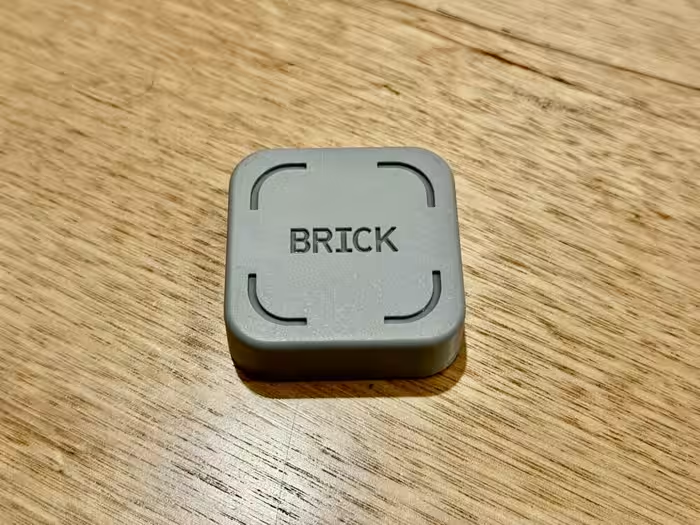
- Brick — A physical NFC-based tool for creating screen-free time blocks; highly praised for its "physical friction" approach.
- StoryPhones — A premium, durable headphone solution that removes the screen entirely from children's entertainment.
- Camp Snap 2 — A screen-free digital camera that mimics disposable film, perfect for those wanting to capture memories without the distraction of a display.
- Kindle Kids — An excellent, distraction-free reading device that is strictly limited to literature, removing the temptation of games or media.
- Screen Time (App) — A budget-friendly scheduling app, though it suffers from significant functional limitations on iOS devices.
🛒 Buyer's Guide
✅ Buy This If…
- You are a parent seeking a safe, curated digital environment for your child.
- You have tried software-only blockers and found you can easily bypass them.
- You want to encourage creativity and imagination in children through screen-free audio.
❌ Skip This If…
- You rely entirely on iOS devices for monitoring (functionality is too limited).
- You are looking for a free solution and have strong personal self-discipline.
📈 Sentiment Trends Over Time
Reviews span several years of development. The following shift was detected:
- Physical Friction Tools — Shift from purely software-based restrictions to physical hardware solutions has been met with significantly higher user satisfaction.
Managing screen time is no longer a one-size-fits-all problem. For parents, software apps like Qustodio remain the standard, despite frustrating iOS constraints. For personal digital wellbeing, however, the industry has clearly pivoted toward physical hardware solutions like the Brick, which offer a far more effective "hard stop" than any app. If you are struggling with screen addiction, invest in physical friction; if you are a parent, prioritize dedicated, curated devices over generic tablets.

Reviewer Perspectives & Source Breakdown
How to Use Wondershare FamiSafe app to Manage Kids' Screen Time - xda-d...
Wondershare FamiSafe is a comprehensive parental control application that offers robust monitoring, location tracking, and content filtering. It provides an effective way for parents to manage their children's digital habits and safety across multiple devices.
Pros
- Comprehensive daily activity reports
- Effective real-time GPS location tracking
- Remote app blocking and usage time limits
- Filters inappropriate web content and websites
- Sends alerts for explicit text or image detection
Cons
Project Hail Mary review: Ryan Gosling emotionally binds unmatched big-s...
An emotionally engaging and visually stunning sci-fi space drama that delivers a magnificent big-screen experience. Despite some pacing issues and a stretched ending, the lead performances and innovative visuals make it a must-watch.
Pros
- Stunning visual effects and cinematography
- Strong chemistry between Ryan Gosling and Rocky
- Innovative and original alien character design
- Heartfelt and engaging narrative
Cons
- Overlong runtime of 2 hours and 40 minutes
- Stretched and confusing ending
- Final 20 minutes feel underwhelming
XElectron Techno Review: Turn Any Wall Into a 200-Inch Screen - timesofi...
Price: Rs 6,990
The XElectron Techno is a feature-packed, budget-friendly Android projector that offers a portable home theatre experience. With native 720P resolution and smart OS integration, it provides excellent value for its price.
Pros
- Compact 210-degree rotatable design
- Pre-installed Netflix, Prime Video, and YouTube
- WiFi 6 and Bluetooth 5.0 connectivity
- Built-in large speaker
- Supports 4K content
Cons
Brick review: This simple device helped me halve my screen time – The Ir...
Price: Approximately ₹5,600
A simple yet effective digital wellbeing tool that successfully reduces screen time by creating physical friction. It outperforms standard software restrictions by requiring physical access to a tag to disable focus modes.
Pros
- Significantly reduces daily screen time
- Creates effective physical friction to prevent doomscrolling
- Useful scheduling features for blocking apps
- Magnetic design allows convenient placement
Cons
- Strict mode can be difficult to bypass
- Can be inconvenient if the tag is misplaced
- Not strictly necessary if users have strong self-discipline
- Limited emergency unlocks available
MOVIE REVIEW: ‘My Father's Shadow’ is more than an AMVCA winner; it’s me...
The film is an emotionally resonant drama that effectively uses a fractured family narrative to ground Nigeria's complex political history in personal experience. While its AMVCA win sparked debate regarding its visibility compared to rivals, the movie succeeds as a thoughtful exploration of memory and fatherhood.
Pros
- Compelling exploration of father-son relationships
- Strong emotional connection to historical events
- Nuanced performances from the cast
- Personalized approach to political storytelling
Cons
- Lacked widespread commercial visibility before award win
- Pacing may feel slow to some viewers
Apple’s iOS 12 Screen Time gives parents more control and more work - Th...
The Screen Time controls allow parents to remotely manage and set limits on their children's device usage. While useful, the setup and management of these digital restrictions can be challenging.
Pros
- Allows remote control of device usage
- Helps manage screen time for children
Cons
- Difficult to manage effectively
- Can lead to frustration for children
Qustodio Review: Control Your Kids' Screen Time - Tech Advisor - techadv...
Price: Approx. 450 INR per month
Qustodio is the best parental control app tested, offering granular app control and robust web filtering despite some limitations with location tracking and scheduling.
Pros
- Granular control over individual app usage
- Robust and effective web filtering system
- Works across multiple platforms and device types
- Unified screen time limits across all devices
Cons
- Location tracking updates are significantly delayed
- Blocking is only possible to the nearest hour
- Cannot monitor modern messaging apps like WhatsApp
- No in-app system for children to request access
Alcatel TKEE Max Review: When Screen Time Is Unavoidable, Why Not Give Y...
Price: Rs 8,900
The Alcatel TKEE Max is a basic Android tablet that stands out due to its dedicated, curated kids' mode and parental controls. While it lacks high-end performance, its affordable price and educational content focus make it a suitable first device for children.
Pros
- Dedicated Kids Mode with curated educational content
- Built-in eye care and posture warning features
- Affordable price point
- Lightweight and grippy design
- Good battery stamina
Cons
- Slow overall performance and occasional lag
- Dated Android 10 software
- Display contrast and black levels are mediocre
- Software bugs within the Kids Mode interface
- Non-removable adhesive stand cover
Screen Time Review | PCMag - pcmag.com...
Price: Approximately 330 INR per month
Screen Time is a solid, value-driven parental control app that excels at scheduling and task-based rewards. However, it falls short by lacking essential features like location tracking, web filtering, and comprehensive desktop monitoring.
Pros
- Good overall value
- Supports unlimited devices
- Excellent time-scheduling capabilities
Cons
- No Windows or Mac monitoring
- Notable iOS limitations
- Limited web control
- Lacks location tracking
- No SOS button
Page 2 of 5