Razer Kiyo v2 Review
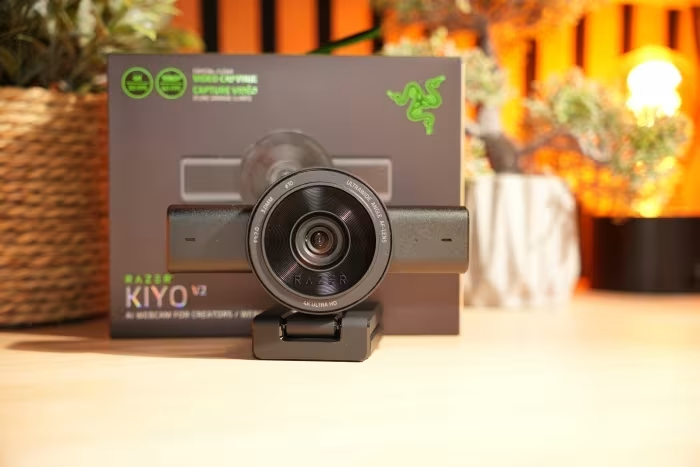
Razer Kiyo V2 Series
A range of 4K and 1440p webcams by Razer designed for streamers and professional remote work.
How This Score Is Calculated
- Sources analysed: 23 reviews
- Raw weighted average: 7.4/10
- Formula: Σ(score × weight) ÷ Σ(weight)
- Review period: 2026
- Value sources: 14 of 23 mentioned price or value
- Final score: 7.4/10 (clamped, rounded to 1 decimal)
- Most reviewed featureImage Quality (23/23)
- Most praisedBuild Quality
- Most criticisedAutofocus
- Reviewer consensus levelModerate
- Value for moneyGood Value (7.8/10)
The Razer Kiyo V2 and V2 X are capable, modern webcams that offer professional-grade visuals and solid build quality, particularly for the price. While they excel in color accuracy and physical design, they are frequently hampered by inconsistent autofocus and a fragmented software experience. They represent a strong upgrade for those moving from standard laptop cameras, provided users can navigate the quirks of the Razer Synapse and Camo Studio ecosystem.
🔧 Key Specifications
- Resolution: 4K (Kiyo V2) / 1440p (Kiyo V2 X)
- Max Frame Rate: 30fps (4K) / 60fps (1440p)
- Sensor: Sony STARVIS
- Privacy: Physical integrated shutter
- Connectivity: USB-C (Kiyo V2) / USB-A (V2 X specific models)
- Mounting: Tripod thread support included
- Software: Razer Synapse, Camo Studio Pro
💲 Price Range
₹8,300 – ₹26,965
Prices fluctuate by region and specific model (V2 vs V2 X).
📊 What Reviewers Say — Feature by Feature
Key features evaluated across 23 sources.
👍 Key Strengths
- Excellent 4K/1440p image clarity
- Robust build and physical privacy shutter
- Great value with bundled software
- Versatile mounting options
👎 Key Weaknesses
- Inconsistent, hunting autofocus
- Sluggish Razer Synapse software
- 4K capped at 30fps
- Mediocre low-light performance in some units
💰 Value for Money Analysis
Reviewers consistently highlight the Kiyo V2 series as a smart purchase, especially when considering the lifetime Camo Studio Pro license included with the V2 model. While some competitors offer slightly better raw performance at the top end, the Razer value proposition remains highly competitive for the price.
⚡ Where Reviewers Disagreed
The following areas saw meaningful disagreement across sources.
- Low-Light Performance: 10 sources praised it as 'excellent' while 8 sources found it 'grainy' or 'mediocre', suggesting unit variation or software-dependent performance.
🎯 Who This Product Is For
🛠️ Best Use Cases
- Streaming High-quality 4K/1440p output provides professional visuals for live broadcasts. Great
- Video Conferencing Reliable color balance and clarity make it excellent for Zoom/Teams meetings. Good
🔀 Alternatives Mentioned by Reviewers
- Logitech C920: A classic benchmark often compared for its stability, though reviewers note the Kiyo V2 provides significantly better color and resolution. Choose the Kiyo V2 for image quality, or the C920 for proven reliability.
- Insta360 Link 2: A premium, high-end competitor that offers superior motion tracking and cinematic performance, though at a higher price point. Choose the Insta360 if you need advanced AI tracking features.
- Elgato Facecam MK.2: Often cited as a more polished professional choice for streamers. Reviewers suggest it for those who prefer a more streamlined, dedicated software experience.
- Dell Pro Webcam: A business-focused alternative noted for its reliable performance and professional aesthetic. Consider this if your primary use is enterprise-level video conferencing.
🛒 Buyer's Guide
✅ Buy This If…
- You are a streamer looking for an all-in-one 4K/1440p solution.
- You value bundled software licenses like Camo Studio Pro.
- You need a physical privacy shutter for peace of mind.
❌ Skip This If…
- You require flawless, lightning-fast autofocus for high-motion content.
- You have limited patience for potentially bloated or sluggish software.
⚠️ Things to Check Before Buying
- Ensure your PC has a USB 3.0 port if you intend to stream in 4K resolution.
- Check if your specific model includes the Camo Studio license, as some V2 X bundles may vary.
📈 Sentiment Trends Over Time
Reviews from 2026 indicate a shift toward valuing the software ecosystem over pure hardware specs.
- Software Integration — Remains a point of contention, with reviewers consistently praising the value add of Camo Studio but noting the bloat of Synapse.
The Razer Kiyo V2 series is a compelling, high-quality choice for streamers and professionals who want a significant visual upgrade without the complexity of a dedicated camera setup. While its autofocus can occasionally hunt and the software requires some patience, the combination of excellent image clarity, solid build quality, and bundled software makes it a top-tier value. For most users looking to improve their video presence, this is a reliable, feature-rich choice.
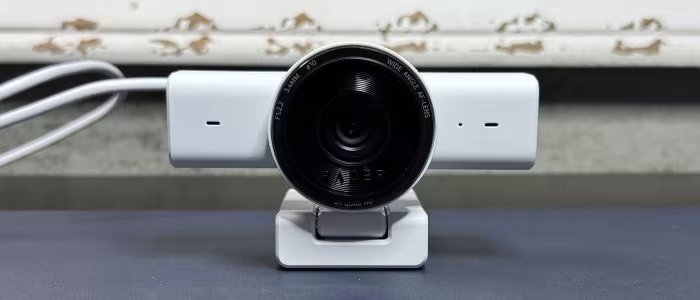
Reviewer Perspectives & Source Breakdown
Razer Kiyo V2 review - A webcam 4K quase perfeita | Eurogamer.pt - eurog...
Price: ₹15,400 (Approximate)
The Razer Kiyo V2 is a powerful webcam that offers high-end 4K image quality and professional AI-driven software features at a much more accessible price point than its predecessor. It is an excellent choice for creators needing studio-grade visuals without the exorbitant cost of premium professional alternatives.
Pros
- Stunning 4K detail with Sony STARVIS sensor
- Advanced AI software features like Auto-Framing
- Supports lossless video encoding for editing
- Elegant integrated physical privacy shutter
Cons
- Bulky design unsuitable for thin laptop screens
- Requires direct high-speed USB-C connectivity
- Wide 93-degree FOV may require constant digital zoom
- Non-removable mounting base limits placement options
REVIEW – Razer’s “Kiyo V2” is a solid webcam that could be a little over...
The Razer Kiyo V2 is a high-quality 4K webcam that delivers impressive image performance, especially in low-light conditions. While it is feature-rich for creators, the mandatory Razer Synapse software requirements may feel like overkill for casual users.
Pros
- Excellent 4K 30FPS image quality
- Effective AI auto-framing and face tracking
- Good performance in low-light environments
- Built-in privacy shutter
- Includes convenient camera thread mount
Cons
- Requires Razer Synapse software installation
- Advanced features may be overkill for non-creators
- Mandatory account creation for full software functionality
Gamezoom - Razer Kiyo V2 - Test/Review - gamezoom.net...
Price: approx. 12,800 INR
The Razer Kiyo V2 is a capable successor that offers solid technical specifications for content creators after a long wait. It provides reliable performance suitable for professional streaming needs.
Pros
- High-quality Sony Starvis sensor
- Supports 4K at 30fps and 1080p at 60fps
- Integrated omnidirectional stereo microphone
- Versatile mounting options including 1/4 inch thread
Cons
Razer Kiyo V2 Webcam Review: Streamer’s Dream Camera | TAV - tavesper.te...
Price: Approx. ₹14,500
The Razer Kiyo V2 is a premium, highly configurable 4K webcam that serves as an ideal "end-game" tool for streamers and professionals. Its deep software integration and impressive sensor performance justify its price, though it may be overkill for casual users.
Pros
- Excellent 4K image quality with Sony STARVIS sensor
- Granular camera controls via Razer Synapse
- Includes lifetime license for Camo Studio
- Physical privacy shutter for added security
Cons
- Autofocus can be slow in low-light conditions
- Built-in microphone performance is only average
- May be considered overkill for non-professional users
Razer Kiyo V2 X Review: Auto-focus for life | Tom's Hardware - tomshardw...
Price: ₹11,969
The Kiyo V2 X is a functional plug-and-play webcam, but it struggles significantly with auto-focus consistency and low-light performance. While it is budget-friendly, there are other competitive options available at similar price points.
Pros
- Budget-friendly price point
- Integrated physical privacy shutter
- Fast auto-focus performance
Cons
- Below average low-light performance
- Inconsistent and overly sensitive auto-focus
- Non-detachable USB cable
Razer Kiyo V2 review: Excellent optics - Can Buy or Not - canbuyornot.co...
Price: Approximately 14,800 INR
The Razer Kiyo V2 is a high-quality webcam offering excellent optics and solid build quality. While it is pricier than some alternatives, the inclusion of a lifetime Camo Studio license adds significant value.
Pros
- Excellent optics for a webcam
- Good low-light performance
- High-quality build
Cons
- Shutter does not disable camera or microphone
- Feels expensive compared to alternatives
Razer Kiyo V2 Review: Is This the Best Streamer's Webcam for 4K Clarity ...
The Razer Kiyo V2 is a significant upgrade for streamers, offering professional-grade 4K video, intelligent AI auto-framing, and an exceptional noise-canceling microphone array. It effectively removes the need for complex lighting or external audio setups, making it a reliable, all-in-one solution for content creators.
Pros
- High-quality 4K video output
- Effective AI-powered auto-framing
- Excellent built-in noise-canceling quad-microphone array
- Adapts well to changing light conditions
- Integrated physical privacy shutter
Cons
- Higher cost than entry-level webcams
- Requires Razer Synapse software for best features
Razer Kiyo V2 Review - Sharp Visuals And Smart Controls For Creators - l...
The Razer Kiyo V2 is a polished, highly capable webcam that blends professional image quality with user-friendly features. It is an excellent choice for creators and professionals seeking reliable performance across varied lighting conditions without unnecessary complexity.
Pros
- Sharp and detailed Sony STARVIS image sensor
- Solid build quality with integrated privacy shutter
- Versatile monitor and tripod mounting options
- Excellent autofocus performance for moving subjects
- Reliable out-of-the-box performance
Cons
- Grainy footage in very low light conditions
- Lacks physical buttons for on-device adjustments
- Dependent on software for advanced features
Razer Kiyo V2 X review | 52 facts and highlights - versus.com...
The Razer Kiyo V2 X is a capable webcam offering 1440p at 60fps, useful features like an adjustable field of view, and a built-in privacy shutter. It performs well for streaming, though it lacks a noise-canceling microphone and built-in lighting.
Pros
- High-resolution 1440p video at 60 fps
- Built-in privacy shutter for security
- Adjustable field of view settings
- Convenient detachable cable design
- Integrated tripod mount included
Cons
- Lacks a noise-canceling microphone
- Does not include an integrated video light
- No USB Type-C connectivity
- Not compatible with Android or Chrome OS
Page 1 of 3