Razer Kiyo Pro Review
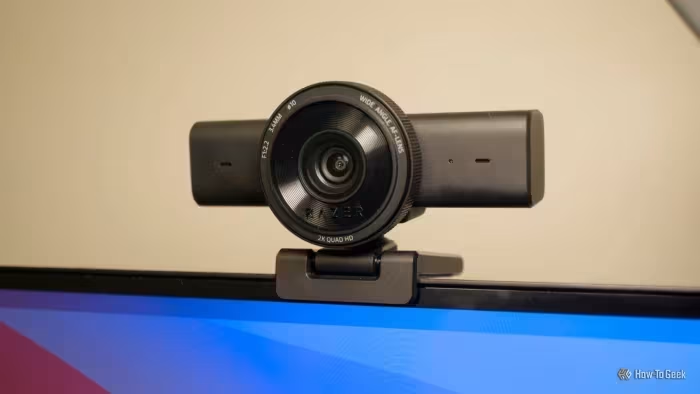
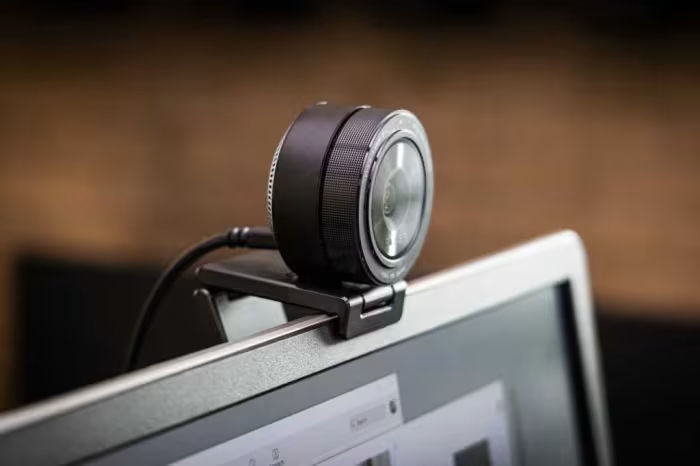
Razer Kiyo Pro
A premium high-performance webcam series by Razer designed for professional streamers, content creators, and remote workers.
How This Score Is Calculated
- Sources analysed: 29 reviews
- Raw weighted average: 7.8
- Formula: Σ(score × weight) ÷ Σ(weight)
- Review period: 2021–2026
- Value sources: 22 of 29 mentioned price or value
- Final score: 7.8/10
- Most reviewed featureImage Quality (29/29)
- Most praisedLow-light Performance
- Most criticisedSoftware (Razer Synapse)
- Reviewer consensus levelModerate
- Value for moneyFair Value (6.2/10)
The Razer Kiyo Pro series is widely regarded as a top-tier visual performer, prized for its industry-leading low-light capabilities and high-fidelity sensor. While it consistently beats standard webcams in image clarity and dynamic range, reviewers frequently point to the buggy, resource-heavy Razer Synapse software and inconsistent autofocus as major pain points. It is a premium, purpose-built tool best suited for streamers and professionals who value image quality over plug-and-play simplicity.
🔧 Key Specifications
- Resolution: 1080p (Kiyo Pro) / 4K (Kiyo Pro Ultra)
- Frame Rate: 60fps (at 1080p)
- HDR: Supported (limited to 30fps)
- Sensor: Large format STARVIS sensor
- Software: Razer Synapse 3
- Connectivity: USB 3.0
- Build: Gorilla Glass, Aluminum/Premium Plastic
💲 Price Range
₹14,800 – ₹61,214
Prices fluctuate significantly based on model (Pro vs. Ultra) and regional availability.
📊 What Reviewers Say — Feature by Feature
👍 Key Strengths
- Best-in-class low-light performance
- Exceptional 1080p/4K image clarity
- Premium, durable build quality
- Powerful, granular software customization
👎 Key Weaknesses
- Glitchy, resource-heavy Synapse software
- Inconsistent, slow autofocus performance
- Expensive price point
- Limited or no macOS software support
💰 Value for Money Analysis
Reviewers generally view the Kiyo Pro as an investment-grade product. While the hardware quality is high, the high price tag makes it difficult to justify for casual users, especially compared to more budget-friendly alternatives.
⚡ Where Reviewers Disagreed
- Autofocus Reliability: 8 sources praised the autofocus as 'snappy,' while 18 sources criticized it as 'slow' or 'problematic.' Disagreements likely stem from differing lighting environments and firmware versions tested over the 5-year period.
🎯 Who This Product Is For
🛠️ Best Use Cases
- Live Streaming Excellent for streamers needing professional-grade lighting and detail without the hassle of a mirrorless camera setup. Great
- Professional Video Conferencing Provides a significant visual upgrade over integrated laptop cameras for high-stakes business meetings. Good
🔀 Alternatives Mentioned by Reviewers
- Logitech C920 — The classic budget-friendly benchmark. Reviewers note it lacks the image fidelity and low-light capabilities of the Kiyo Pro but is significantly cheaper and more reliable for general use.
- Logitech Brio Ultra HD Pro — A major competitor offering 4K resolution and Windows Hello support at a similar price point. Many reviewers suggest this as a better value proposition for those prioritizing features over raw low-light sensor performance.
- Insta360 Link — A premium alternative featuring AI-driven gimbal tracking. Reviewers prefer this over the Kiyo Pro for users who need active subject tracking, though the Kiyo Pro generally retains a lead in static image sharpness.
- Elgato Facecam Pro — A high-end 4K/60fps competitor. Often compared for its superior frame rates and professional streaming focus, though some find the Kiyo Pro's sensor performance more natural in low light.
- Dell UltraSharp Webcam — A more professional, office-oriented alternative. Reviewers often recommend this for business users due to its cleaner design and better integration with professional conferencing software.
🛒 Buyer's Guide
✅ Buy This If…
- You are a streamer who requires high-end low-light performance.
- You want a webcam that rivals the visual quality of a dedicated DSLR.
- You primarily use a Windows PC and can handle software configuration.
❌ Skip This If…
- You are a casual user looking for a simple 'plug-and-play' experience.
- You use a Mac and need full software compatibility.
- You are on a strict budget and don't need pro-level visuals.
⚠️ Things to Check Before Buying
- Check if your streaming setup requires 4K/60fps, which some models may not support.
- Ensure your PC has USB 3.0 ports for optimal data bandwidth.
- Verify your OS software support if you are a macOS user.
📈 Sentiment Trends Over Time
Reviews span 2021–2026. The following changes were detected:
- Software Frustration — The criticism regarding Razer Synapse remains consistent across both launch and long-term reviews.
The Razer Kiyo Pro is a powerhouse of visual fidelity that remains a top choice for those who prioritize image quality above all else. While its software is often a hurdle, the sheer performance of its sensor in challenging lighting makes it a formidable tool for content creators. If you are a streamer looking for an upgrade that bridges the gap between webcams and DSLRs, this is a strong buy. For casual users, however, the price and software complexity make it hard to justify over cheaper, more reliable options.
Top Alternative: Logitech Brio Ultra HD Pro — A more feature-complete, versatile choice for those who value 4K and Windows Hello over raw sensor performance.
Reviewer Perspectives & Source Breakdown
Razer Kiyo Pro review: A worthy webcam for conference calls and streamin...
Price: ₹21,000
The Razer Kiyo Pro is a capable webcam offering exceptional video quality and thoughtful design, making it a strong choice for streaming and professional calls. While expensive and limited to 1080p, its low-light performance justifies the upgrade for those needing better visuals.
Pros
- Exceptional video quality in all lighting conditions
- Thoughtful design with privacy cover
- Useful HDR support
Cons
- Expensive
- Maximum 1080p resolution
- Autofocus can be slow
Razer Kiyo Pro Ultra review | TechRadar - techradar.com...
Price: ₹61,214
The Razer Kiyo Pro Ultra is a top-tier, premium webcam offering exceptional low-light performance, crisp 4K resolution, and reliable autofocus. While its high price and large size make it overkill for casual users, it is an excellent investment for streamers and professionals.
Pros
- Great low-light performance and noise handling
- Wide dynamic range plus HDR
- Fantastic autofocus
- Built-in privacy shutter
- Omnidirectional mic
Cons
- Expensive
- Not the right size for laptops
- 4K at 30fps only
Razer Kiyo Pro Review - Top of its class - Vamers - vamers.com...
The Razer Kiyo Pro is a versatile, high-end webcam that delivers exceptional low-light performance and 1080p60 imagery. Despite minor focus hunting issues and resource-heavy software, it stands out as an all-around top-tier choice.
Pros
- Best-in-class low-light performance
- Versatile mounting and articulation options
- Excellent 1080p60 image quality
- Highly customizable software settings
Cons
- Razer Synapse is resource intensive
- HDR limited to 30fps
- Occasional focus hunting in low light
- Large and bulky design
Razer Kiyo Pro Ultra Review - IGN - ign.com...
Price: Approximately 25,000 INR
The Razer Kiyo Pro Ultra is currently the best performing webcam on the market, offering class-leading image quality and low-light performance. While it is bulky and let down by unreliable software and a poor microphone, its superior sensor makes it the top choice for streamers.
Pros
- Largest sensor of any current webcam
- Outstanding low light performance
- Snappy and reliable autofocus
- Supports uncompressed 4K video recording
- Excellent HDR implementation
Cons
- Software is bloated and unstable
- Bulky physical design
- Disappointing, tinny microphone quality
- Limited field of view options
- Underwhelming accessory package
Razer Kiyo Pro webcam review | Tom's Guide - tomsguide.com...
Price: Approximately 16,600 INR
The Razer Kiyo Pro is an excellent choice for streamers seeking high-quality 1080p 60fps video. Despite its premium price and occasional autofocus hiccups, it offers significant performance upgrades over standard built-in webcams.
Pros
- Fantastic image quality
- HDR capabilities
- Adjustable field of view presets
Cons
- Expensive
- Occasional issues with autofocus
Razer Kiyo Pro webcam review | Digital Camera World - digitalcameraworld...
Price: Approximately ₹15,000 to ₹16,500
The Razer Kiyo Pro is a premium, high-quality webcam that excels in video production for gamers and streamers. While it delivers excellent image quality, its high price and lack of 4K or Windows Hello features make it a significant investment.
Pros
- Great image quality
- 60fps at Full HD
- Optional HDR support
Cons
- Mac software compatibility is lacking
- High price
- Lacks 4K and Windows Hello support
Razer Kiyo Pro HDR Webcam Review | KitGuru - kitguru.net...
Price: Approximately ₹21,000
The Razer Kiyo Pro is an excellent high-quality webcam that provides superior image performance for streamers and professionals. While it is expensive, it is a worthwhile investment that serves as a more affordable alternative to using a DSLR camera.
Pros
- Excellent for streaming and productivity
- Great image quality and sensor
- Brilliant build quality with Gorilla Glass 3
- Extensive adjustable options in Synapse software
Cons
- Very large design
- Poor autofocus performance
Razer Kiyo Pro Ultra review: quite possibly the best webcamn | PCWorld -...
Price: Approximately ₹25,000
The Razer Kiyo Pro Ultra is a fantastic 4K webcam that delivers professional, DSLR-quality imagery. While it carries a steep price and lacks Windows Hello, it is a significant upgrade for anyone seeking top-tier video performance.
Pros
- DSLR-quality image performance
- 4K resolution and HDR support
- Extensive customization options
- Includes physical lens cover and privacy shield
Cons
- High price point
- Average microphone quality
- Lacks Windows Hello support
- Limited to Razer.com purchase
Razer Kiyo Pro review | Laptop Mag - laptopmag.com...
Price: Approximately ₹16,700
The Razer Kiyo Pro delivers solid 1080p HDR video and decent audio quality, but it is difficult to recommend at its $200 price point due to the lack of 4K resolution and occasional technical issues. It is a capable choice for users who do not prioritize 4K resolution.
Pros
- Solid 1080p video and photo quality
- HDR works effectively
- Included privacy cover
- Useful companion app
- Decent microphone
Cons
- No 4K support despite the high price
- Finicky autofocus performance
- Inconsistent saved settings
- Included cable is too short
Page 2 of 4