MSI MAG X870E Tomahawk Wi-Fi Review
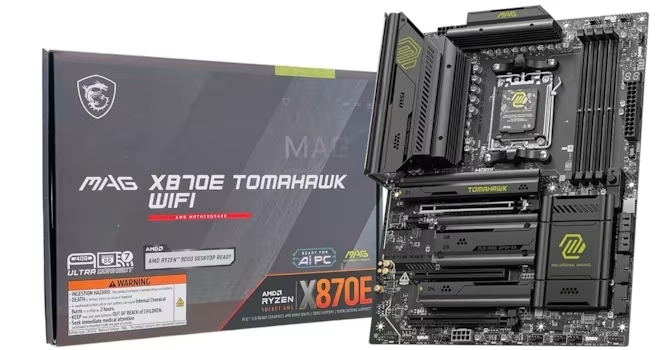
MSI MAG X870E Tomahawk Wi-Fi
A feature-rich, high-value AM5 motherboard offering robust power delivery, USB4, and Wi-Fi 7 for enthusiast-grade systems.
How This Score Is Calculated
- Sources analysed: 12 reviews
- Explicit scores: 12 sources (weighted 1.5×)
- Raw weighted average: 8.2
- Formula: Σ(score × weight) ÷ Σ(weight)
- Review period: 2024-2025
- Most reviewed featureVRM/Cooling (12/12)
- Most praisedConnectivity (USB4/Wi-Fi 7)
- Most criticisedBandwidth sharing limitations
- Reviewer consensus levelHigh
- Value for moneyExcellent Value (8.5/10)
The MSI MAG X870E Tomahawk Wi-Fi is widely regarded as one of the most competitive, feature-dense motherboards for the AMD AM5 platform. Reviewers praise its robust 14+2+1 power delivery and extensive connectivity suite, including dual USB4 ports and Wi-Fi 7. While it faces some criticism regarding bandwidth sharing between USB4 and secondary storage slots, it remains a top-tier choice for users seeking future-proof performance without the ultra-premium price tag.
🔧 Key Specifications
- Power Phases: 14+2+1
- Storage: PCIe Gen 5 support for SSDs
- Connectivity: Wi-Fi 7, Dual USB4, Thunderbolt 4 support
- BIOS: 64MB capacity (Max model)
- Fan Headers: Nine 4-pin headers
- Build: Tool-free M.2 installation, EZ PCIe Release
💲 Price Range
Approximately ₹25,000 - ₹27,000
📊 What Reviewers Say — Feature by Feature
👍 Key Strengths
- Excellent thermal performance under heavy load
- Comprehensive USB4 and Wi-Fi 7 connectivity
- User-friendly tool-free M.2 installation
- Robust 14+2+1 power phase design
👎 Key Weaknesses
- Bandwidth sharing limits storage/USB speed
- Tedious middle M.2 heatsink installation
- Software suite requires additional polish
💰 Value for Money Analysis
Reviewers highlight the Tomahawk as a high-value entry point for the flagship X870E chipset, often outperforming more expensive alternatives from competitors.
⚡ Where Reviewers Disagreed
- BIOS Interface: While many praise the EZ Mode and monitoring features, some reviewers find the fan curve interface and default favorites population confusing or unintuitive.
🎯 Who This Product Is For
🛠️ Best Use Cases
- High-Performance Gaming Excellent thermal management ensures stability during intense, prolonged gaming sessions. Great
- Content Creation Dual USB4 ports provide the high-speed data transfer needed for external drives and professional peripherals. Great
🔀 Alternatives Mentioned by Reviewers
- Gigabyte X870E Aorus Pro — Generally outperformed by the MSI Tomahawk in terms of cooling and feature density for the price.
- ASUS TUF Gaming X870E-Plus — Considered a strong competitor, though reviewers note the Tomahawk often provides better feature-to-price value.
- MSI MAG B850 Tomahawk Wi-Fi Max — A cheaper alternative that lacks the extensive PCIe lanes and USB4 connectivity found on the X870E model.
🛒 Buyer's Guide
✅ Buy This If…
- You need high-bandwidth connectivity like USB4 and Wi-Fi 7.
- You want a reliable, cool-running board for an AM5 high-end CPU.
- You prioritize ease of installation with tool-free M.2 features.
❌ Skip This If…
- You are on a strict budget and don't require the extra PCIe lanes of the X870E chipset.
- You have complex storage needs that would be hindered by bandwidth sharing.
📈 Sentiment Trends Over Time
Reviews indicate a stable, positive reception, with the 'Max' variant refining the BIOS and cooling over the original model.
The MSI MAG X870E Tomahawk Wi-Fi is an outstanding motherboard that balances high-end features with a competitive price point. Its robust VRM design and excellent connectivity make it a top choice for power users, though users should be mindful of bandwidth sharing. It is a must-buy for anyone looking to build a high-performance, future-proof AM5 system.
PLG_CONTENT_IMAGEGALLERY_ERROR_NO_IMAGES
Reviewer Perspectives & Source Breakdown
MSI MAG X870E Tomahawk Wi-Fi Review - Overclocking | TechPowerUp - techp...
The ASRock Phantom Gaming X870 Riptide Wi-Fi offers a robust EFI with extensive overclocking options. It provides dedicated menus for PBO and advanced AMD overclocking features.
Pros
- Comprehensive EFI overclocking options
- Easy access to PBO and Curve Optimizer
- Support for advanced tuning settings
Cons
- Overclocking settings spread across multiple sub-menus
- Limited software-based voltage adjustment
MSI MAG X870E Tomahawk Wi-Fi Review - VRM Overview | TechPowerUp - techp...
The motherboard features a robust 14+2+1 power delivery system that remains exceptionally cool under stress. It provides an excellent thermal solution suitable for overclocking enthusiasts.
Pros
- Excellent thermal performance under heavy load
- Effective cooling for MOSFETs and chokes
- Support for manual overclocking and PBO
Cons
MSI MAG X870E Tomahawk Wi-Fi Review - Board Layout | TechPowerUp - techp...
The MSI MAG X870E Tomahawk Wi-Fi is a functional, feature-rich motherboard offering robust power delivery and convenient tool-free installation features. It provides a balanced design for users needing extensive M.2 support and modern connectivity.
Pros
- Useful LED POST code display
- Convenient tool-free M.2 installation
- Effective EZ PCIe Release mechanism
- Robust power phase design
- Includes Wi-Fi 7 and USB4 connectivity
Cons
- Bandwidth sharing limits PCIe lanes for USB4
- Second M.2 slot requires screws
- Some fan headers are awkwardly placed
MSI MAG X870E Tomahawk Max Wi-Fi Review - BIOS Overview | TechPowerUp - ...
The motherboard BIOS offers a user-friendly EZ Mode and excellent hardware monitoring capabilities, though some fan curve interface elements are confusing. It provides useful features like customizable favorites, yet requires careful attention to detail when configuring specific settings.
Pros
- User-friendly EZ Mode interface
- Excellent hardware monitoring features
- Customizable favorites menu for quick access
- Advanced fan curve adjustment capabilities
Cons
- Confusing Y-axis scales in fan curves
- Limited range of alternative temperature sources
- Unpopulated favorites page by default
MSI MAG X870E Tomahawk Max Wi-Fi Review - VRM Overview | TechPowerUp - t...
The motherboard features an effective 14+2+1 power phase design with upgraded MOSFETs. It maintains cool operating temperatures even under heavy load despite using basic heatsinks.
Pros
- Stable VRM temperatures under full load
- Effective finned heatsink design
- Reliable power delivery for high-end CPUs
Cons
- Heatsinks appear visually basic
- Mixed manufacturers for PWM controllers
MSI MAG X870E Tomahawk Max Wi-Fi Review - Overclocking | TechPowerUp - t...
MSI's updated Click BIOS X improves CPU overclocking through dedicated BCLK control and enhanced power management options. It offers a more refined, granular interface for enthusiasts compared to previous versions.
Pros
- Dedicated BCLK control for simpler overclocking
- Physical overclocking jumpers on PCB
- Granular Config TDP replacing Eco Mode
- Well-organized EFI layout
Cons
- 105 MHz BCLK may be unstable
- Redundant menus in advanced settings
MSI MAG X870E Tomahawk Max Wi-Fi Review - Component Analysis | TechPower...
The provided text offers a technical breakdown of MSI motherboard components rather than a comprehensive product review. It highlights features like the Renesas clock generator and Realtek audio/Ethernet controllers.
Pros
- Includes dedicated base clock overclocking features
- Equipped with modern Wi-Fi 7 connectivity
- USB4 ports provide Thunderbolt 4 certification
Cons
- Wi-Fi module removal process is cumbersome
- Heatsink for USB4 controller is relatively small
MSI MAG X870E Tomahawk Max Wi-Fi Review - Board Layout | TechPowerUp - t...
The MSI MAG X870E Tomahawk Max Wi-Fi offers a robust, feature-rich design with improved cooling and M.2 support. However, users should be aware of potential bandwidth sharing limitations between USB4 and PCIe Gen 5 storage ports.
Pros
- Improved VRM and M.2 heatsink cooling
- Tool-free M.2 installation for multiple slots
- Comprehensive rear I/O including dual USB4 ports
- Nine 4-pin fan headers for flexible cooling
Cons
- Bandwidth sharing reduces speed on USB4 and PCIe slots
- Requires manual USB4 disablement for full PCIe x4 speeds
- Mid-slot M.2 heatsink installation can be tedious
- Lacks dedicated thermistor headers
MSI MAG X870E Tomahawk Max Wi-Fi Review - Value & Conclusion | TechPower...
Price: approx. 27,000 INR
The MSI MAG X870E Tomahawk Max Wi-Fi is a solid motherboard that offers excellent value and a great feature set. While it does not introduce revolutionary upgrades over its predecessor, it remains a highly competitive option for those looking for a well-rounded board.
Pros
- Decent number of USB ports
- Excellent VRM temperatures
- Dual PCIe Gen 5 SSD support
- Tool-free SSD heatsinks
- 27W power delivery via Type-C header
Cons
- Inadequate cooling for second M.2 PCIe Gen 5 SSD
- Limited benefits from 64 MB BIOS
- USB4 ports disabled if second M.2 uses lanes
- Tricky installation for middle M.2 heatsink
- Lack of power or reset buttons
Page 1 of 2