Lofree Flow 2 Review
Lofree Flow 2
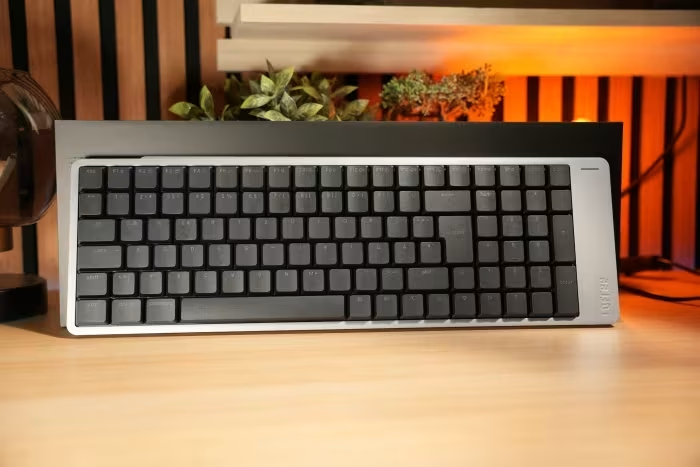
A premium, low-profile mechanical keyboard featuring an all-aluminum chassis, gasket mounting, and extensive VIA customization.
How This Score Is Calculated
- Sources analysed: 23 reviews
- Sentiment-only: 23 sources (weighted 1.0×)
- Split: 15 Positive · 6 Mixed · 2 Negative
- Raw weighted average: 7.4
- Formula: Σ(score × weight) ÷ Σ(weight)
- Final score: 7.4/10 (clamped, rounded to 1 decimal)
Algorithmically calculated from source data. No manual adjustments.
- Most reviewed featureTyping Experience (23/23)
- Most praisedAluminum build quality
- Most criticisedTouch bar placement
- Reviewer consensus levelModerate
The Lofree Flow 2 is a visually striking, premium low-profile mechanical keyboard that earns high marks for its exceptional typing feel and robust CNC-machined aluminum construction. While it represents a significant upgrade over the original with the addition of QMK/VIA support and improved wireless connectivity, it is hampered by divisive ergonomic choices, particularly an overly sensitive, poorly placed touch bar. It is an ideal choice for Mac users and office professionals who prioritize aesthetics and tactile feedback, provided they can adapt to its unique design quirks.
🔧 Key Specifications
Specifications sourced from reviewer mentions. Verify with manufacturer for complete details.
- Build: CNC-machined aluminum unibody
- Profile: Low-profile
- Mounting: Gasket-mounted
- Connectivity: Wired, Bluetooth, 2.4GHz Wireless
- Customization: VIA/QMK compatible
- Polling Rate: 1000Hz
- Keycaps: PBT
- Layouts: 68-key, 75%, 84-key
- Switches: Hot-swappable
- Backlighting: White-only
💲 Price Range
₹7,500 – ₹17,500
Prices sourced from reviews. Check current retailer pricing.
📊 What Reviewers Say — Feature by Feature
9 features evaluated across 23 sources.
👍 Key Strengths
- Premium CNC-machined aluminum build
- Excellent gasket-mounted typing feel
- Full QMK/VIA customization support
- Reliable tri-mode wireless connectivity
- Improved battery life over predecessor
👎 Key Weaknesses
- Oversensitive, poorly placed touch bar
- Inconvenient side USB-C port placement
- Polarizing asymmetrical design language
- Backlight drains battery significantly
- Inconsistent keycap legend visibility
💰 Value for Money Analysis
While initially considered pricey depending on the sales channel, reviewers generally feel the build quality justifies the cost. However, some note that ergonomic flaws make it a harder recommendation at full retail price compared to more practical competitors.
21 of 23 sources commented on price or value.
⚡ Where Reviewers Disagreed
The following areas saw meaningful disagreement across sources.
- Design Ergonomics: 8 sources praised the aesthetic uniqueness of the asymmetrical design, while 7 sources labeled it as a functional failure due to the touch bar placement.
🎯 Who This Product Is For
Reviewer recommendations for different target audiences and use cases.
🛠️ Best Use Cases
- Productivity & WritingThe excellent typing acoustics and gasket-mounted flex provide a superior experience for long writing sessions.Great
- Office EnvironmentsThe refined, relatively quiet switches prevent disturbance in shared office settings.Good
- Casual GamingWhile not a pro-gaming board, it is responsive enough for casual, non-competitive gaming.OK
🔀 Alternatives Mentioned by Reviewers
Maximise this list. Include EVERY single competitor, rival, or alternative product mentioned in any of the source reviews.
- Logitech MX Keys S — Frequently cited as a more practical, mainstream alternative for office users, though it lacks the mechanical, gasket-mounted feel of the Flow 2.
- NuPhy Air75 V3 — Often recommended as a direct competitor that offers better battery efficiency and a more traditional, ergonomic layout without the Flow 2's polarizing touch bar.
- Keychron K Max Series — Highlighted as a versatile, reliable mechanical keyboard series that offers better long-term software support and wider layout options.
- IQUNIX MQ80 — Mentioned as a competitive low-profile alternative that excels in battery life and ergonomics, sometimes outperforming the Flow 2 in pure daily-driver utility.
- Apple Magic Keyboard — The benchmark for low-profile typing; reviewers suggest the Flow 2 is a 'mechanical upgrade' for users who love the Magic Keyboard's thin form factor but crave more tactile feedback.
Alternatives sourced exclusively from reviewer mentions.
🛒 Buyer's Guide
✅ Buy This If…
- You want a premium, all-aluminum mechanical keyboard with a low profile.
- You are a Mac user seeking a natural transition from the Apple Magic Keyboard.
- You prioritize typing acoustics and a 'thocky' feel.
- You need VIA/QMK support for custom key remapping.
❌ Skip This If…
- You are a competitive gamer who requires ultra-low latency.
- You dislike touch-sensitive controls or unconventional layouts.
- You require a standard, highly ergonomic layout for long-term comfort.
- You prioritize maximum battery life and wireless reliability over aesthetics.
⚠️ Things to Check Before Buying
- Check if the specific switch/colorway combination is available, as they are often locked.
- Be prepared for the side-mounted USB-C port, which may require specific cable routing.
- Consider the risk of accidental touch bar activation if your typing style involves resting hands near the edge.
📈 Sentiment Trends Over Time
Reviews span from initial launch to recent long-term usage. The following changes were detected:
- Software Support — The addition of QMK/VIA support significantly improved the consensus view compared to the original Flow.
- Design Ergonomics — Initial excitement over the 'asymmetrical design' gave way to criticism regarding the side-mounted touch bar as users spent more time with the device.
The Lofree Flow 2 is a masterclass in build quality and typing acoustics, standing out as one of the most premium-feeling low-profile keyboards on the market. While its VIA support and aluminum unibody make it a dream for enthusiasts, the polarizing touch bar and awkward port placement prevent it from being a perfect daily driver. It is the best choice for Mac-focused typists who value aesthetics above all else. If you prefer pure utility, consider the NuPhy Air75 V3 instead.
Reviewer Perspectives & Source Breakdown
Lofree Flow 2 84 REVIEW A Low Profile Mechanical Keyboard For Mac Users ...
The Lofree Flow 2 84 is a premium, low-profile mechanical keyboard that offers a seamless transition for Mac users. It balances high-quality build materials with reliable performance and excellent macOS integration.
Pros
- Premium aluminum build quality
- Natural transition for Mac users
- Comfortable low-profile typing experience
- Strong, reliable wireless connectivity
Cons
- Keyboard sits very flat
- Accidental touch bar triggers
- High price point
- Limited backlighting options
Lofree Flow 2 review | PC Gamer - pcgamer.com...
The Lofree Flow 2 is a high-quality, beautifully designed mechanical keyboard that offers a superior typing experience with thoughtful improvements over its predecessor. While it suffers from an awkward touch-sensitive strip and inconsistent sound, it remains an excellent choice for users who prioritize premium build quality.
Pros
- Incredible build quality
- Looks beautiful
- Fantastic typing experience
Cons
- Somewhat inconsistent typing sound
- Gimmicky touch-sensitive strip
Lofree Flow 2 Review: A Fine, But Misguided Mechanical Keyboard - howtog...
The Lofree Flow 2 is a mediocre mechanical keyboard featuring a divisive asymmetrical design and an overly sensitive touch strip. It fails to offer enough improvements over its predecessor to justify its $199 price tag.
Pros
- Sturdy aluminum construction
- VIA software support
- Multiple wireless connection options
Cons
- Awkward side-mounted USB-C port
- Unreliable and oversensitive touch bar
- Poor value for money
Review: LOFREE Flow 2 – a low-profile CNC aluminum wireless keyboard for...
The LOFREE Flow 2 is a premium, well-built low-profile mechanical keyboard that stands out for its unique design and excellent typing experience. Its combination of portability, QMK/VIA support, and aluminum craftsmanship makes it a top-tier choice for Mac and iOS users.
Pros
- Premium CNC-machined aluminum chassis
- Excellent typing feel and acoustics
- Convenient touch-controlled side volume bar
Cons
- Silent switch version costs extra
- Limited to 68-key layout for standard model
LOFREE Flow2 Review: High-quality low-profile keyboard with German layou...
The LOFREE Flow2 is a high-quality, premium aluminum keyboard with an excellent typing experience, though it is hampered by a cramped layout and impractical design choices. While it improves significantly over its predecessor, minor ergonomic flaws prevent it from being perfect.
Pros
- Stellar aluminum build quality
- Excellent typing feel
- Improved battery life
- VIA customization support
Cons
- Squashed key layout
- Impractical USB-C port placement
- Weak backlighting
- Accidental touch bar triggers
lofree flow2 review high quality low profile keyboard with german layout...
A high-quality, stylish keyboard for enthusiasts, though functional design flaws prevent it from being the perfect choice.
Pros
- Unique design
- Great feel
- Hot-swappable
- QMK/VIA support
- Triple connectivity
- Solid aluminum housing
- Excellent typing experience
Cons
- Squeezed layout
- USB port on the side
- Mode selection hidden under the stand
- Oversensitive touch bar
- Poor battery life with illumination
- Expensive
lofree flow2 review high quality low profile keyboard with german layout...
The LOFREE Flow 2 is the best keyboard the manufacturer has built to date. The long overdue QMK/VIA support and a useful battery life solve the biggest frustrations of the original Flow. There are also adjustable feet, 2.4 GHz wireless and revised keycaps. For frequent typists looking for an elegant low-profile keyboard for the office and everyday use, it is a very good option.
Pros
- Unique design
- Great feel
- Hot-swappable
- QMK/VIA
- Triple connectivity
Cons
- Squeezed layout
- USB port on the side
- Mode selection hidden under the stand
- Quiet touch oversensitive
- Poor battery life with illumination
- Expensive
Page 3 of 3