Kindle Scribe Colorsoft Review
Kindle Scribe Colorsoft
A premium 11-inch color E-Ink digital notebook and e-reader designed for focused productivity and note-taking within the Amazon ecosystem.
How This Score Is Calculated
- Sources analysed: 23 reviews
- Raw weighted average: 7.2/10
- Review period: 2025-2026
- Value sources: 18 of 23 mentioned price
- Most reviewed featureWriting Experience (23/23)
- Most praisedColor E-Ink Display
- Most criticisedHigh Price Point
- Value for moneyOverpriced (4.2/10)
The Kindle Scribe Colorsoft is a highly refined, premium digital notebook that successfully brings color E-Ink to Amazon's largest screen format. While it offers a top-tier, low-latency writing experience and excellent battery life, its steep $630 price tag and locked-down software ecosystem make it a luxury niche product rather than a mainstream essential. It is best suited for dedicated Kindle users who prioritize distraction-free productivity over the versatility of traditional tablets.
🔧 Key Specifications
- Display: 11-inch Kaleido 3 Color E-Ink
- Writing Latency: 12ms
- Stylus: Premium Pen (battery-free)
- Processor: Quad-core
- Battery: Multi-week capacity
- Connectivity: Wi-Fi, Bluetooth
- Security: Robust data encryption
- Build: Metal body, symmetrical bezels
💲 Price Range
$629.99 / ₹52,700 - ₹62,000
📊 What Reviewers Say — Feature by Feature
👍 Key Strengths
- Excellent 11-inch color E-Ink display
- Industry-leading low-latency writing feel
- Long multi-week battery life
- Polished premium metal build
- Seamless integration with cloud services
👎 Key Weaknesses
- Exorbitant $630 price tag
- Restrictive, closed Amazon ecosystem
- No waterproofing protection
- Color resolution lower than monochrome
- Symmetrical bezels can be hard to grip
💰 Value for Money Analysis
Most reviewers categorize the Scribe Colorsoft as a luxury purchase. While the hardware is premium, the $130 premium over the standard Scribe for color features is difficult to justify for casual readers.
⚡ Where Reviewers Disagreed
- Ergonomics: Some reviewers praise the new symmetrical bezel design for being modern and balanced, while others argue it makes the device difficult to hold one-handed.
🎯 Who This Product Is For
🛠️ Best Use Cases
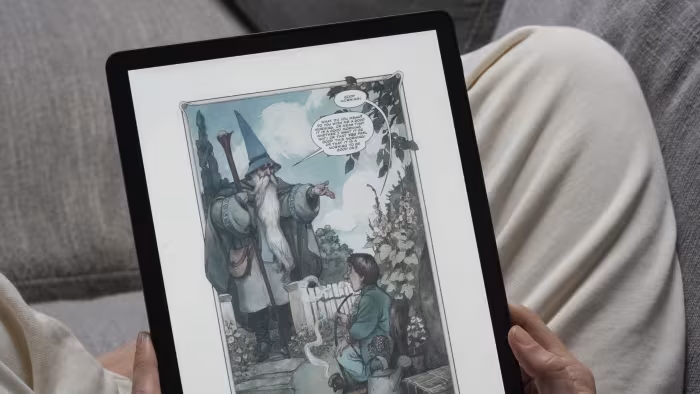
- Graphic Novels & Comics The color display significantly enhances the reading experience for visual media. Great
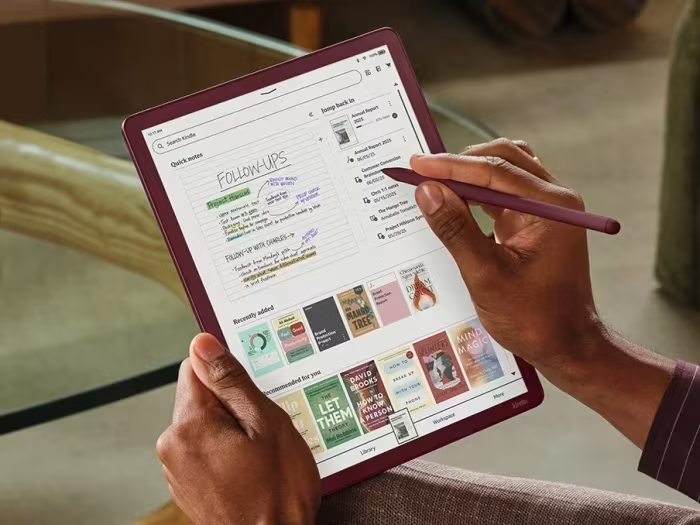
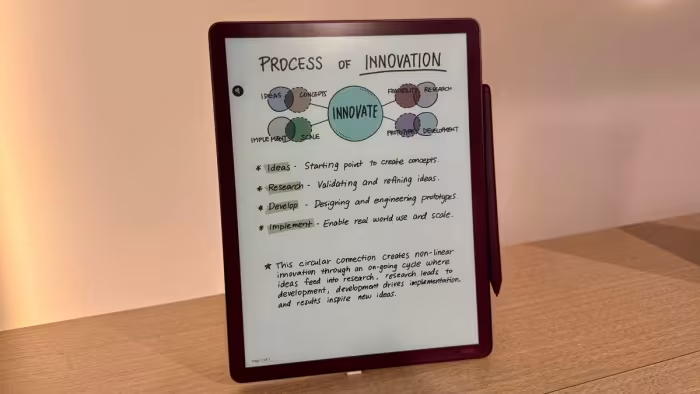
- Digital Note-Taking Low latency and high-quality stylus make it a top contender for handwritten notes. Great
- General Productivity Useful for document review, but lacks the app versatility of a standard iPad. OK
🔀 Alternatives Mentioned by Reviewers
- reMarkable Paper Pro — Often cited as the primary rival; it offers a larger screen and a more focused, paper-like experience, though the Kindle is noted for its ecosystem integration.
- Onyx Boox Note Air 4C — Recommended for users who want a more flexible, Android-based system with more storage at a potentially better price point.
- iPad Air — Frequently contrasted as a superior alternative for users who need media consumption, full app support, and faster processing, despite the lack of an E-Ink display.
- Kobo Libra Color — Mentioned as a more affordable alternative for those seeking color E-Ink, though it lacks the premium size and build of the Scribe.
✅ Buy This If…
- You are already deeply invested in the Amazon Kindle ecosystem.
- You need a dedicated, distraction-free environment for taking notes.
- You frequently read graphic novels or reference books requiring color.
❌ Skip This If…
- You are on a budget or looking for high value-for-money.
- You need a full-featured tablet for apps, media, and web browsing.
- You prioritize waterproofing for reading in the bath or pool.
The Kindle Scribe Colorsoft is a masterclass in E-Ink hardware design, offering a best-in-class writing experience and a vibrant color display. While it is undeniably the "Cadillac of Kindles," its prohibitive price and restrictive software make it difficult to recommend as a mass-market device. If you are a professional or student firmly planted in the Amazon ecosystem who values focus above all else, this is an excellent tool. Otherwise, consider more flexible Android-based alternatives like the Onyx Boox series.


Reviewer Perspectives & Source Breakdown
Kindle Scribe Colorsoft review: De e-reader die een tablet wil zijn - an...
Price: Approximately ₹59,000
The Kindle Scribe Colorsoft is an expensive hybrid device that struggles to find its identity as either a dedicated e-reader or a note-taking tool. While it offers a great color screen and long battery life, the high price, lack of clear documentation, and restricted Amazon ecosystem make it hard to recommend over more versatile tablets.
Pros
- High-quality, pleasant color display
- Extremely long battery life
- Lightweight and portable design
- Fast performance for an e-reader
Cons
- Large size feels awkward for reading books
- Writing experience doesn't truly feel like paper
- Restricted ecosystem forces reliance on Amazon
- AI features are limited or unavailable in some regions
- Expensive price tag
Amazon Kindle Scribe Colorsoft hands-on | The Verge - theverge.com...
Price: Approx. ₹52,700 ($629.99)
The Kindle Scribe Colorsoft is a compelling, thin, and lightweight e-reader that excels for professionals and students. While expensive, its focused, distraction-free environment and new color display make it a superior tool for reading and annotating documents.
Pros
- Beautiful and functional color display
- Extremely thin and lightweight design
- Improved pen with stronger magnets
- Useful AI-powered document summarization
- Distraction-free environment for productivity
Cons
- Premium pricing for an e-reader
- AI features require Wi-Fi connection
- Not a full-featured tablet
Here are the new features on the Kindle Scribe Colorsoft and Kindle Scri...
The latest Kindle Scribe models receive significant software updates, including AI-powered note-taking features, improved productivity integrations, and system-wide Dark Mode. These enhancements aim to increase utility and streamline workflows for note-taking and document management.
Pros
- AI-powered notebook search and summarization tools
- Seamless integration with Google Drive and Microsoft OneDrive
- System-wide Dark Mode for better customization
- Smart Shapes feature for clean and precise note-taking
- Ability to share notes and documents with Alexa
Cons
I Go Hands-On With the New Kindle Scribe Colorsoft. Is It Worth $630? - ...
Price: ₹53,000
The Kindle Scribe Colorsoft is a high-end E Ink tablet featuring a larger display, improved stylus ergonomics, and color annotation capabilities. While it offers performance boosts and a refined design, its high price point puts it in direct competition with premium rivals.
Pros
- Larger 11-inch screen with smaller bezels
- Smoother, more lifelike pen responsiveness
- Improved ergonomic design for the Premium Pen
- Stronger magnets for pen attachment
- Useful new color annotation and shading tools
Cons
- Expensive at $630
- Color resolution drops to 150 ppi
- Not waterproof
- No immediate availability for pre-order
I tried the Kindle Scribe Colorsoft and it finally delivers the digital ...
Price: Approximately ₹62,000
The Kindle Scribe Colorsoft finally makes color display technology meaningful for productivity and reading. With improved hardware, faster performance, and enhanced software features, it is a significant step forward for Amazon's note-taking line.
Pros
- Improved slim and lightweight design
- Enhanced 11-inch display with reduced parallax
- Faster performance with new quad-core processor
- Useful productivity integrations with Google and OneDrive
- Color display benefits reference books and graphic novels
Cons
- Very expensive pricing
- Less versatile for drawing than full-color tablets
Amazon's Kindle Scribe Colorsoft wants to take on the reMarkable Paper P...
Price: ₹53,000 - ₹57,000
The Kindle Scribe Colorsoft brings a versatile 11-inch color E Ink display to Amazon's largest e-reader series. It balances a high-quality paper-like writing experience with enhanced security features and long battery life.
Pros
- Large 11-inch Colorsoft display
- Paper-like writing experience
- Includes battery-free Premium Pen
- Robust data encryption and security
- Long battery life for reading
Cons
- Lower color resolution compared to B&W
- Shorter battery life when used for writing
The Kindle Scribe Colorsoft surprised me - pocket-lint.com...
Price: Approximately ₹53,000
The Kindle Scribe Colorsoft is an impressive note-taking device with vibrant colors and a fluid writing experience. While it is a significant upgrade in productivity and UI, the $130 price premium for color features may not be worth it for every user.
Pros
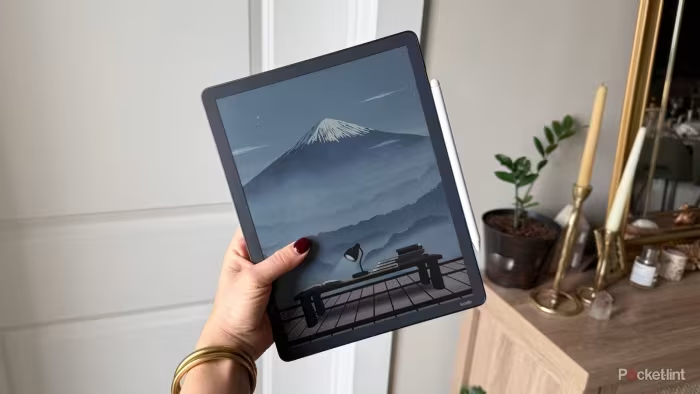
- Vivid and distinct color palette
- Fluid writing with low latency
- Improved faster user interface
- Strong magnetic stylus attachment
- Comfortable symmetrical bezel design
Cons
- High price premium for color
- Stylus can be difficult to remove
- Expensive for casual users
Amazon Kindle Scribe Colorsoft Review: After a month, I am not won over ...
Price: Approximately ₹62,000
The Kindle Scribe Colorsoft is a highly refined, sleek device featuring an excellent color e-ink display that excels for comics and larger documents. However, its high price, sluggish software, and mediocre writing experience prevent it from being the top-tier choice for all users.
Pros
- Design is a real step forward
- Good screen
- Color panel works better than on smaller Colorsoft
Cons
- Very expensive
- Software is a bit sloppy
- Merely ok for writing
Kindle Scribe Colorsoft Review: Amazon’s First Color E-Notebook Raises t...
Price: Approx. ₹52,700
The Kindle Scribe Colorsoft is a technologically advanced e-notebook featuring a high-quality Kaleido 3 color display and improved productivity tools. However, its high price point may limit its mass-market appeal.
Pros
- Vibrant, accurate color Kaleido 3 e-paper display
- Faster refresh rates with Sharp Oxide panel
- Realistic pen friction on textured glass
- Enhanced integration with Google Drive and OneNote
Cons
- Very high price point
- Lower 150 PPI resolution for color content
- Premium cost may outweigh benefits for some users
Page 1 of 3