1Password Review
1Password
A premium, highly secure password manager known for robust encryption, cross-platform reliability, and unique privacy features like Travel Mode.
How This Score Is Calculated
- Sources analysed: 22 reviews
- Sentiment-only: 22 sources (weighted 1.0×)
- Split: 19 Positive · 3 Mixed · 0 Negative
- Raw weighted average: 8.4
- Consensus bonus +0.3: 86% of sources agreed on high quality
- Final score: 8.4/10
Algorithmically calculated from source data. No manual adjustments.
- Most reviewed featureSecurity (22/22)
- Most praisedTravel Mode
- Most criticisedNo free tier
- Reviewer consensus levelHigh
1Password is widely regarded as a top-tier password manager that excels in security architecture and user interface polish. Its standout features, particularly the unique Travel Mode and Secret Key, provide a level of protection that justifies its premium subscription model for most users. While the lack of a permanent free tier is a common point of criticism, its reliability makes it a preferred choice for those prioritizing digital security over budget alternatives.
🔧 Key Specifications
- Encryption: AES 256-bit (Zero-knowledge)
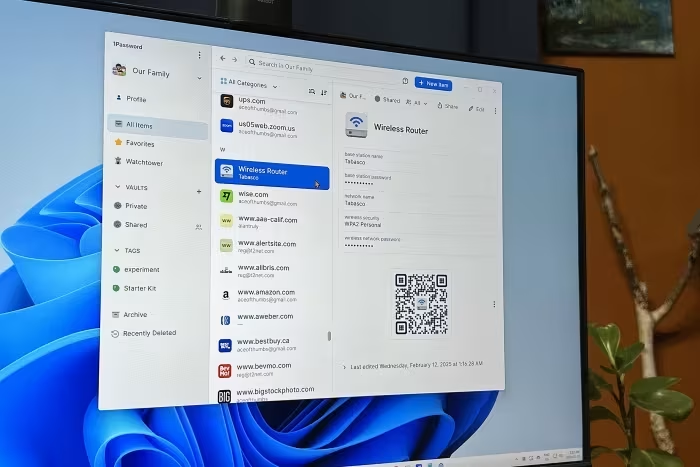
- Key Security Features: Secret Key, Travel Mode, Watchtower
- Platforms: Windows, macOS, Linux, iOS, Android, Browser Extensions
- Authentication: Biometric support, 2FA/MFA, Passkeys
- Syncing: Cloud-based, Multi-device
- Data Types: Passwords, Secure Notes, Financial Info, Identities
💲 Price Range
Approximately ₹167 – ₹7,100 per month/year
Pricing varies by plan (Individual, Family, Teams, Business). No permanent free tier available.
📊 What Reviewers Say — Feature by Feature
6 features evaluated across 22 sources.
👍 Key Strengths
- Industry-leading security and encryption
- Unique, highly praised Travel Mode
- Excellent, polished cross-platform experience
- Robust Watchtower security monitoring
- Strong passkey and 2FA support
👎 Key Weaknesses
- No permanent free version available
- Occasional autofill glitches on some sites
- Can be complex for non-technical users
- No phone support for personal plans
- Subscription-only model
💰 Value for Money Analysis
While reviewers acknowledge the lack of a free tier makes it pricier than competitors, most agree that the security features, reliability, and polish justify the investment for professional and family use.
20 of 22 sources commented on price or value.
⚡ Where Reviewers Disagreed
The following areas saw meaningful disagreement across sources.
- Ease of Use: 16 sources praised the interface as intuitive, while 6 sources labeled it complex or too hands-on. This appears to depend on the user's technical comfort level.
🎯 Who This Product Is For
Reviewer recommendations for different target audiences and use cases.
🛠️ Best Use Cases
- Secure Credential SharingExcellent for families and teams needing to share login info securely.Great
- International TravelTravel mode allows hiding vaults before traveling to high-risk areas.Great
- Security AuditingWatchtower provides proactive monitoring for breached passwords and weak security.Good
🔀 Alternatives Mentioned by Reviewers
Reviewers frequently compared 1Password to several competitors depending on the specific user need.
- Bitwarden — Often cited as the best free alternative, offering superior flexibility and a generous free tier compared to 1Password's paid-only model.
- Dashlane — Frequently compared as a direct competitor; while it includes integrated VPN services, reviewers often prefer 1Password's vault management.
- LastPass — A common alternative in the same price tier, though it is often noted to have a less favorable security track record than 1Password.
- NordPass — Noted as a value-driven alternative that is more budget-friendly and offers features like email masking, though it lacks some of 1Password's advanced vault tools.
- Proton Pass — Recommended for those seeking free plans and integrated privacy tools like email masking, highlighting a better value proposition for basic users.
Alternatives sourced exclusively from reviewer mentions.
🛒 Buyer's Guide
✅ Buy This If…
- You prioritize top-tier security and a zero-knowledge architecture.
- You travel internationally and need to protect your digital identity.
- You are a family or team needing reliable, secure credential sharing.
- You want a polished, high-quality user experience and don't mind a subscription.
❌ Skip This If…
- You require a permanently free password management solution.
- You are a beginner looking for the simplest possible setup with zero manual effort.
- You are on a very tight budget and don't need advanced security features.
⚠️ Things to Check Before Buying
- Ensure you have a reliable backup of your Master Password, as there is no account recovery.
- Evaluate whether you need the extra features of the Business or Team plans before purchasing.
- Check current subscription pricing, as price hikes have been noted in recent reviews.
📈 Sentiment Trends Over Time
Reviews span 2014 to 2026. The following changes were detected:
- Pricing Perception — Recent reviews reflect frustration with price increases and the continued lack of a free tier compared to the growing number of free-tier competitors.
1Password remains the gold standard for users who value security and professional-grade features above all else. Its Travel Mode and robust encryption make it a superior choice for families and frequent travelers. While the subscription-only model is a drawback for budget-seekers, the overall polish and reliability are unmatched. If you can afford the monthly cost, it is a must-buy for your digital security toolkit.
Top Alternative: Bitwarden — Choose this if you require a robust free tier and greater flexibility at a lower price point.
Reviewer Perspectives & Source Breakdown
1Password Review 2026: Is This Password Manager Safe? - wizcase.com...
Price: Approximately 250 INR per month
1Password is a robust, highly secure, and user-friendly password manager. It stands out with unique features like Travel Mode and multiple vaults, making it an excellent choice despite the lack of a free version.
Pros
- Military-grade AES 256-bit encryption
- Unique Travel Mode for secure border crossings
- Supports multiple password vaults for better organization
- Includes helpful biometric and auto-lock security features
Cons
- No free version available
- No money-back guarantee provided
- Master password complexity not strictly enforced
1Password Review | Expensive, but, the desktop has some great features -...
Price: Approx. 250 INR to 665 INR per month
1Password is a highly reliable and secure password manager offering excellent cross-platform support and user-friendly features. While it lacks a free plan and is closed-source, its zero-knowledge policy and robust functionality make it a top-tier choice for security.
Pros
- Zero-knowledge policy for high security
- Excellent cross-platform compatibility
- User-friendly dashboard and interface
- Convenient auto-fill and password generation
- Secure document and identity storage
Cons
- No free tier available
- Closed-source software
- No recovery if Master Password is lost
1Password Review (2026) - Why I Switched to 1Password - Kripesh Adwani -...
1Password is a highly secure and feature-rich password manager that balances usability with robust protection. While it lacks a free tier and can feel complex for beginners, it remains a top-tier choice for individuals and teams.
Pros
- Strong password generator
- Comprehensive password history tracking
- Helpful Watchtower dark web monitoring
- In-built 2FA authenticator
- Frequent third-party security audits
Cons
- No free version available
- Interface can be complex for beginners
- No emergency access feature
- Lack of account recovery options
- Limited export capabilities
1Password Review: Best Password Manager of 2026? - password-managers.cyb...
Price: Approximately ₹167/month
1Password is a top-tier, highly secure, and user-friendly password manager that justifies its premium status with advanced features and reliable performance. While it lacks a free version and is pricier than competitors, its robust security architecture makes it a leading choice for individuals and families.
Pros
- Excellent apps and reliable password management features
- Strong security with AES-256 and zero-knowledge architecture
- Great cross-device compatibility and browser extensions
- Advanced privacy tools like Travel Mode and Privacy Cards
- Proven track record with no reported breaches
Cons
- No free version available
- More expensive than many competing password managers
- No phone support for personal plans
- Headquartered in a Five Eyes alliance country
1Password 4 for Mac Review - MacStories - macstories.net...
1Password 4 is a refined, feature-rich update that modernizes the user interface and adds powerful tools like multiple vault support and comprehensive security auditing. It remains an essential tool for Mac users to securely manage passwords.
Pros
- Modernized, clean interface inspired by iOS
- Support for multiple, switchable password vaults
- Improved Security Audit feature for identifying weak passwords
- Seamless iCloud, Dropbox, and local Wi-Fi sync
- Better handling of multiple URLs for single logins
Cons
1Password 5 for iOS 8 Review - MacStories - macstories.net...
Price: Free
1Password 5 for iOS 8 is a major, long-awaited upgrade that introduces essential Touch ID support and system-wide extensions. While some minor limitations remain, it makes password management on mobile significantly faster and more secure.
Pros
- Seamless Touch ID authentication
- System-wide action extension for quick logins
- Improved interface with favorites and folder organization
- Native integration with Safari and third-party apps
Cons
- No Security Audit feature
- Cannot fill Identities and Credit Cards yet
- Requires manual tap of share sheet for extensions
1Password Review 2026: Is It Safe + Worth the Price? - safetydetectives....
Price: Starting at INR230/month
1Password is an outstanding, feature-rich password manager that offers top-notch security, intuitive usability, and excellent value. It stands out with unique tools like Travel Mode and highly flexible family plan options.
Pros
- Customizable vaults for better data organization
- Effective password monitoring for security
- Unique Travel Mode for hiding sensitive data
- Excellent family plan with flexible user additions
Cons
- No completely free version available
- No money-back guarantee provided
1Password review: A top-security password manager | Expert Reviews - exp...
Price: Approximately ₹2,700 per year
1Password is a highly secure, cross-platform password manager ideal for privacy-focused users. While slightly less convenient than some competitors, its robust security measures and unique Travel Mode provide excellent protection.
Pros
- Compatible with almost any browser and operating system
- Extremely secure by design
- Innovative travel mode keeps information hidden
Cons
- Less user-friendly than some alternatives
- No sharing option with individual licences
1Password review: Capable password manager is missing some key features ...
Price: Approx. ₹3,000 to ₹5,000 per year
1Password provides robust security features but demands significant manual effort due to a lack of automation found in competing tools. The installation process may also be intimidating for beginners.
Pros
- Generates strong, customizable passwords
- Securely stores notes and financial information
- Autofills web forms for shopping and registration
Cons
- Lacks automated login and password update features
- Requires significant hands-on management
- Involved and complex installation process
Page 1 of 3