1Password Review
1Password
A premium, highly secure password manager known for robust encryption, cross-platform reliability, and unique privacy features like Travel Mode.
How This Score Is Calculated
- Sources analysed: 22 reviews
- Sentiment-only: 22 sources (weighted 1.0×)
- Split: 19 Positive · 3 Mixed · 0 Negative
- Raw weighted average: 8.4
- Consensus bonus +0.3: 86% of sources agreed on high quality
- Final score: 8.4/10
Algorithmically calculated from source data. No manual adjustments.
- Most reviewed featureSecurity (22/22)
- Most praisedTravel Mode
- Most criticisedNo free tier
- Reviewer consensus levelHigh
1Password is widely regarded as a top-tier password manager that excels in security architecture and user interface polish. Its standout features, particularly the unique Travel Mode and Secret Key, provide a level of protection that justifies its premium subscription model for most users. While the lack of a permanent free tier is a common point of criticism, its reliability makes it a preferred choice for those prioritizing digital security over budget alternatives.
🔧 Key Specifications
- Encryption: AES 256-bit (Zero-knowledge)
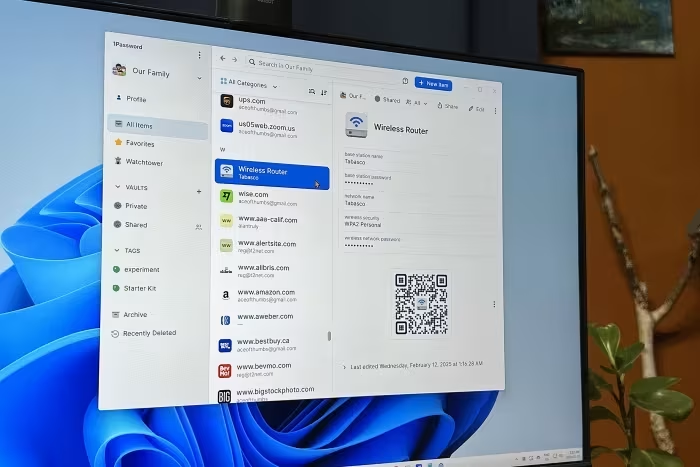
- Key Security Features: Secret Key, Travel Mode, Watchtower
- Platforms: Windows, macOS, Linux, iOS, Android, Browser Extensions
- Authentication: Biometric support, 2FA/MFA, Passkeys
- Syncing: Cloud-based, Multi-device
- Data Types: Passwords, Secure Notes, Financial Info, Identities
💲 Price Range
Approximately ₹167 – ₹7,100 per month/year
Pricing varies by plan (Individual, Family, Teams, Business). No permanent free tier available.
📊 What Reviewers Say — Feature by Feature
6 features evaluated across 22 sources.
👍 Key Strengths
- Industry-leading security and encryption
- Unique, highly praised Travel Mode
- Excellent, polished cross-platform experience
- Robust Watchtower security monitoring
- Strong passkey and 2FA support
👎 Key Weaknesses
- No permanent free version available
- Occasional autofill glitches on some sites
- Can be complex for non-technical users
- No phone support for personal plans
- Subscription-only model
💰 Value for Money Analysis
While reviewers acknowledge the lack of a free tier makes it pricier than competitors, most agree that the security features, reliability, and polish justify the investment for professional and family use.
20 of 22 sources commented on price or value.
⚡ Where Reviewers Disagreed
The following areas saw meaningful disagreement across sources.
- Ease of Use: 16 sources praised the interface as intuitive, while 6 sources labeled it complex or too hands-on. This appears to depend on the user's technical comfort level.
🎯 Who This Product Is For
Reviewer recommendations for different target audiences and use cases.
🛠️ Best Use Cases
- Secure Credential SharingExcellent for families and teams needing to share login info securely.Great
- International TravelTravel mode allows hiding vaults before traveling to high-risk areas.Great
- Security AuditingWatchtower provides proactive monitoring for breached passwords and weak security.Good
🔀 Alternatives Mentioned by Reviewers
Reviewers frequently compared 1Password to several competitors depending on the specific user need.
- Bitwarden — Often cited as the best free alternative, offering superior flexibility and a generous free tier compared to 1Password's paid-only model.
- Dashlane — Frequently compared as a direct competitor; while it includes integrated VPN services, reviewers often prefer 1Password's vault management.
- LastPass — A common alternative in the same price tier, though it is often noted to have a less favorable security track record than 1Password.
- NordPass — Noted as a value-driven alternative that is more budget-friendly and offers features like email masking, though it lacks some of 1Password's advanced vault tools.
- Proton Pass — Recommended for those seeking free plans and integrated privacy tools like email masking, highlighting a better value proposition for basic users.
Alternatives sourced exclusively from reviewer mentions.
🛒 Buyer's Guide
✅ Buy This If…
- You prioritize top-tier security and a zero-knowledge architecture.
- You travel internationally and need to protect your digital identity.
- You are a family or team needing reliable, secure credential sharing.
- You want a polished, high-quality user experience and don't mind a subscription.
❌ Skip This If…
- You require a permanently free password management solution.
- You are a beginner looking for the simplest possible setup with zero manual effort.
- You are on a very tight budget and don't need advanced security features.
⚠️ Things to Check Before Buying
- Ensure you have a reliable backup of your Master Password, as there is no account recovery.
- Evaluate whether you need the extra features of the Business or Team plans before purchasing.
- Check current subscription pricing, as price hikes have been noted in recent reviews.
📈 Sentiment Trends Over Time
Reviews span 2014 to 2026. The following changes were detected:
- Pricing Perception — Recent reviews reflect frustration with price increases and the continued lack of a free tier compared to the growing number of free-tier competitors.
1Password remains the gold standard for users who value security and professional-grade features above all else. Its Travel Mode and robust encryption make it a superior choice for families and frequent travelers. While the subscription-only model is a drawback for budget-seekers, the overall polish and reliability are unmatched. If you can afford the monthly cost, it is a must-buy for your digital security toolkit.
Top Alternative: Bitwarden — Choose this if you require a robust free tier and greater flexibility at a lower price point.
Reviewer Perspectives & Source Breakdown
1Password Business review: First choice for business travel and guest ac...
Price: Approx. ₹1,480 per month for Teams; ₹7,100 per user/year for Business
1Password is a pleasant and highly secure password manager, especially notable for its travel mode, though its business tiers can be expensive compared to competitors. While feature-rich for general use, some sophisticated permission settings are locked behind the more expensive business subscription.
Pros
- Travel mode protects data during international transit
- Includes managed guest accounts for limited access
- Excellent cross-platform application support
Cons
- Teams plan restricted to ten seats
- Limited custom groups and roles in Teams tier
- More expensive than Bitwarden and LastPass equivalents
1Password review: Keep your passwords safe and secure | Macworld - macwo...
Price: Approximately ₹3,000 per year
1Password is an easy-to-use, reliable, and secure password manager that offers essential features for managing online accounts effectively. It is a top choice for both first-time users and those looking to switch providers.
Pros
- Powerful security measures
- Supports modern passkeys
- Stores other secure information easily
Cons
- Appearance is clean but a little tame
1Password password manager review | Tom's Guide - tomsguide.com...
Price: Approximately ₹3,000 per year
1Password is an industry-leading password manager that offers a comprehensive feature set, robust security, and cross-platform support. While it lacks a free tier, its performance and unique tools like Travel Mode make it a superior premium choice.
Pros
- Passkey support across multiple platforms
- Robust security monitoring via Watchtower
- Excellent support and documentation resources
Cons
- No free version available
1Password review: A premium password manager well worth the money | ZDNE...
Price: Approx. ₹3,000 per year
1Password is an excellent, premium password manager that justifies its subscription fee with a user-friendly interface, robust security features like Watchtower and Travel Mode, and seamless cross-platform integration.
Pros
- Clean and user-friendly interface
- Effective Watchtower security monitoring
- Useful Travel Mode for sensitive data
- Smooth integration across devices and browsers
- Supports passkeys and two-factor authentication
Cons
- Does not offer a free tier
- No robust dark web monitoring
1Password - Review 2026 - PCMag Middle East - me.pcmag.com...
Price: Approx. ₹4,000 per year
1Password remains a polished, highly secure, and user-friendly password manager, but a significant price increase and lack of a free tier make it less competitive than rivals. It offers excellent platform support, yet lacks features like built-in email masking that are now standard in cheaper alternatives.
Pros
- Easy to navigate across all platforms
- Browser extensions display phishing alerts
- Compatible with smartwatches
Cons
- Significant price increase
- No free tier available
- Lacks digital legacy options
- Masked emails require paid add-ons
1Password review: affordable password storage and management | TechRadar...
Price: Approx. ₹250/month (US$2.99/mth)
1Password is an affordable, effective, and versatile password manager suitable for individuals and businesses alike. Its broad platform support, intuitive interface, and robust security features make it a top-tier choice for credential management.
Pros
- Easy to use
- Broad device compatibility
- Some subscriptions include document storage
Cons
- No free option
- Logging in online can be a faff
1Password Review 2026: A Powerful Lockbox for Your Data | All About Cook...
Price: Approximately ₹250 to ₹670 per month
1Password is a premium, highly intuitive password manager that stands out for its robust security, unique features like Travel Mode, and seamless cross-platform usability. While it lacks a free version and money-back guarantee, its reliability and ease of use make it a top-tier choice for individuals and families.
Pros
- Highly intuitive and customizable interface
- Secure, seamless password sharing features
- Unique security tools like Travel Mode and Watchtower
- Excellent cross-platform compatibility
Cons
- No free version available
- No money-back guarantee
- 24/7 customer support limited to email
1Password Review and Test Results 2026 (Pros and Cons) - cyberinsider.co...
Price: Approximately ₹250/month
1Password is a highly secure, feature-rich password manager that excels in usability and advanced security tools like the Secret Key and Travel Mode. While it lacks a permanent free plan, its robust encryption and reliable performance make it a top-tier choice for individual and professional use.
Pros
- Secret Key enhances vault security
- Uses zero-knowledge encryption architecture
- Simplifies passkey and passwordless logins
- Watchtower warns about breached passwords
- Seamless syncing across all platforms
- Includes convenient Travel Mode feature
- User-friendly dashboard interface
Cons
- No permanent free version available
- Jurisdiction in Canada raises privacy concerns
- Lack of live chat or phone support
- Secret Key setup may confuse beginners
1Password Review: Never Worry About Password Breaches Again – Unite.AI -...
1Password is a highly secure, user-friendly password manager that excels across multiple devices. While it requires a paid subscription and occasionally experiences minor autofill glitches, it remains a top-tier choice for robust digital security.
Pros
- Strong security with Secret Keys and zero-knowledge encryption
- User-friendly interface across desktop, mobile, and browsers
- Wide cross-platform compatibility including Windows, macOS, and Linux
- Includes passkey support and built-in two-factor authentication tools
- Easy and secure credential sharing for families and teams
Cons
- No free plan available after the trial period
- Autofill functionality occasionally fails on some websites
- Requires a recurring monthly or annual subscription
- May feel overly complex for basic users
Page 2 of 3