Xebec Tri-Screen 2 Review
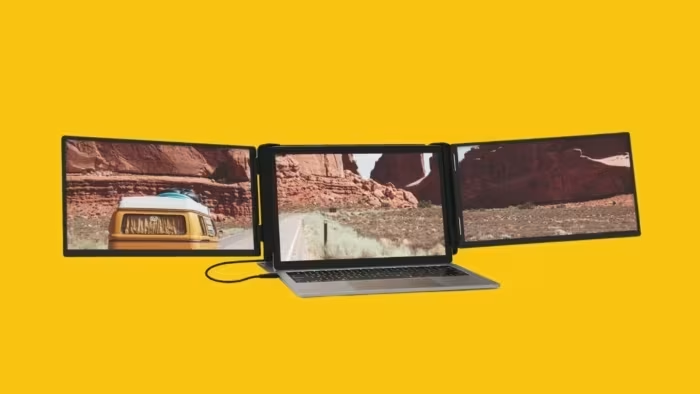
Xebec Tri-Screen 2
A portable, multi-monitor laptop attachment designed to expand screen real estate for remote professionals and road warriors.
How This Score Is Calculated
- Sources analysed: 5 reviews
- Explicit scores: 0 sources
- Sentiment-only: 5 sources (weighted 1.0×)
- Split: 3 Positive · 1.5 Mixed · 0.5 Negative
- Raw weighted average: 7.2
- Formula: Σ(score × weight) ÷ Σ(weight)
- Final score: 7.2/10 (clamped, rounded to 1 decimal)
Algorithmically calculated from source data. No manual adjustments.
- Most reviewed featureSetup/Portability (5/5)
- Most praisedProductivity boost
- Most criticisedKickstand stability
- Reviewer consensus levelModerate
The Xebec Tri-Screen 2 is a highly effective, portable monitor solution that significantly boosts multitasking capabilities for remote workers. While reviewers praise its high build quality and the sheer productivity gain of added screen real estate, it is held back by an unstable kickstand and inconsistent pass-through charging. It serves as a strong tool for frequent travellers, though potential buyers should be wary of the small 10.1-inch display size.
🔧 Key Specifications
Specifications sourced from reviewer mentions. Verify with manufacturer for complete details.
- Display Size: 10.1 inch
- Resolution: 1920x1200
- Build Materials: Aluminum
- Connectivity: USB-C (supports pass-through charging)
- Rotation: 180-degree
💲 Price Range
Approx. ₹41,500 – ₹54,000
Prices sourced from reviews. Check current retailer pricing.
📊 What Reviewers Say — Feature by Feature
5 features evaluated across 5 sources.
👍 Key Strengths
- Significant productivity boost
- High-quality aluminum build
- Compact and lightweight design
- Easy setup on most systems
- 180-degree screen rotation
👎 Key Weaknesses
- Unstable and poorly designed kickstand
- Inconsistent pass-through charging
- Small 10.1-inch screen size
- Finicky configuration switches
- Can make laptop top-heavy
💰 Value for Money Analysis
Reviewers debate the value given the price point of approximately ₹41,500 to ₹54,000. While it is seen as a worthwhile investment for professional productivity, some users feel the hardware limitations—specifically the kickstand and screen size—make it a premium purchase that requires careful consideration.
3 of 5 sources commented on price or value.
⚡ Where Reviewers Disagreed
The following areas saw meaningful disagreement across sources.
- Ease of Setup: 3 sources praised the 'easy' or 'simple' setup, while 2 sources described the process as 'finicky,' 'unintuitive,' or 'not as plug-and-play as advertised.' This discrepancy likely stems from differences in laptop OS compatibility and user experience with Thunderbolt-enabled systems.
🎯 Who This Product Is For
Reviewer recommendations for different target audiences and use cases.
🛠️ Best Use Cases
- Mobile MultitaskingExcellent for managing multiple documents, spreadsheets, or communication apps simultaneously while away from a desk.Great
- Remote CollaborationProvides the necessary screen real estate to host video calls on one screen while referencing materials on others.Good
🔀 Alternatives Mentioned by Reviewers
Maximise this list. Include EVERY single competitor, rival, or alternative product mentioned in any of the source reviews. Do not omit any. More alternatives and longer lists are better.
- Mobile Pixels DUEX Plus — Mentioned as a direct competitor in the ultra-thin portable monitor category. Reviewers suggest considering this if you find the Xebec's design too bulky or if you prefer a different mounting mechanism for your laptop setup.
Alternatives sourced exclusively from reviewer mentions.
🛒 Buyer's Guide
✅ Buy This If…
- You are a remote professional needing a multi-monitor setup on the move.
- You prioritise build quality and a premium aluminum aesthetic.
- You require a lightweight, foldable solution that fits into a travel bag.
❌ Skip This If…
- You use a very large laptop that makes the 10.1-inch screens feel insufficient.
- You frequently work with your laptop already elevated on a stand.
- You are looking for a completely seamless, zero-effort plug-and-play experience.
⚠️ Things to Check Before Buying
- Check if your laptop OS requires specific drivers or adapters (notably Mac users).
- Verify your laptop's port configuration to ensure full compatibility with the single-cable setup.
The Xebec Tri-Screen 2 is a robust, high-quality productivity tool that successfully solves the problem of limited screen space for mobile workers. While its kickstand and power pass-through features are imperfect, the overall gain in multitasking efficiency is hard to ignore for those who travel frequently. If you need a triple-monitor setup on the go, this is a strong, albeit premium, choice. For those seeking even thinner alternatives, look into options like the Mobile Pixels DUEX Plus.
PLG_CONTENT_IMAGEGALLERY_ERROR_NO_IMAGES
Reviewer Perspectives & Source Breakdown
Xebec Tri-Screen 2 Review: Maximizing Your Workflow with a Triple-Displa...
Price: Approx. ₹54,000
The Xebec Tri-Screen 2 is an excellent, highly portable solution for anyone needing a multi-monitor workstation on the go. Despite minor issues with pass-through charging and screen size, it significantly boosts productivity for remote work.
Pros
- High build quality
- Greatly increases productivity
- Easy to set up
- 180-degree screen rotation
- Compact and lightweight design
Cons
- Pass-through charging is not adequate
- Discharges laptop battery faster
- Smaller screen size can make text difficult to read
Xebec Tri-Screen 2 Review: Is It Actually Worth The Money? - travelswith...
The Xebec Tri-Screen 2 is a highly portable and effective solution for users needing a multi-monitor setup on the go. While it significantly boosts productivity for multitasking, the small 10.1-inch screens may feel underwhelming for larger laptop users and cable management can be cumbersome.
Pros
- Compatible with all major operating systems
- Built-in extendable kickstand for stability
- Easy to pack and quick to set up
- Sharp display with good brightness
- Universal attachment fits various laptop sizes
Cons
- Screens are too small for larger laptops
- Requires individual plugging for each screen
- Sliding mechanism is not very smooth
- Kickstand fails if laptop is on a stand
- Does not include a protective case
Xebec Tri-Screen 2 Review: Triple Your Productivity by Adding Two More D...
The Xebec Tri-Screen 2 is an impressive and portable tool that significantly boosts productivity by adding two extra displays to a laptop. It is a user-friendly, plug-and-play solution for remote workers needing more screen real estate.
Pros
- Simple out-of-the-box setup
- Impressive portability
- Supports USB-C pass-through charging
- Nearly universal across platforms
- Provides flexibility and increased productivity
Cons
- Can make laptop top-heavy without kickstand
Xebec Tri-Screen 2 Review: A Top-Notch Dual Monitor Solution for Road Wa...
Price: Approximately ₹41,500
The Xebec Tri-Screen 2 provides a portable and effective way to expand your laptop workspace with dual displays. While it offers excellent versatility for productivity, it suffers from a finicky setup process and a poorly designed, unstable kickstand.
Pros
- Dual 1920x1200 panels add significant display real estate
- Easy setup on most modern Thunderbolt-compatible systems
- Lightweight and highly portable design
Cons
- Kickstand is unstable when extended
- Configuration switches are unintuitive and difficult to use
- Not as plug-and-play as advertised
- Lacks support for HDR
Xebec Tri-Screen 3 Ode 2026 - Forbes Vetted - forbes.com...
The Xebec Tri-Screen 3 is an excellent portable multi-monitor solution that effectively enhances productivity for laptop users on the road. It offers a premium, sturdy design with a convenient single-cable setup, making it a highly recommended travel companion.
Pros
- Connects using a single USB-C cable
- High-quality, sturdy aluminum build
- Quick and easy setup
- Includes pass-through charging for laptops
- Bright, sharp, and lag-free display quality
- Comes with a convenient padded carrying case
Cons
- Mac users require a separate $60 adapter
- Mac users must install additional driver software