Tasks App Review
Tasks App
A collection of task management and productivity applications reviewed across Apple and cross-platform ecosystems.
How This Score Is Calculated
- Sources analysed: 6 reviews
- Explicit scores: 0 sources
- Sentiment-only: 6 sources
- Split: 4 Positive · 2 Mixed · 0 Negative
- Raw weighted average: 7.2
- Formula: Σ(score × weight) ÷ Σ(weight)
- Final score: 7.2/10 (clamped, rounded to 1 decimal)
Algorithmically calculated from source data. No manual adjustments.
- Most reviewed featureNative Design (3/6)
- Most praisedNative integration
- Most criticisedLimited free tiers
- Reviewer consensus levelModerate
The reviewed task management tools offer varied approaches, ranging from native Apple-centric designs to AI-driven automation. While users appreciate the clean interfaces and productivity-focused features, many apps face criticism regarding steep learning curves and limited free-tier functionality. Overall, these tools serve as robust solutions for those looking to organize workflows, provided the specific app matches the user's need for simplicity versus advanced automation.
🔧 Key Specifications
Specifications sourced from reviewer mentions. Verify with manufacturer for complete details.
- Platform: iOS, Android, Desktop
- Sync: iCloud, Google, Outlook
- Key Features: AI Scheduling, Gamification, Natural Language Input, Custom Fields
- Pricing Model: Subscription, Lifetime Purchase, One-time fee
- Offline Support: Limited/Varies by app
📊 What Reviewers Say — Feature by Feature
5 features evaluated across 6 sources.
👍 Key Strengths
- Clean, native Apple-centric design
- Seamless calendar and task integration
- AI-driven prioritization and automation
- Gamified focus and productivity tools
👎 Key Weaknesses
- Limited or non-existent free tiers
- Steep learning curves for advanced tools
- Lack of deep third-party integrations
- Interface sluggishness in some apps
💰 Value for Money Analysis
Value perception varies significantly by product. FirstSeed Tasks is praised for its lifetime purchase option, while others like Motion are seen as premium investments for power users. Free versions are generally viewed as insufficient for professional use cases.
4 of 6 sources commented on price or value.
⚡ Where Reviewers Disagreed
The following areas saw meaningful disagreement across sources.
- Complexity vs. Simplicity: 3 sources praised advanced customization and AI features, while 2 sources warned that these features lead to overwhelming interfaces and steep learning curves.
🎯 Who This Product Is For
Reviewer recommendations for different target audiences and use cases.
🛠️ Best Use Cases
- Project ManagementGreat for teams needing structure and stage tracking.Great
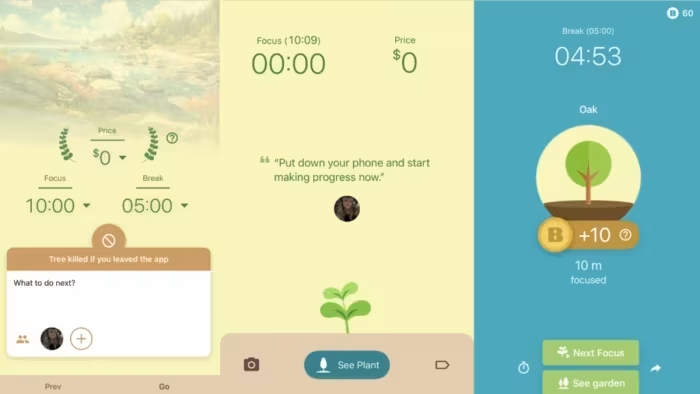
- Focus & ConcentrationGamified tools like Flora are ideal for users who need focus reinforcement without hard app blocking.Great
- Calendar IntegrationPerfect for users wanting to consolidate tasks and events into one view.Good
🔀 Alternatives Mentioned by Reviewers
Maximise this list. Include EVERY single competitor, rival, or alternative product mentioned in any of the source reviews. Do not omit any. More alternatives and longer lists are better.
- Notion — A manual project management tool often compared to Motion, noted for being less automated but highly flexible.
- ClickUp — A traditional manual project management tool that lacks the AI-driven scheduling found in Motion.
- Steppin — Recommended by reviewers as a superior alternative to Flora if you require hard app-blocking rather than gamified focus.
Alternatives sourced exclusively from reviewer mentions.
🛒 Buyer's Guide
✅ Buy This If…
- You are firmly within the Apple ecosystem and prioritize native design.
- You require AI-driven automation to manage complex schedules.
- You prefer gamification over strict restrictions for focus.
❌ Skip This If…
- You rely on a robust free tier for your professional workflow.
- You are a new user who finds complex, AI-heavy interfaces overwhelming.
- You require hard app-blocking functionality for focus.
⚠️ Things to Check Before Buying
- Verify if the app requires a subscription or offers a lifetime purchase model.
- Check if the mobile app features match the desktop version for your specific needs.
- Evaluate if the app allows for data export or backup, as this is missing in some options.
📈 Sentiment Trends Over Time
Reviews span various development stages for these tools. The following changes were detected:
- Integration — The trend towards combining calendar and task management remains a consistent priority for top-tier productivity apps.
The current landscape of task management apps offers specialized tools that excel in specific niches, from native Apple-centric design to AI-powered project scheduling. While no single app dominates, the best choice depends on whether you value simple, integrated workflows or advanced, automated productivity. We recommend testing your primary workflow against the app's free tier before committing to a subscription.
PLG_CONTENT_IMAGEGALLERY_ERROR_NO_IMAGES
Reviewer Perspectives & Source Breakdown
Flora Review: This App Plants Virtual (and Real) Trees While You Focus o...
Flora is a relaxing and gamified productivity tool that encourages focus by growing virtual trees. It offers a stress-free experience with optional real-world tree planting incentives, making it a great choice for those who prefer positive reinforcement over strict app blocking.
Pros
- Available on iOS and Android
- Easy to use and navigate
- Tracks focus periods effectively
- Allows planting real-life trees
- Highly customizable sessions
Cons
- Does not actively block access to distracting apps
App Review: FCmobilelife Tasks by FranklinCovey for iPhone | iMore - imo...
Price: Approximately 500 INR
FCmobilelife is a polished, feature-rich app that successfully implements FranklinCovey's prioritization methodology. While it offers powerful tools for both simple and power users, it suffers from minor interface sluggishness and lacks a truly bare-bones entry mode.
Pros
- Packed with features
- Simple, polished user interface
- Voice tasks supported
- Effective filtering and recurring tasks
- Photo attachment capability
Cons
- Sluggish list scrolling and transitions
- No simple bare-bones task creation option
Calendars 5 for iOS review: Combine your calendars and tasks into one be...
Price: ₹415
Calendars 5 is a significant improvement over its predecessor, offering a top-tier combination of calendar management and task tracking. It stands out as one of the best integrated options for users seeking an alternative to the native app.
Pros
- Supports natural language input
- Excellent calendar and task integration
- Intuitive week view design
- Syncs with native iOS calendars
- Customizable push notifications
Cons
- Natural language input cannot specify calendars
Motion App Review: The AI That Finally Tamed My Tasks – Unite.AI - unite...
Motion is a robust productivity tool that uses AI to automate scheduling and team coordination. While it lacks a free tier and has a learning curve, its powerful automation significantly simplifies complex project management.
Pros
- All-in-one calendar, task, and project management
- AI-driven task prioritization reduces manual planning
- Syncs seamlessly with Google, Outlook, and Apple calendars
- Visual project planning with stages and tracking
- Mobile app available for on-the-go management
Cons
- No free plan available
- Steep learning curve for setup and usage
- Mobile app features are limited compared to desktop
- Interface can feel overwhelming to new users
FirstSeed Tasks APP REVIEW - MacSources - macsources.com...
FirstSeed Tasks is a highly capable and user-friendly task manager designed specifically for the Apple ecosystem. While it lacks some advanced features like custom fields and direct commenting, its ease of use and lifetime purchase option make it an excellent choice.
Pros
- Apple Calendar integration
- Consistent, native design
- Seamless iCloud syncing
- Reasonable lifetime pricing
Cons
- No custom fields
- Lacks calendar view
- No task commenting
- Cumbersome team sharing
tasks app review a flexible kanban task manager for apple users ProsCons...
Tasks delivers a clean, native experience that feels at home across Apple devices. It offers meaningful customization without clutter and handles both small and growing team workflows with ease. The collaboration model keeps costs predictable, and the performance remains fast and reliable in daily use. For teams that value structure without unnecessary complexity, it is a practical and well-executed solution.
Pros
- Highly customizable fields and statuses per project
- Clean, native Apple design across devices
- Fast performance and reliable sync
- Collaboration model does not charge per team member
Cons
- Free tier is limited for evaluating larger workflows
- No deep third-party integrations like larger SaaS tools
- Primarily Apple ecosystem focused
- Advanced customization may require initial setup time
- No backup option
- No import/export function