Onyx Boox Note Max Review
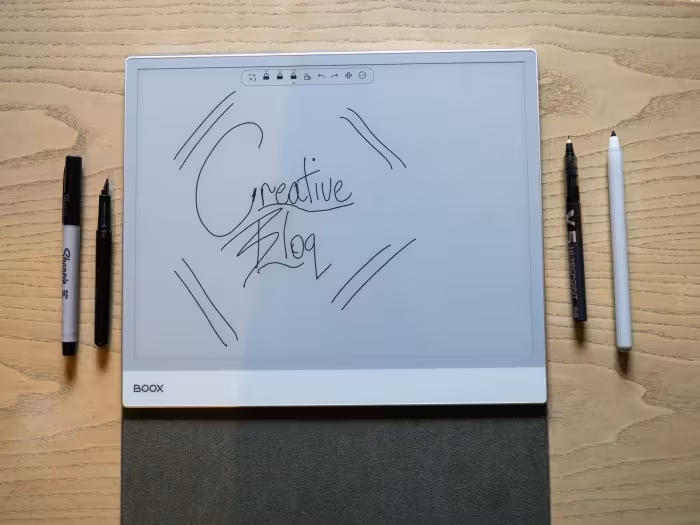
Onyx Boox Note Max
A large-format 13.3-inch E Ink digital notebook running full Android, designed for professional document management and academic workflows.
How This Score Is Calculated
- Sources analysed: 5 reviews
- Explicit scores: 0 sources (weighted 1.5×)
- Sentiment-only: 5 sources (weighted 1.0×)
- Split: 3 Positive · 2 Mixed · 0 Negative
- Raw weighted average: 7.2
- Formula: Σ(score × weight) ÷ Σ(weight)
- Review period: 2025
- Final score: 7.2/10 (clamped, rounded to 1 decimal)
Algorithmically calculated from source data. No manual adjustments.
- Most reviewed feature13.3-inch Display (5/5)
- Most praisedLarge A4-size Screen
- Most criticisedLack of Backlight/Input Lag
- Reviewer consensus levelModerate
The Onyx Boox Note Max is a specialized, large-format e-note featuring a massive 13.3-inch display that excels at handling A4-sized documents and academic PDFs. Unlike restricted e-readers, it offers the flexibility of a full Android operating system, though users must contend with potential input lag and inconsistent hardware features like the lack of a backlight in some models. It is a powerful tool for serious productivity, but its high price and niche focus make it less suitable for casual consumers.
🔧 Key Specifications
Specifications sourced from reviewer mentions. Verify with manufacturer for complete details.
- Display: 13.3-inch E Ink Carta 1300
- Processor: Snapdragon
- RAM: 6GB
- OS: Android 13
- Build: Thin and light
💲 Price Range
Approximately ₹54,500 – ₹55,000
Prices sourced from reviews. Check current retailer pricing.
📊 What Reviewers Say — Feature by Feature
3 features evaluated across 5 sources.
👍 Key Strengths
- Massive 13.3-inch E Ink display
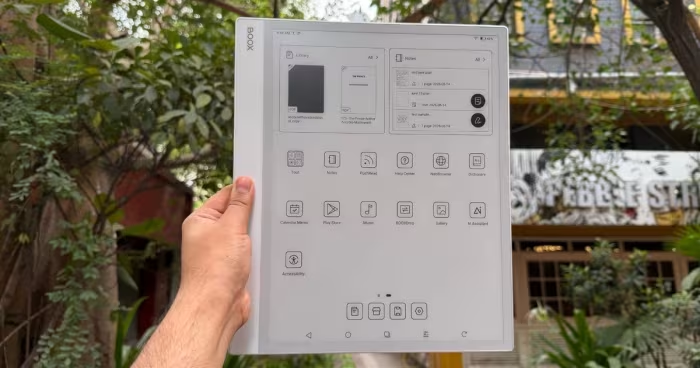
- Full Android app versatility
- Excellent handwriting and note-taking feel
- Great for A4-sized documents
👎 Key Weaknesses
- Noticeable system and typing input lag
- Lack of integrated backlight
- High price point
- Inconsistent long-term software support
💰 Value for Money Analysis
Reviewers generally view the device as an expensive professional tool rather than a consumer value proposition. With prices around ₹55,000, it is noted to be significantly more expensive than other e-ink devices, leading to questions about whether the cost is justified for general users.
2 of 5 sources commented on price or value.
⚡ Where Reviewers Disagreed
The following areas saw meaningful disagreement across sources.
- Backlight Availability: 2 sources explicitly state the device lacks a backlight, while 1 source mentions a front-lit display with adjustable light. This likely reflects regional or generational model variations in the Onyx product line.
🎯 Who This Product Is For
Reviewer recommendations for different target audiences and use cases.
🛠️ Best Use Cases
- Document ManagementIdeal for handling large A4 academic papers and PDFs due to the 13.3-inch screen size.Great
- Handwritten Note-takingProvides a superior, paper-like writing experience suitable for focused productivity.Great
- General E-readingFunctions well for reading, though the lack of physical volume buttons and backlight (on some models) can be limiting.OK
🔀 Alternatives Mentioned by Reviewers
Maximise this list. Include EVERY single competitor, rival, or alternative product mentioned in any of the source reviews. Do not omit any. More alternatives and longer lists are better.
- Kindle Scribe — A locked-down, proprietary e-reader that offers a more streamlined, user-friendly experience compared to the Boox's complex Android environment.
- reMarkable (and reMarkable Pro) — The gold standard for focused, distraction-free digital note-taking; reviewers suggest these if you prefer a walled-garden approach over the Boox's versatility.
Alternatives sourced exclusively from reviewer mentions.
🛒 Buyer's Guide
✅ Buy This If…
- You are a professional or academic requiring a large 13.3-inch canvas for A4 documents.
- You need the versatility of full Android apps on an E Ink display.
- You prioritize a superior, paper-like handwriting feel for notes.
❌ Skip This If…
- You are a casual reader looking for a simple, out-of-the-box e-reader experience.
- You are sensitive to system latency and input lag.
- You are on a budget, as there are more affordable, specialized alternatives available.
⚠️ Things to Check Before Buying
- Verify if the specific model you are purchasing includes a front-lit display, as there is conflicting data across reviews.
- Be prepared to spend time tweaking system settings to achieve optimal performance.
- Consider the potential for inconsistent long-term software update support.
📈 Sentiment Trends Over Time
Reviews span 2024 to 2025. The following changes were detected:
- Performance — Newer generations (e.g., Max Lumi 2) show a 20% performance improvement over previous models, though input lag remains a recurring critique.
The Onyx Boox Note Max is an impressive piece of hardware for those who specifically need a large 13.3-inch screen for academic or professional document tasks. While its full Android capabilities and handwriting feel are top-tier, the system-wide input lag and high cost prevent it from being a universal recommendation. If your workflow demands maximum screen real estate and app flexibility, this is a strong pick. Otherwise, consider more refined, dedicated note-takers like the reMarkable series.
Top Alternative: reMarkable Pro — Choose this if you prefer a distraction-free, polished note-taking environment over the complexity of Android.
Reviewer Perspectives & Source Breakdown
Onyx Boox Note Max review: A year later, I love this giant e-reader that...
Price: Approximately ₹55,000
The Onyx Boox Note Max is an exceptional large-format digital notebook for professionals and academics, offering a superior writing experience and versatile Android integration. However, it is hindered by noticeable input lag, a lack of backlighting, and the absence of physical volume controls.
Pros
- Gorgeous, paper-sized e-ink display
- Full Android experience with Play Store access
- Superb handwriting feel
- Excellent document and note apps
- Weeks-long battery mileage
Cons
- Severe input lag when typing
- No backlight makes it useless in the dark
- Lacks a physical volume rocker
- Spotty software update record
Onyx Boox Max Lumi 2 Review – The best 13.3 e-note money can buy - Good ...
The Onyx Boox Max Lumi 2 is an exceptional 13.3-inch e-note, offering top-tier performance for reading and editing A4 documents. Its powerful hardware and advanced drawing capabilities make it a market-leading device despite lacking an HDMI port.
Pros
- Large 13.3-inch display ideal for A4 documents
- High-performance Snapdragon processor and 6GB RAM
- Excellent, advanced drawing app for notes and PDFs
- Front-lit display with adjustable warm and white light
- Fast page turns and reduced pen input latency
Cons
- Lack of a dedicated HDMI port
- No SD card slot for storage expansion
- Magnetic stylus does not attach to the device
Onyx Boox Note Max: This e-reader has big ideas – on an even bigger scre...
The Onyx Boox Note Max is a specialized digital notebook featuring a massive 13.3-inch screen. It functions more like a professional tool for document management and handwriting than a standard consumer e-reader.
Pros
- Enormous 13.3-inch E Ink screen
- Excellent for handling PDFs and academic papers
- Versatile Android-based operating system
- Thin, portable A4 paper dimensions
Cons
Onyx Boox Note Max Review - Review 2025 - PCMag Middle East - me.pcmag.c...
Price: Approximately ₹54,500
The Onyx Boox Note Max is an excellent, distraction-free large-format productivity tool for document-heavy workflows. Its Android flexibility and fluid writing experience make it a powerful alternative to locked-down e-ink devices, though the lack of a front light and high price limit its general appeal.
Pros
- Large, crisp 13.3-inch E Ink Carta 1300 display
- Smooth and responsive stylus writing experience
- Versatile functionality with full Android 13 support
Cons
- Lacks a built-in front light
- Expensive compared to other e-ink devices
- Requires time to tweak settings for optimal performance
onyx boox note max review ambitious ereader tries too muchbyerlingur ein...
The idea of a productivity e-reader is a sound one, proven by the likes of reMarkable. Done right, they’re brilliant for taking handwritten notes and light word-processing. With the Boox Note Max, Onyx has thrown its hat into the ring with a customary full-fat Android flavour. And while it is good for taking notes, it tries a little too much and is too inconsistent to make an instant recommendation. With software updates the picture may change, but there’s currently better options available for less.
Pros
- Thin and light
- Nice for reading
- Can be used for multiple tasks
Cons
- Screen too slow for many tasks
- No volume rocker
- Awkward question of long-term software support