MSI MPG X870E Carbon Max Wi-Fi Review
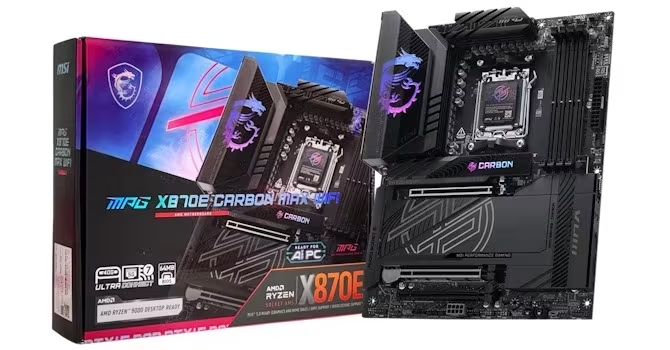
MSI MPG X870E Carbon Max Wi-Fi
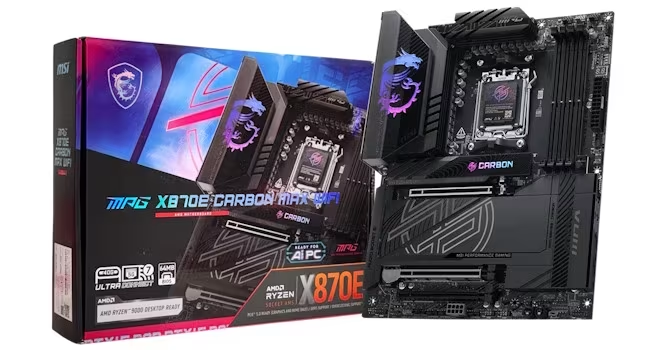
A premium X870E motherboard by MSI offering robust power delivery and high-speed connectivity for high-end gaming builds.
How This Score Is Calculated
- Sources analysed: 7 reviews
- Sentiment-only: 7 sources (weighted 1.0×)
- Split: 4 Positive · 2 Mixed · 1 Negative
- Raw weighted average: 7.1
- Formula: Σ(score × weight) ÷ Σ(weight)
- Final score: 7.1/10 (clamped, rounded to 1 decimal)
Algorithmically calculated from source data. No manual adjustments.
- Most reviewed featureConnectivity (7/7)
- Most praisedTool-free M.2 design
- Most criticisedVRM/SSD temperatures
- Reviewer consensus levelModerate
- Value for moneyFair Value (6.0/10)
The MSI MPG X870E Carbon Max Wi-Fi is a stylish, feature-dense motherboard that sits comfortably between mid-range boards and ultra-premium flagships. It excels in connectivity, offering USB4, Wi-Fi 7, and a robust 18-phase power design that rivals more expensive models. However, reviewers noted drawbacks in thermal management, specifically regarding VRM and SSD temperatures under heavy load, and cautioned that its price-to-performance ratio faces stiff competition.
🔧 Key Specifications
Specifications sourced from reviewer mentions. Verify with manufacturer for complete details.
- Power Design: 18-phase
- Display: —
- Networking: Wi-Fi 7, 5 Gbps & 2.5 Gbps Ethernet
- USB: USB4, 9 rear USB ports
- Storage: Dual PCIe Gen 5 M.2 slots
- Build Materials: Integrated RGB heatsinks, no rear backplate
- Features: Tool-free M.2 heatsinks, onboard power/reset buttons, EZ antenna connectors
💲 Price Range
Approximately ₹42,000
Prices sourced from reviews. Check current retailer pricing.
📊 What Reviewers Say — Feature by Feature
7 features evaluated across 7 sources.
👍 Key Strengths
- Robust 18-phase power delivery
- Excellent USB4 and Wi-Fi 7 connectivity
- Convenient tool-free M.2 heatsink design
- Attractive aesthetic with integrated RGB
- Useful onboard overclocking buttons
👎 Key Weaknesses
- VRM temperatures run warmer than preferred
- Lack of rear VRM backplate
- RGB lighting can hinder heat dissipation
- Bandwidth sharing limits PCIe Gen 5
- Proprietary software is clunky
💰 Value for Money Analysis
Reviewers view the board as a high-end option that bridges the gap between budget and flagship models, but it is considered expensive. Its value is heavily tied to the final retail price, as cheaper alternatives provide similar or better performance.
The board is positioned as a more affordable alternative to the MEG Ace, yet it struggles to justify its premium cost against competitors like the Gigabyte Aorus Pro X3D.
4 of 7 sources commented on price or value.
⚡ Where Reviewers Disagreed
The following areas saw meaningful disagreement across sources.
- Thermal Management: 3 sources praised the cooling as effective, while 3 sources criticised the VRM temperatures and the impact of RGB lighting on heat dissipation. The disagreement stems from whether the cooling is sufficient for standard use versus the higher temperatures observed under extreme enthusiast overclocking scenarios.
🎯 Who This Product Is For
Reviewer recommendations for different target audiences and use cases.
🛠️ Best Use Cases
- OverclockingExcellent power delivery and dedicated onboard buttons make it suitable for enthusiast performance tuning.Great
- High-Speed Networking/DataWi-Fi 7 and USB4 make it perfect for users with high-bandwidth peripheral requirements.Great
🔀 Alternatives Mentioned by Reviewers
Maximise this list. Include EVERY single competitor, rival, or alternative product mentioned in any of the source reviews.
- MSI MEG X870E Ace Max — A higher-tier model offering superior thermal management, 10 Gbps Ethernet, and an integrated ESS DAC, but at a significantly higher price point. Choose this if you need professional-grade networking and audio.
- MSI MAG Tomahawk Series — A more affordable, feature-stripped alternative. Recommended for users who prioritize value over high-end connectivity features like USB4.
- Gigabyte X870E Aorus Pro X3D — A strong competitor that offers better thermal performance and higher power delivery for a lower price. This is the recommended choice for users focused on pure performance per dollar.
Alternatives sourced exclusively from reviewer mentions.
🛒 Buyer's Guide
✅ Buy This If…
- You need USB4 and Wi-Fi 7 for a high-end workstation or gaming build.
- You appreciate tool-free component installation for SSDs.
- You want robust power delivery for overclocking without the cost of Godlike/Ace models.
❌ Skip This If…
- You are on a tight budget and don't need high-end connectivity.
- You require 10 Gbps Ethernet or high-fidelity onboard audio.
- You prioritize the lowest possible VRM temperatures for extreme long-term overclocking.
⚠️ Things to Check Before Buying
- Verify if your specific build requires the 10 Gbps Ethernet found on higher-tier models.
- Be aware of bandwidth sharing limitations between USB4 and PCIe Gen 5 slots.
- Consider the availability, as initial supply may lag behind entry-level models.
📈 Sentiment Trends Over Time
Reviews indicate a stable sentiment across the launch period.
- Thermal Performance — Consistent feedback that while adequate for most, it lags behind cheaper, more thermally efficient competitors.
The MSI MPG X870E Carbon Max Wi-Fi is a highly capable motherboard that delivers a premium feature set, including USB4 and Wi-Fi 7, at a price point below the flagship MEG series. While its power delivery is excellent, the board is held back by thermal performance that trails cheaper competitors and a lack of premium additions like 10 Gbps Ethernet. It is an excellent choice for enthusiasts who value connectivity and aesthetics, provided they find it at a competitive price. If pure thermal performance is your priority, look toward the Gigabyte X870E Aorus Pro X3D instead.
Top Alternative: Gigabyte X870E Aorus Pro X3D — Offers better thermal performance and higher power delivery for less money.
Reviewer Perspectives & Source Breakdown
MSI MPG X870E Carbon Max Wi-Fi Review - BIOS Overview | TechPowerUp - te...
The motherboard BIOS offers robust customization tools including favorites, custom fan curves, and smart button configuration. However, the fan curve interface lacks a linear scale, making precise adjustments challenging.
Pros
- Useful favorites section for quick access
- Flexible fan curve control with addable points
- Customizable smart button on rear I/O
- Effective search function for menu settings
Cons
- Non-linear fan curve temperature scale
- Lack of 0-100 scale for fan adjustments
MSI MPG X870E Carbon Max Wi-Fi Review - SSD Performance & Temperatures |...
The motherboard provides solid SSD cooling performance that prevents thermal throttling. However, the integrated RGB lighting on the heatsinks may slightly impede optimal heat dissipation.
Pros
- Prevents SSD thermal throttling
- Effective cooling on lower heatsink
Cons
- RGB lighting hinders heat dissipation
- Underwhelming SSD temperatures
MSI MPG X870E Carbon Max Wi-Fi Review | TechPowerUp - techpowerup.com...
Price: Approximately ₹42,000
The MSI MPG X870E Carbon Max Wi-Fi is a premium, feature-rich motherboard that bridges the gap between budget boards and ultra-expensive enthusiast options. It offers excellent power delivery and specialized overclocking tools, making it a compelling sweet spot for high-end builds.
Pros
- Robust 18-phase power design
- Comprehensive high-speed USB port connectivity
- Includes dedicated overclocking and testing features
- Premium aesthetic design with RGB
Cons
- Expensive premium pricing
- Availability delays compared to base models
MSI MPG X870E Carbon Max Wi-Fi Review - Component Analysis | TechPowerUp...
This motherboard provides a solid feature set including USB4 and Wi-Fi 7, though it lacks some of the premium audio and high-speed networking capabilities found on higher-end models like the Ace.
Pros
- Integrated USB4 controller with Thunderbolt 4 certification
- Modern Wi-Fi 7 connectivity with EZ antenna connectors
- Efficient thermal design with heatpipe-linked VRMs
Cons
- Lacks 10 Gbps Ethernet found on higher-tier models
- No integrated ESS DAC for premium audio output
- Complex disassembly process for maintenance access
MSI MPG X870E Carbon Max Wi-Fi Review - VRM Overview | TechPowerUp - tec...
The motherboard features robust power delivery comparable to the higher-end MEG X870E Ace Max, though it runs slightly warmer due to its cooling design. It is a capable board but lacks some premium thermal features like a rear backplate.
Pros
- Identical power delivery to higher-end Ace Max model
- Effective dual-part heatpipe-linked heatsink design
Cons
- VRM temperatures run slightly warmer than preferred
- Lacks rear cooling backplate found on more expensive models
MSI MPG X870E Carbon Max Wi-Fi Review - Board Layout | TechPowerUp - tec...
The MSI MPG Carbon is a stylish, feature-rich motherboard that offers excellent connectivity and cooling at a lower price point than the flagship MEG Ace series. While it makes minor compromises on bandwidth sharing and accessory cooling, it remains a highly capable high-end option.
Pros
- Attractive all-black design with integrated RGB
- Tool-free heatsinks for all M.2 slots
- Impressive rear I/O with nine USB ports
- Includes both 5 Gbps and 2.5 Gbps Ethernet
- Onboard power, reset buttons, and LED display
Cons
- Lacks a rear backplate for VRM cooling
- Bandwidth sharing limits USB4 and PCIe Gen 5 slots
- Reduced fast-charge power for front Type-C header
- Fewer fan headers compared to MEG series
MSI MPG X870E Carbon Max Wi-Fi Review - Value & Conclusion | TechPowerUp...
Price: Approximately ₹42,000
The MSI MPG X870E Carbon Max Wi-Fi is a well-balanced, feature-rich motherboard, but its value proposition heavily depends on the final retail price. It offers incremental improvements over its predecessor, though it faces stiff competition from both internal and third-party alternatives.
Pros
- Attractive, high-end design
- Dual PCIe Gen 5 M.2 ports
- Tool-free SSD heatsinks
- Decent number of USB ports
- Effective M.2 cooling
Cons
- Expensive
- Disappointing VRM temperatures
- Clunky proprietary software
- SSD thermal performance trails cheaper boards
- Bandwidth sharing compromises