Monday.com Review

Monday.com
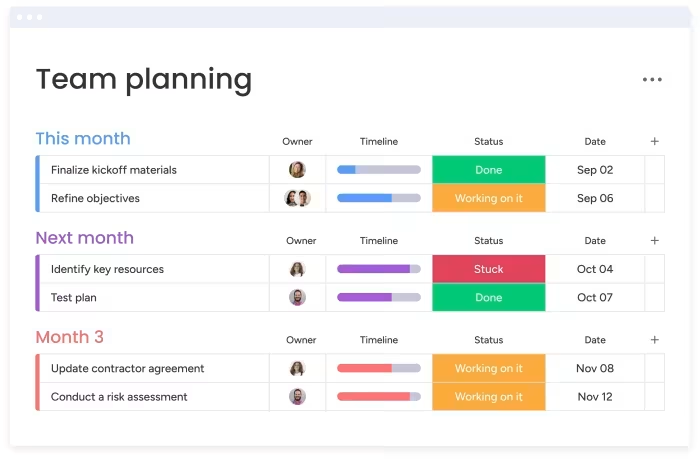
A highly visual, customizable cloud-based work OS designed for project management, CRM, and streamlined team collaboration workflows.
How This Score Is Calculated
- Sources analysed: 13 reviews
- Sentiment-only: 13 sources (weighted 1.0×)
- Split: 10 Positive · 3 Mixed · 0 Negative
- Raw weighted average: 7.8
- Formula: Σ(score × weight) ÷ Σ(weight)
- Review period: 2024–2026
- Value sources: 11 of 13 mentioned price or value
- Final score: 7.8/10 (clamped, rounded to 1 decimal)
Algorithmically calculated from source data. No manual adjustments.
- Most reviewed featureCustomization (13/13)
- Most praisedVisual Interface
- Most criticisedPricing Complexity
- Reviewer consensus levelHigh
- Value for moneyFair Value (5.8/10)
Monday.com is widely regarded as a top-tier, visually intuitive Work OS that excels at project management and CRM through high levels of customizability. While its interface and automation capabilities are industry-leading, users frequently cite a complex, per-seat pricing structure and a steep learning curve as primary barriers. It is best suited for teams that need a central, flexible hub for collaboration and are prepared to navigate its intricate setup process.
🔧 Key Specifications
Specifications sourced from reviewer mentions.
- Platform: Cloud-based
- Key Features: Customizable dashboards, Automated workflows, CRM, Time tracking, 200+ templates
- Integrations: Extensive third-party marketplace
- Minimum Seats: 3 (for paid plans)
- Free Tier: Available (limited to 2 seats)
- Support: 24/7 customer support
💲 Price Range
Approx. ₹830 to ₹6,500 per month (varies by seat count/tier)
Prices sourced from reviews. Check current retailer pricing.
📊 What Reviewers Say — Feature by Feature
6 features evaluated across 13 sources.
👍 Key Strengths
- Highly visual and intuitive dashboard
- Extensive customization for varied workflows
- Robust, time-saving automation capabilities
- Excellent third-party app integrations
- Large template library (200+)
👎 Key Weaknesses
- Confusing per-seat pricing model
- Mandatory three-user minimum for paid plans
- Steep learning curve for advanced setup
- Limited functionality in lower-tier plans
- Free plan not viable for business
💰 Value for Money Analysis
Reviewers generally perceive Monday.com as a premium product. While it offers high value for organizations needing deep customization, the complex pricing structure—specifically the seat minimums and feature-gating—often leaves smaller teams feeling it is overpriced.
11 of 13 sources commented on price or value.
⚡ Where Reviewers Disagreed
The following areas saw meaningful disagreement across sources.
- Ease of Use: 8 sources praised the intuitive interface, while 4 reviewers highlighted that the setup process is overwhelming and complex. This suggests that while daily navigation is simple, initial implementation is a significant hurdle.
🎯 Who This Product Is For
Reviewer recommendations for different target audiences and use cases.
🛠️ Best Use Cases
- Project TrackingExcellent for visualizing project timelines and task accountability through custom board views.Great
- CRM & Lead ManagementHighly effective for centralizing sales pipelines and automating lead scoring and email tracking.Great
- Agile SprintsFunctionality is described as 'clunky' by some reviewers, making it less ideal for pure Agile shops.OK
🔀 Alternatives Mentioned by Reviewers
Maximise this list. Include EVERY single competitor, rival, or alternative product mentioned in any of the source reviews.
- Asana — Frequently cited as a preferred alternative, especially for those prioritizing a better free plan and overall value.
- Todoist — Recommended by PCMag as a superior choice for individual task management and better value for most users.
- Trello — Often compared for project management needs; choice depends on whether you prefer Trello’s simplicity or Monday’s deeper customization.
- Wrike — Noted for having a more comprehensive mobile application experience than Monday.com.
- Zoho Projects — Highlighted for a better mobile experience compared to Monday.com.
- Salesforce — A more robust, enterprise-scale solution that reviewers suggest for companies requiring large-scale CRM functionality.
- Pipedrive — A standalone CRM that Monday.com can potentially replace for some teams through its own CRM features.
- Freshsales Suite — Compared to Monday.com CRM for dynamic customization capabilities.
- Google Workspace — Often recommended as a budget-friendly alternative for smaller businesses looking for basic collaboration.
Alternatives sourced exclusively from reviewer mentions.
🛒 Buyer's Guide
✅ Buy This If…
- You need a highly visual, customizable project management tool.
- Your team requires deep automation to handle routine administrative tasks.
- You are an SMB looking to consolidate project management and CRM into one platform.
❌ Skip This If…
- You are a solo user or a team of two (due to 3-user minimum).
- You require an extremely low-cost or robust free-tier solution.
- You need specialized, high-end Agile sprint management tools.
⚠️ Things to Check Before Buying
- Verify if the specific features you need (like time tracking) are locked behind the Pro tier.
- Ensure your team size meets the mandatory 3-user requirement for paid plans.
- Consider the setup time required to properly configure boards for your specific workflow.
📈 Sentiment Trends Over Time
Reviews span 2024–2026. The following changes were detected:
- Feature Set — While the platform has matured, the consensus remains consistent: powerful and customizable, but with a persistent pricing complexity.
Monday.com is an outstanding, highly visual Work OS that excels at centralizing complex team workflows and CRM tasks. While it requires an upfront investment in setup time and a realistic budget for its tiered pricing, its automation and customization capabilities are difficult to beat. For growing teams that value transparency and visual project tracking, it is a top-tier choice. If you are a small, budget-constrained team, you may want to look at simpler alternatives like Asana or Trello first.
Top Alternative: Asana — A strong competitor that is often preferred for its more accessible free plan and overall value.


Reviewer Perspectives & Source Breakdown
monday.com Review (2026) — Project Management | SoftwareGlimpse - softwa...
Price: Approx. ₹750 - ₹1,600 per user/month (based on $9 - $19 USD)
monday.com is a leading Work OS offering robust project tracking, automations, and cross-team collaboration tools. It is best suited for teams needing a versatile, scalable platform, provided they can accommodate the three-seat paid minimum and additional AI credit costs.
Pros
- Category-leading Work OS breadth and features
- Strong integrations ecosystem
- Approachable free tier for tiny teams
- Clear depth ladder across plans
- AI assistance with published credit bundles
Cons
- Three-seat paid minimum increases cost for micro-teams
- AI credits increase total cost of ownership
- Advanced views and time tracking are Pro-gated
- Not a specialist tool for PDF or remote work
- Potential confusion with monday sales CRM
monday.com Work Management Review: Pros & Cons, Features, Ratings, Prici...
Price: Approx. ₹830 - ₹1,660 per seat/month
An intuitive, powerful, and versatile workplace management platform that excels in dashboarding and automation. It is ideal for higher-level management but can feel costly and initially overwhelming for new users.
Pros
- Excellent dashboarding capabilities
- Great range of integrations
- Powerful time-saving automations
- Access to other company tools
Cons
- Can be a touch costly
- Initial setup can feel overwhelming
monday.com Review: Features, Pros & Cons – Forbes Advisor Australia - fo...
Price: From approximately ₹1,100 per month
Monday.com is an excellent, highly customizable, and visual work management platform ideal for small to mid-sized businesses. While its powerful features and intuitive interface provide great flexibility, the per-seat pricing model and seat minimums can make it less cost-effective for smaller teams.
Pros
- Forever free plan for up to two seats
- Modern, intuitive, and visual dashboard
- Highly customizable interface
- Over 200 templates for boards and automations
- Integrates with many third-party apps
- Excellent customer support
Cons
- Confusing per-group seat pricing
- Minimum team size of three for paid plans
- Short 14-day free trial
- Clunky agile sprints
- Time tracking requires Pro account
Monday.com Review: The Complete Guide - UC Today - uctoday.com...
Price: Approximately ₹4,000 to ₹6,500 monthly for five users
Monday.com is a versatile and highly customizable work management platform that is ideal for teams needing diverse workflow solutions. Despite a complex pricing structure, its intuitive interface and robust feature set make it a valuable tool for project management and collaboration.
Pros
- Affordable pricing with a free plan for small companies
- Modern, intuitive, and highly visual dashboard
- Highly customizable with dozens of templates
- Excellent customer support
- Integrations with a variety of third-party apps
- Excellent CRM solutions
Cons
- Pricing structure can be a little complicated
- Some features are restricted to more expensive accounts
monday.com Review: Features, Pros & Cons – Forbes Advisor Canada - forbe...
Price: Approximately ₹2,750 per month (billed annually for 3 seats)
monday.com is a highly visual and flexible cloud-based work management platform ideal for SMBs needing customizable workflows. While it offers excellent collaboration features and integrations, its complex per-seat pricing model may be a drawback for some teams.
Pros
- Forever free plan for up to two seats
- Modern, intuitive, and highly visual dashboard
- Highly customizable with over 200 templates
- Integrates with numerous third-party applications
- Excellent 24/7 customer support
Cons
- Confusing per-seat group pricing model
- Minimum requirement of three seats for paid plans
- Short 14-day free trial period
- Agile sprint functionality is considered clunky
- Time tracking requires a Pro account
monday.com Review 2024: Features, Pros & Cons – Forbes Advisor INDIA - f...
Price: Around INR 2,456 per month
monday.com is a highly versatile and intuitive cloud-based work management platform suitable for various business workflows. Its visual interface and extensive customization options make it an excellent choice for teams needing a central hub for projects and CRM.
Pros
- Forever free plan available for up to two seats
- Modern, intuitive, and visual dashboard
- Highly customizable platform
- Over 200 templates for boards and automations
Cons
- Confusing per-seat pricing structure
- Minimum team size of three for paid plans
- Limited 14-day trial for paid plans
Monday.com Review: Still the Best PM Solution in 2026? - websiteplanet.c...
Price: ₹0 - ₹1590
monday.com is a powerful and highly customizable project management platform with an attractive interface, making it an excellent choice for teams willing to invest in quality. While it is feature-rich, it may not be suitable for budget-conscious users due to limited features in lower-tier plans.
Pros
- Attractive and intuitive user interface
- Extremely powerful and highly customizable
- Wide range of project visualization views
- Excellent selection of over 200 templates
- Robust automation capabilities for routine tasks
Cons
- Not ideal for small budgets
- Core features locked behind higher-tier plans
- Free and Basic plans lack essential functionality
Monday.com - Review 2025 - PCMag Middle East - me.pcmag.com...
Price: Approx. ₹1,000 per person per month
Monday.com is a highly customizable and intuitive work management solution, though its confusing pricing tiers and limited free plan hold it back from being the best option.
Pros
- Variety of boards, tools, and views
- Modern interface with extensive customization
- Tons of automations and integrations
- Easy to get started with templates
Cons
- Confusing pricing plans
- Free plan not feasible for serious business use
Monday.com review | TechRadar - techradar.com...
Price: Starting from approximately ₹4,100 per month for 10 users
Monday.com is an excellent project management tool that offers a highly visual, user-friendly interface for teams prioritizing simplicity and transparency. While it excels in ease of use, it may lack the advanced task tracking functionality required by some larger organizations.
Pros
- Attractive and intuitive user interface
- Useful project visualization tools
- Supports integration with various platforms
- Encourages team transparency and accountability
Cons
- Expensive for large teams
- Lacks advanced task tracking features
Page 1 of 2