Malwarebytes Review
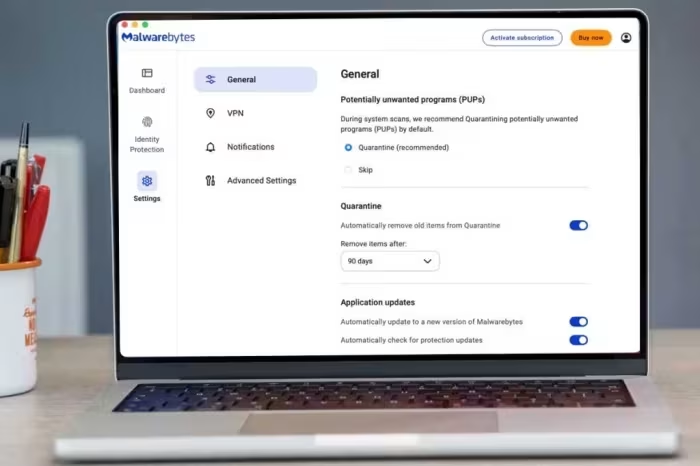
Malwarebytes
A lightweight, user-friendly security solution best utilized for malware remediation and supplemental real-time protection.
How This Score Is Calculated
- Sources analysed: 25 reviews
- Sentiment-only: 25 sources (weighted 1.0×)
- Split: 14 Positive · 8 Mixed · 3 Negative
- Raw weighted average: 6.8
- Final score: 6.8/10 (rounded to 1 decimal)
- Most reviewed featureMalware Detection (25/25)
- Most praisedEase of Use
- Most criticisedLack of Independent Testing
- Reviewer consensus levelModerate
- Value for moneyFair Value (6.2/10)
Malwarebytes is widely regarded as a premiere tool for deep-cleaning systems and removing persistent malware that traditional antivirus software might miss. While highly effective as an on-demand, secondary scanner, it falls short as a comprehensive security suite due to a lack of advanced features like firewalls and parental controls. It is best suited for users who want a lightweight, simple-to-use security utility rather than a resource-heavy, all-in-one protection package.
🔧 Key Specifications
- OS: Windows, macOS, Android, iOS
- Core Features: Real-time protection, Malware/Adware removal, Browser Guard
- VPN: Available (Wireguard protocol)
- Device Limits: Typically 3-5 devices depending on plan
- Money-back Guarantee: 60 days
💲 Price Range
Approximately ₹2,500 – ₹16,700 per year
Prices vary by region and bundle (VPN/Identity Theft). Check current retailer pricing.
📊 What Reviewers Say — Feature by Feature
Features evaluated across 25 sources.
👍 Key Strengths
- Excellent at cleaning existing malware infections
- Lightweight, minimal system resource impact
- Simple, intuitive user interface
- Generous 60-day money-back guarantee
- Fast, responsive customer support
👎 Key Weaknesses
- Lacks independent third-party lab testing
- Missing essential suite features (firewall/parental)
- VPN performance is limited compared to rivals
- Mac version lacks feature parity with Windows
- Expensive compared to feature-rich alternatives
💰 Value for Money Analysis
Reviewers generally view the pricing as high given the limited feature set. However, it is considered a good value when bundled as a secondary security layer or as part of a package for users who prioritize simplicity over comprehensive, lab-tested security suites.
18 of 25 sources commented on price or value.
⚡ Where Reviewers Disagreed
The following areas saw meaningful disagreement across sources.
- Effectiveness as Primary Antivirus: 10 sources suggest it is sufficient for basic users, while 15 sources explicitly recommend using it only as a secondary, on-demand scanner alongside a primary antivirus.
🎯 Who This Product Is For
Reviewer recommendations for different target audiences.
🛠️ Best Use Cases
- Secondary Security Layer Excellent for running alongside a primary suite for on-demand deep scans and remediation. Great
- Malware Removal Highly efficient at detecting and removing adware and PUPs. Great
- Web Protection Browser Guard effectively blocks trackers, ads, and phishing sites. Good
🔀 Alternatives Mentioned by Reviewers
- Bitdefender: Frequently cited as a superior, feature-rich alternative that undergoes rigorous independent lab testing. Choose this if you want an all-in-one, fully validated security suite.
- Norton: Offers more comprehensive protection including advanced parental controls and identity theft features. Recommended for users who want a complete, lab-tested security ecosystem.
- Avast One / AVG: Often suggested as alternatives for users looking for a free or lower-cost, full-featured antivirus solution that serves as a primary, rather than secondary, security layer.
- NordVPN / ExpressVPN: Recommended over Malwarebytes Privacy VPN for users who prioritize geoblocking consistency, server variety, and advanced privacy features.
- Sophos / Intego: Mentioned as alternatives for Mac-specific security needs, with varying feature sets and price points compared to Malwarebytes' macOS offerings.
🛒 Buyer's Guide
✅ Buy This If…
- You need a tool to clean up a system already infected with malware.
- You want a lightweight, secondary security layer to supplement your current antivirus.
- You prioritize ease of use and a clean, simple interface.
❌ Skip This If…
- You require a full-featured security suite with parental controls and a firewall.
- You demand independent third-party lab certification for your security software.
- You are a Mac user seeking feature parity with the Windows version.
📈 Sentiment Trends Over Time
Reviews span several years. The following changes were detected:
- Feature Parity: The Mac version continues to be viewed as a 'second-class citizen' compared to the Windows version, with persistent requests for missing features like external volume scanning.
Malwarebytes remains an industry leader for malware remediation and ease of use. While it is not a comprehensive security suite and lacks the third-party validation of rivals like Bitdefender or Norton, it is an essential tool for deep-cleaning infected systems. We recommend it as a secondary, on-demand scanner for most users. If you need a primary, all-in-one security suite, consider alternatives that offer broader feature sets and lab-tested performance.
Top Alternative: Bitdefender — Choose this for a more comprehensive, lab-tested, all-in-one security suite.


Reviewer Perspectives & Source Breakdown
Malwarebytes for Mac Premium: Fast but Bare-Bones | Tom's Guide - tomsgu...
Price: Approximately ₹3,350 per year
Malwarebytes for Mac Premium is difficult to recommend due to its lack of independent security testing and absence of special features. It feels incomplete compared to competing solutions.
Pros
- Easy-to-use design
- Super-fast system scans
- Low system impact
Cons
- No special features
- Untested antivirus security
Malwarebytes Privacy VPN for Windows and Mac – a new VPN player (review)...
Price: Approximately 3,850 INR
Malwarebytes Privacy VPN is a reliable new entrant but lacks the maturity and features of established competitors. While it shows promise, it is not currently recommended over more feature-rich alternatives.
Pros
- Reputable security company
- Simple user interface
- Uses modern Wireguard technology
- Good future potential
Cons
- Missing many essential features
- Unable to bypass common geo-blocking
- Persistent interface UI issues
- Slow torrent download performance
Malwarebytes Privacy VPN for Mac review | Macworld - macworld.com...
Price: Approximately ₹3,350 to ₹5,000 per year
Malwarebytes Privacy VPN is a solid, user-friendly service that excels in performance and security integration. While it lacks the server variety and geoblocking consistency of top-tier rivals, it remains a compelling choice when bundled with the company's excellent anti-malware suite.
Pros
- Integrates seamlessly with robust anti-malware suite
- Includes advanced features like Killswitch
- Strong performance with decent upload and download speeds
- Verified no-logs policy in place
Cons
- Fewer server locations compared to industry rivals
- Geoblocking performance can be inconsistent
- Lacks options to switch between VPN protocols
- Limited to five device connections
Malwarebytes Privacy VPN review: Simple and fast, but distinctly limited...
Price: Approximately ₹285 per month
Malwarebytes Privacy VPN offers fast performance and a simple interface but is held back by restrictive licensing, limited platform support, and a lack of advanced features on non-Windows devices. It is a capable service for basic use but struggles to compete with more versatile and affordable rivals.
Pros
- Decent connection speeds
- Clean and easy-to-navigate interface
- Includes a free trial
- Generous 60-day money-back guarantee
Cons
- Inflexible and inconvenient device licensing
- Limited feature set on non-Windows platforms
- Smaller server network than top competitors
- Higher cost compared to many rivals
Malwarebytes for Mac 2025 review: an antivirus and privacy upgrade - Dig...
Price: Approximately ₹3,750 to ₹10,000 annually
Malwarebytes offers an affordable and user-friendly antivirus solution for Mac users, though it lacks independent third-party verification of its effectiveness. It is a solid choice for basic protection, but those needing advanced features or audited security should look elsewhere.
Pros
- Good free antivirus scanner
- Low-cost real-time protection plans
- Quick and friendly support
- Easy setup
- 14-day trial
Cons
- VPN costs extra
- Installer extension error
- Lacks third-party testing
Malwarebytes Antivirus solutions review | TechRadar - techradar.com...
Price: Approx. ₹3,800/year to ₹8,400/year
Malwarebytes excels as a simple, effective tool for malware removal but falls short as a primary antivirus due to below-average detection rates. It is best used as a secondary security layer alongside other robust antivirus software.
Pros
- Simple to use
- Powerful anti-exploit module
- Works well with other antivirus tools
- Fast VPN included in Plus tier
Cons
- Below-average detection rates
- Not all test labs evaluate this program
- Lacks extensive feature set
Malwarebytes Premium + Privacy for Mac review | Tom's Guide - tomsguide....
Price: Approx. ₹3,300 to ₹8,300 per year
Malwarebytes Premium + Privacy offers fast scanning and basic protection, but it lacks key features like a firewall and parental controls. Because the apps are not integrated and lack third-party effectiveness testing, it is not as comprehensive as its competitors.
Pros
- Basic protection
- Fast installation
- Very quick scanning
Cons
- Less than comprehensive scanning
- Large system impact
- Lacks firewall, parental controls, and password manager
- No independent effectiveness testing
Malwarebytes Free Antivirus Review | Macworld - macworld.com...
Price: Approximately ₹3,750 per year (for paid version)
Malwarebytes Free is effective at removing persistent malware, but it is hampered by frequent bugs, crashes, and aggressive paywalls that limit its usability. It feels less developed than the Windows version, particularly due to the ongoing lack of external volume scanning.
Pros
- Good settings and performance
- Easily created file whitelists
- Easy installation
- Removes malware other applications miss
Cons
- Occasional software crashes
- Requires reinstallation after crashes
- No external volume scan feature
- Most features locked behind subscriptions
Malwarebytes Premium Security for Mac - Review 2025 - PCMag Middle East ...
Price: Approximately ₹3,750
Malwarebytes Premium Security for Mac offers efficient real-time protection and speedy malware scans, making it a reliable security utility. However, the lack of independent lab testing verification makes it less ideal than competitors like Norton or Bitdefender for users prioritizing third-party validation.
Pros
- Speedy initial malware scan
- Very good phishing protection score
- Strong reputation among tech experts
- Now includes identity protection features
Cons
- Identity protection is limited
- No test results from independent labs
Page 2 of 3