Logitech Signature Comfort Plus M850 L Review
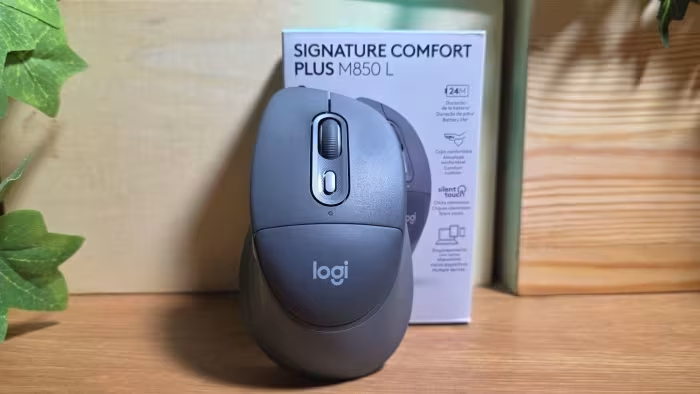
Logitech Signature Comfort Plus M850 L
A productivity-focused wireless mouse featuring a palm cushion, silent switches, and multi-device connectivity for office environments.
How This Score Is Calculated
- Sources analysed: 5 reviews
- Sentiment-only: 5 sources (weighted 1.0×)
- Split: 3 Positive · 0 Mixed · 2 Negative
- Raw weighted average: 6.3
- Formula: Σ(score × weight) ÷ Σ(weight)
- Final score: 6.3/10 (clamped, rounded to 1 decimal)
Algorithmically calculated from source data. No manual adjustments.
- Most reviewed featurePalm Cushion (5/5)
- Most praisedSilent Clicking
- Most criticisedPalm Cushion Efficacy
- Reviewer consensus levelModerate
- Value for moneyFair Value (5.7/10)
The Logitech Signature Comfort Plus M850 L offers a polarizing experience, defined by its unique integrated palm cushion and silent clicking mechanism. While praised for multi-device connectivity and ergonomic comfort, reviewers are divided on whether the palm cushion provides genuine support or is simply a design gimmick. It functions as a reliable, if uninspired, office tool that struggles to justify its premium pricing compared to more capable alternatives.
🔧 Key Specifications
Specifications sourced from reviewer mentions. Verify with manufacturer for complete details.
- Connectivity: Multi-point (up to 3 devices)
- Buttons: Silent primary clicks; auxiliary buttons
- Battery: AAA (non-rechargeable)
- Battery Life: Up to two years
- Design: Right-handed only
- Extras: SmartWheel, Actions Ring software
- Dongle: Logi Bolt (sold separately in some regions)
💲 Price Range
₹4,000 – ₹7,762
Prices sourced from reviews. Check current retailer pricing.
📊 What Reviewers Say — Feature by Feature
5 features evaluated across 5 sources.
👍 Key Strengths
- Silent click mechanism
- Multi-device connectivity
- Ergonomic rubberized grip
- Two-year battery life
- Customizable Actions Ring
👎 Key Weaknesses
- Ineffective palm cushion
- Non-rechargeable AAA batteries
- Basic sensor performance
- Right-handed only design
- No Logi Bolt receiver included
💰 Value for Money Analysis
Reviewers are divided; some see it as a productivity tool, while others argue it fails to justify its price compared to legacy models or more advanced alternatives. The lack of an included receiver and basic sensor performance are frequent points of contention regarding its cost.
5 of 5 sources commented on price or value.
⚡ Where Reviewers Disagreed
The following areas saw meaningful disagreement across sources.
- Palm Cushion: 2 sources praised it for reducing fatigue, while 3 sources criticized it for being ineffective or providing minimal support. This suggests the benefit depends heavily on individual hand size.
🎯 Who This Product Is For
Reviewer recommendations for different target audiences and use cases.
🛠️ Best Use Cases
- Office WorkGreat for multi-device workflows and quiet office spaces due to silent switches.Great
- Mobile ProductivityLess ideal due to bulky design and lack of included receiver.OK
🔀 Alternatives Mentioned by Reviewers
The M850 L is frequently compared against a wide range of Logitech and third-party office mice.
- Logitech MX Master 4 — The gold standard for professional users, offering superior MagSpeed scrolling and horizontal scroll wheels, though at a higher price point. Choose this if you need advanced features and premium build quality.
- Logitech M720 Triathlon — A long-standing, well-regarded multi-device mouse that offers similar functionality to the M850 L often at a more competitive price. Choose this if you prefer a proven, reliable workhorse.
- Logitech Lift — A vertical ergonomic mouse that provides better wrist alignment than the M850 L. Choose this if you suffer from wrist pain and prefer a vertical form factor.
- HP/Dell/Microsoft Office Mice — Various entry-level and mid-range mice from these brands are noted as direct competitors. Choose these if you are looking for a lower-cost, no-frills alternative for basic office tasks.
Alternatives sourced exclusively from reviewer mentions.
🛒 Buyer's Guide
✅ Buy This If…
- You prioritize silent clicking for a quiet office environment.
- You frequently switch between three different devices.
- You appreciate a rubberized grip and soft-touch materials.
❌ Skip This If…
- You are a power user requiring a high-precision sensor.
- You prefer a rechargeable mouse over one using AAAs.
- You are left-handed, as the design is ergonomic for right-handers only.
⚠️ Things to Check Before Buying
- Confirm if the Logi Bolt receiver is included in your specific regional retail package.
- Ensure the palm cushion size fits your hand, as it is non-adjustable.
The Logitech Signature Comfort Plus M850 L is a functional office peripheral that struggles to find its identity. While it succeeds in providing silent operation and multi-device convenience, its signature palm cushion is polarizing and the hardware sensor falls short of expectations for the price. It is a decent, comfortable choice for standard office tasks, but power users should look toward the MX series, while budget-conscious buyers may find better value in the M720 or lower-cost alternatives.
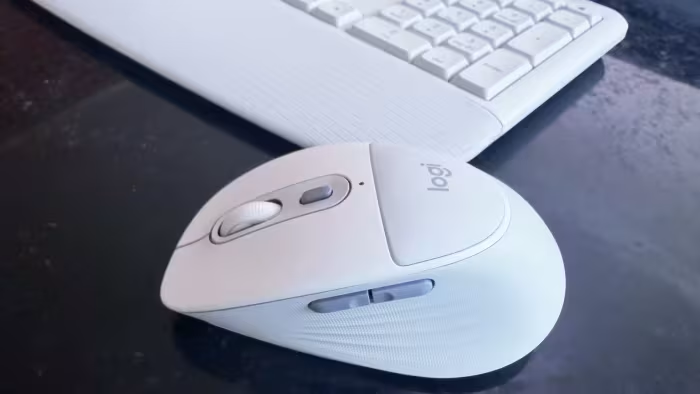
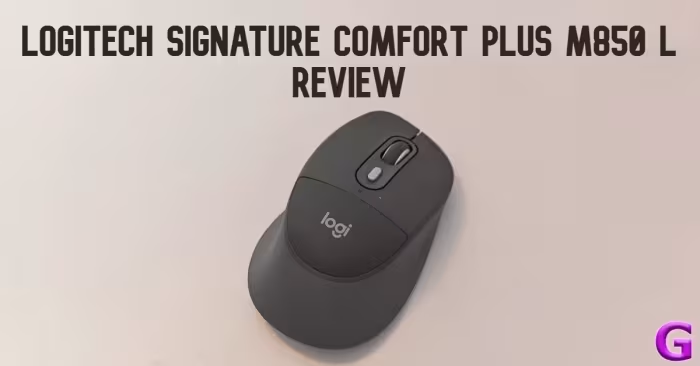
Reviewer Perspectives & Source Breakdown
Logitech Signature Comfort Plus M850 L review: Designed for comfortable ...
Price: Rs 7,762
The Logitech Signature Comfort Plus M850 L is a high-comfort, productivity-focused mouse that excels with its ergonomic design, multi-device connectivity, and quiet operation. While it offers significant benefits for heavy desk users, its premium price point and right-handed design may not suit everyone.
Pros
- Integrated palm cushion provides excellent support
- Sculpted right-handed design is comfortable for long sessions
- Silent clicking and scrolling for quiet environments
- Easy-Switch feature connects up to three devices
- Highly customizable via Logi Options+ software
Cons
- Expensive compared to standard office mice
- Requires disposable batteries instead of USB-C charging
- Right-handed design is not suitable for left-handed users
- Flatter mouse users may need time to adjust
Logitech Signature Comfort Plus M850 L mouse review: Comfortable and sea...
Price: Rs 7,762
The Logitech Signature Comfort Plus M850 L is an ergonomic, comfortable mouse ideal for professionals who spend long hours at their desks. While it justifies its price through comfort and customisation, the lack of a USB receiver and reliance on AA batteries might deter some users.
Pros
- Comfortable in-built palm cushion
- Silent, barely noticeable clicks
- Supports connection for up to three devices
- Good battery life lasting up to 2 years
Cons
- Consumer version connects via Bluetooth only
- Runs on replaceable AA batteries only
- Palm cushion only covers top half of palm
Logitech Signature Comfort Plus M850 L Review: Cushioned to reduce fatig...
Price: Rs 7,762
The Logitech Signature Comfort Plus M850 L is an excellent, productivity-focused mouse that offers a comfortable palm cushion and silent clicking. It is a reliable choice for office users looking for multi-device connectivity without the high cost of flagship models.
Pros
- Integrated palm cushion reduces hand fatigue
- Completely muted primary click buttons
- Multi-point connectivity for up to three devices
- SmartWheel allows for fast, efficient scrolling
Cons
- No dedicated wing for thumb rest
- Does not include a USB-C Logi Bolt receiver
- Lacks a horizontal scroll wheel
Logitech Signature Comfort Plus M850 L Review: Creature Comforts for Tho...
Price: Rs. 7,762
The Signature Comfort Plus M850 L fails to justify its premium price due to its lackluster sensor performance and a palm cushion that offers little ergonomic benefit for most users. While it functions adequately for basic tasks, it lacks the hardware quality and comfort found in more affordable or better-equipped alternatives.
Pros
- Excellent grip with sculpted sides and rubberized texture
- Useful and customizable Actions Ring menu software
- Quiet Click feature minimizes audible noise
Cons
- Palm cushion is ineffective for most hand sizes
- Basic sensor performance with low polling rate
- Lack of on-board memory for button customizations
- Expensive given the inferior hardware quality
- No tilt-wheel functionality for easier side scrolling
Logitech Signature Comfort Plus M850 L review: Comfy mouse | Cult of Mac...
Price: Approximately 4,200 INR
A comfortable and ergonomic wireless mouse that features a unique palm cushion and silent switches. It is a great choice for productivity despite relying on a non-rechargeable battery.
Pros
- Very comfortable for daily use
- Connects easily to three devices
Cons
- Uses AAA battery rather than being rechargeable
Logitech Signature Comfort Plus M850 L review - Cushy mouse with cushion...
Price: Approximately ₹5,800
The Logitech Signature Comfort Plus M850 L is a functional, comfortable office mouse with impressive battery life and silent clicks. While it offers good ergonomics, the palm cushioning provides minimal support and it carries a premium price.
Pros
- Relatively silent clicks and scrolling
- Sculpted rubber sides provide good comfort
- Multi-device pairing and seamless switching
- Highly useful customizable Actions Ring
Cons
- Palm cushioning offers marginal benefits
- Logi Bolt dongle sold separately
- Bulky design for mobile setups
Logitech Signature Comfort Plus M850 L wireless mouse review - Root-Nati...
Price: Approximately ₹4,000
A comfortable, ergonomic wireless mouse ideal for multi-device workflows. It offers silent operation and impressive battery life, making it a reliable tool for office productivity.
Pros
- Ergonomic shape suitable for extended use
- Supports connectivity for up to three devices
- Very quiet main button operation
- Excellent battery life of up to two years
Cons
- Heavier than many modern office mice
- Design is strictly for right-handed users
- Auxiliary buttons are noticeably louder than main clicks