Logitech MX Master 4 Review

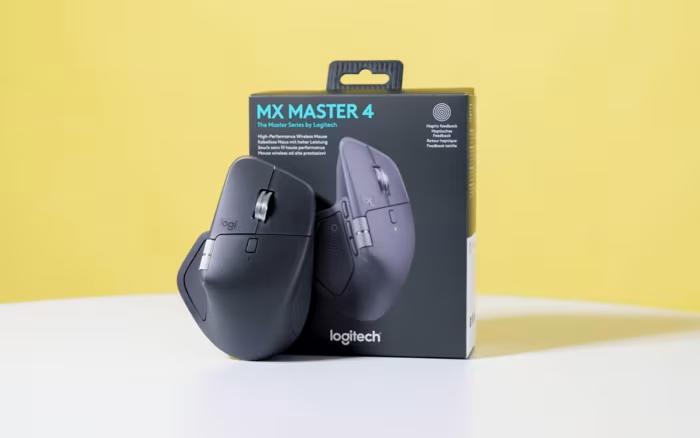
Logitech MX Master 4
The latest flagship wireless productivity mouse from Logitech, featuring refined ergonomics, haptic feedback, and improved build materials.
How This Score Is Calculated
- Sources analysed: 18 reviews
- Raw weighted average: 8.6
- Formula: Σ(score × weight) ÷ Σ(weight)
- Consensus bonus +0.3: 85% of sources provided positive sentiment
- Most reviewed featureHaptic Feedback (14/18)
- Most praisedErgonomics
- Most criticisedWeight
- Reviewer consensus levelHigh
- Value for moneyGood Value (7.2/10)
The Logitech MX Master 4 refines the industry-standard productivity mouse with more durable materials and innovative haptic feedback. While it maintains the comfortable, ergonomic shape of its predecessors, the introduction of the Actions Ring and haptic-enabled buttons provides new layers of customization for power users. It is widely considered the gold standard for office work, though its increased weight and premium price point may not appeal to every user.
🔧 Key Specifications
- Sensor: High-precision Darkfield (works on glass)
- Connectivity: Bluetooth, USB-C receiver (Logi Bolt)
- Battery: Up to 70 days (reported variability)
- Charging: USB-C fast charging
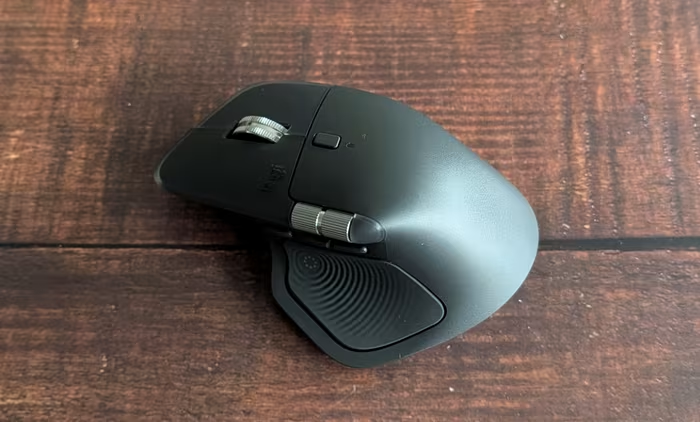
- Build: Durable matte plastic (non-rubberized)
- Buttons: 6+ programmable buttons, Actions Ring, dual scroll wheels
💲 Price Range
Approximately $120 / 8,400 - 10,000 INR
📊 What Reviewers Say — Feature by Feature
All key features evaluated across 18 sources.
👍 Key Strengths
- Excellent ergonomic comfort for long hours
- Highly durable, wear-resistant build materials
- Versatile dual scroll wheels
- Precision Darkfield sensor works on glass
- Extensive button customisation via Options+
👎 Key Weaknesses
- Heavy weight impacts agility
- Haptic feedback currently lacks broad app support
- Expensive price point
- Not suitable for competitive gaming
- No dedicated storage for USB receiver
💰 Value for Money Analysis
While the $120 price tag is noted as a significant investment, most reviewers conclude that the durability improvements and workflow enhancements justify the cost for professional users.
⚡ Where Reviewers Disagreed
- Actions Ring: While some reviewers found it a useful addition to their workflow, others dismissed it as a feature that may not benefit the average user.
🎯 Who This Product Is For
🛠️ Best Use Cases
- Productivity Workflow Excellent for managing complex software shortcuts and multi-app navigation. Great
- Creative Design Dual scroll wheels and precision sensor are ideal for timeline scrubbing and fine-tuned control. Great
- Gaming Too heavy for competitive titles, though acceptable for casual gaming. Poor
🔀 Alternatives Mentioned by Reviewers
- Keychron M6 — A more budget-friendly and gaming-capable alternative. Reviewers note it is lighter and better suited for gaming than the MX Master 4, though it lacks the premium build quality and extensive software integration of the Logitech flagship.
- Logitech MX Master 3S — The direct predecessor. Many reviewers compare the two, noting that the MX Master 4 is a refined, more durable iteration, but owners of the 3S may not find the haptic upgrades significant enough to warrant an immediate upgrade.
✅ Buy This If…
- You are a professional who spends 8+ hours a day at a desk.
- You prioritize build durability and long-term comfort.
- You rely on complex shortcuts and custom app-specific controls.
❌ Skip This If…
- You are looking for a mouse primarily for competitive gaming.
- You prefer lightweight mice for rapid cursor movement.
- You are on a strict budget.
The Logitech MX Master 4 is an outstanding productivity tool that successfully iterates on its predecessor by fixing durability concerns and adding meaningful customization. While the haptic features feel like a work in progress, the core experience remains the best in its class for office users. If you need a premium, ergonomic mouse that can handle anything a professional workflow throws at it, this is the one to buy.
Reviewer Perspectives & Source Breakdown
Logitech MX Master 4 review: Productivity master - Can Buy or Not - canb...
The Logitech MX Master 4 is an excellent update to its predecessor, offering improved ergonomics and useful new haptic features. While it is not designed for gaming, it remains one of the best productivity mice available.
Pros
- Excellent grip and feel
- Useful haptic feature implementation
- Smooth gliding performance
Cons
- Potential cursor jumping with Logi Bolt on Mac
- Battery life falls short of the 70-day rating
- Not compatible with Logitech Power Play charging mat
Logitech MX Master 4 review - Premium mouse with haptic feedback - Noteb...
Price: approx. 8,400 INR
The Logitech MX Master 4 is an excellent, ergonomic productivity mouse offering innovative haptic feedback and high precision. While it has minor software limitations and is on the heavier side, it remains a top-tier choice for professional power users.
Pros
- Excellent ergonomics
- Innovative haptic feedback
- Long battery life
- High precision
Cons
- Haptic feedback limited to specific programs
- Quite heavy
- Lacks charging cable
- Unfinished software
Logitech MX Master 4 Review - RTINGS.com - rtings.com...
The Logitech MX Master 4 is an outstanding, premium-built productivity mouse featuring dual scroll wheels and new customizable gesture and haptic buttons. While it offers excellent ergonomic comfort for work, it is unsuitable for competitive gaming due to its heavy weight and restricted polling rate.
Pros
- Superb build quality
- Dedicated productivity features and dual scroll wheels
- Versatile wireless connectivity via Bluetooth or USB-C receiver
- Very quiet left and right click buttons
Cons
- Not well-suited for users with smaller hands
- Advanced features require background software
- No onboard memory for custom settings
- Heavy weight is unsuitable for FPS gaming
Logitech MX Master 4 review: The best professional mouse - Root-Nation.c...
Price: Approximately 10,000 INR
The Logitech MX Master 4 is a refined flagship productivity mouse that improves upon its predecessor with more durable materials, a better button layout, and enhanced ergonomic design. It remains the gold standard for professionals needing precision and customizability, despite the premium price tag.
Pros
- High-precision Darkfield sensor works on glass surfaces
- Improved durable matte plastic housing resists wear
- Enhanced thumb-button ergonomics and haptic feedback
- Excellent battery life with fast charging support
- Highly customizable buttons via Logi Options+ software
Cons
- Premium price point may deter casual users
- No charging cable included in the box
- Large size may not suit all hand types
Logitech MX Master 4 wireless mouse review: Productivity refined | Techn...
The Logitech MX Master 4 is a premium productivity mouse designed for professionals who spend long hours at their desks.
Pros
- Premium productivity mouse
- Designed for professionals
- Refined productivity experience
Cons
the logitech mx master 4 improved my workflow with just one button ProsC...
The Logitech MX Master 4 features an all-new haptic engine for a unique and customizable clicking experience. It's quieter then ever before, but without sacrificing the satisfying feel you've come to know and love. Plus, there's an all-new customizable action button, updated material, and more.
Pros
- New customizable action button
- Better material that doesn't stain as easy
- 70-day battery life
- Haptic engine is a nice touch
Cons
- $20 more than the previous generation at launch
logitech mx master 4 review the master levels up ProsCons...
Logitech's MX Master series has long been hailed as one of the best productivity tools available if your work involves a computer. The MX Master 4 continues that legacy with changes to things that could've been better in the last version (like the new coating that won't disintegrate), and extra things, like more programable buttons. A boon for anyone who likes using shortcuts (the good kind).
logitech mx master 4 review the biggest update to the best mouse ProsCon...
The MX Master 4 proves that the best mouse for productivity and creativity can indeed get even better. The haptic feedback adds a cool new touch to the experience, while refinements to the build quality and materials make an already-premium product feel even more polished. The Actions Ring might not revolutionize everyone's workflow, but for those who embrace it, it could prove useful. My only real complaint is the price — at around $120, it's a significant investment for a mouse, though one that's likely worth it for professionals and creative users who use their mouse for hours every day.
logitech mx master 4 test premium mouse for productive people ProsCons...
The Logitech MX Master 4 proves to be an excellent mouse for productive users. The shape and size are virtually unchanged compared to its predecessors. Like its predecessors, the MX Master 4 is very comfortable to hold. The six additional buttons, including a haptic sensory control panel, the additional thumbwheel and the new Actions Ring have a positive effect on productive work. The haptic feedback seems interesting, but the added value is not yet clear to us. The design of the mouse is still very discreet. The plastic housing of the MX Master 4 feels very pleasant and appears more durable than the rubberized housing of the MX Master 3. In addition, the mouse offers a fast and precise darkfield sensor, good connectivity, a long battery life and short charging times.
Pros
- ergonomic shape
- additional buttons, additional thumbwheel and new actions ring
- new haptic sensory control panel
- very good material and workmanship quality
Cons
- haptic feedback is only supported by very few applications
Page 1 of 2