HyperX EVE 1800 Review
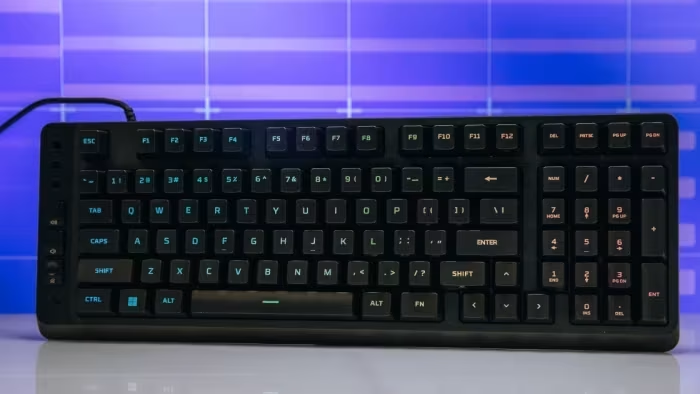
HyperX Eve 1800
A budget-friendly, space-saving membrane gaming keyboard featuring a 96% layout and dedicated media controls.
How This Score Is Calculated
- Sources analysed: 5 reviews
- Explicit scores: 0 sources
- Sentiment-only: 5 sources (weighted 1.0×)
- Split: 1 Positive · 3 Mixed · 1 Negative
- Raw weighted average: 5.6
- Formula: Σ(score × weight) ÷ Σ(weight)
- Review period: 2026
- Value sources: 5 of 5 mentioned price or value
- Final score: 5.6/10 (clamped, rounded to 1 decimal)
Algorithmically calculated from source data. No manual adjustments.
- Most reviewed featureLayout (5/5)
- Most praisedCompact 1800 Size
- Most criticisedMushy Membrane Switches
- Reviewer consensus levelModerate
- Value for moneyGood Value (7.0/10)
The HyperX Eve 1800 is a compact, quiet membrane keyboard that earns praise for its space-saving 96% layout and affordable price point. However, reviewers consistently point to 'mushy' membrane switches and an unconventional layout that hinders typing accuracy as significant drawbacks. It is best suited for casual users and office environments where noise is a concern, but it struggles to compete with similarly priced entry-level mechanical keyboards.
🔧 Key Specifications
Specifications sourced from reviewer mentions. Verify with manufacturer for complete details.
- Layout: 96% (1800)
- Switch Type: Membrane
- Lighting: 10-zone RGB
- Anti-ghosting: 12-key rollover
- Connectivity: Wired (non-swappable cable)
- Controls: Dedicated volume controls, Game Mode
- Dimensions: Compact space-saving profile
💲 Price Range
Approximately ₹4,200
Prices sourced from reviews. Check current retailer pricing.
📊 What Reviewers Say — Feature by Feature
7 features evaluated across 5 sources.
👍 Key Strengths
- Compact space-saving 1800 layout
- Quiet membrane switches for shared spaces
- Competitive budget-friendly pricing
- Dedicated volume and media controls
- Useful Game Mode functionality
👎 Key Weaknesses
- Mushy membrane switch feel
- Buggy and unreliable companion software
- Limited 10-zone RGB lighting
- Steep learning curve for layout
- Noticeable chassis flex
💰 Value for Money Analysis
At approximately ₹4,200, the keyboard is considered a fair entry-level option, though reviewers note that mechanical alternatives often provide better long-term value.
5 of 5 sources commented on price or value.
⚡ Where Reviewers Disagreed
The following areas saw meaningful disagreement across sources.
- Performance: 1 source praised its 'reliable responsiveness' in gaming, while 4 sources criticised its lack of precision compared to mechanical keyboards. The disagreement stems from different user expectations; one source views it as adequate for basic gaming, while others judge it against high-performance mechanical standards.
🎯 Who This Product Is For
Reviewer recommendations for different target audiences and use cases.
🛠️ Best Use Cases
- Office ProductivityThe inclusion of a number pad in a compact footprint is excellent for data entry without requiring a full-size board.Great
- Shared WorkspacesThe quiet nature of the membrane switches ensures you won't disturb colleagues.Great
- Competitive GamingThe mushy feel and lack of per-key lighting make it a poor choice for high-intensity competitive play.Poor
🔀 Alternatives Mentioned by Reviewers
Maximise this list. Include EVERY single competitor, rival, or alternative product mentioned in any of the source reviews. Do not omit any. More alternatives and longer lists are better.
- Keychron C3 Pro — The most frequently cited alternative. Reviewers strongly suggest choosing the C3 Pro instead because it offers a superior mechanical typing experience, better build quality, and more robust features for a similar price point.
Alternatives sourced exclusively from reviewer mentions.
🛒 Buyer's Guide
✅ Buy This If…
- You need a quiet keyboard for a shared office or home space.
- You are on a strict budget and need a compact 1800 layout.
- You prioritise desk space efficiency over mechanical switch feel.
❌ Skip This If…
- You are a serious gamer requiring mechanical precision.
- You want customisable, per-key RGB lighting.
- You have a low tolerance for keyboard flex or mushy switch feedback.
⚠️ Things to Check Before Buying
- Be prepared for a significant learning curve due to the unconventional layout and key spacing.
- Check if the current software updates have resolved the profile-saving issues.
The HyperX Eve 1800 is a functional, quiet, and compact keyboard that serves casual users well, but it is ultimately outclassed in the current market. While the space-saving layout is a highlight, the mushy membrane switches and buggy software make it a hard recommendation. Most users would be better served by an entry-level mechanical keyboard like the Keychron C3 Pro, which offers a significantly more refined experience for a similar price.
Top Alternative: Keychron C3 Pro — Offers a superior mechanical typing experience and better build quality for a similar price.
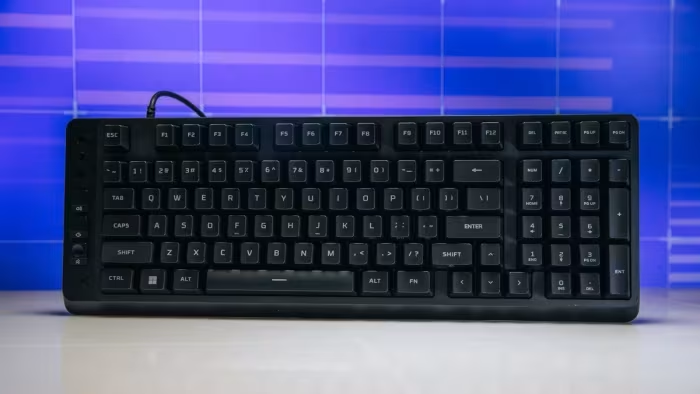
Reviewer Perspectives & Source Breakdown
HyperX Eve 1800 Review: This Blingy Budget Board Gets Outgunned in Games...
Price: ₹4,300
The HyperX Eve 1800 is a comfortable and quiet budget keyboard, but it struggles to compete with increasingly affordable mechanical alternatives. It is a reasonable choice for those specifically seeking a membrane typing experience on a budget.
Pros
- Compact 96% layout retains a number pad
- Quiet membrane switches
- Dedicated volume controls
- Useful Game Mode included
- 12-key rollover with anti-ghosting
- Competitive price
Cons
- Left-side control column requires adjustment period
- Buttons feel mushy
- Membrane switches lack mechanical precision
- Zonal RGB is less flexible than per-key
- Software is still maturing
- Mechanical rivals offer better overall value
HyperX Eve 1800 Review: This Blingy Budget Board Gets Outgunned in Games...
Price: Approximately ₹4,200
The HyperX Eve 1800 is a comfortable, quiet, and well-equipped membrane keyboard for budget-conscious users, but it struggles to compete with the superior performance and value of modern entry-level mechanical keyboards.
Pros
- Compact 96% layout includes a number pad
- Quiet membrane switches suitable for shared spaces
- Useful dedicated volume controls
- Includes dedicated Game Mode
- Competitive budget-friendly pricing
Cons
- Left-side control column requires an adjustment period
- Buttons feel mushy compared to mechanical alternatives
- Membrane switches lack precise tactile feedback
- Zonal RGB lighting is less flexible than per-key
- Software is currently in a maturing state
HyperX Eve 1800 Review: This Blingy Budget Board Gets Outgunned in Games...
Price: ₹4,200
The HyperX Eve 1800 is a comfortable and quiet budget membrane keyboard, but it struggles to compete against increasingly affordable mechanical options. It is suitable for casual users but lacks the precision required for serious gaming.
Pros
- Compact 96% layout with number pad
- Quiet membrane switches
- Dedicated volume controls
- Useful Game Mode feature
- Competitive pricing
Cons
- Left-side control column requires adjustment period
- Mushy button feel
- Membrane switches lack mechanical precision
- Zonal RGB lighting is limited
- Software is still maturing
HyperX Eve 1800 Review: This Blingy Budget Board Gets Outgunned in Games...
Price: ₹4,200
The HyperX Eve 1800 is a comfortable, quiet, and well-equipped budget keyboard with a 96% layout. However, its mushy membrane switches and unconventional layout make it difficult to recommend over superior, similarly priced mechanical alternatives.
Pros
- Compact 96% layout with numeric keypad
- Quiet membrane switches suitable for shared spaces
- Dedicated volume controls
- Competitive budget-friendly price
- Includes useful Game Mode and anti-ghosting
Cons
- Membrane switches feel mushy and lack precision
- Non-standard layout causes frequent typing errors
- Plastic chassis exhibits noticeable flex
- Zonal RGB lighting is limited
- Software is still in development
HyperX Eve 1800 Review: Compact Gaming Keyboard - hp.com...
The HyperX Eve 1800 is a practical, budget-friendly gaming keyboard that offers a space-saving 1800 layout without sacrificing a number pad or media controls. It is an ideal choice for casual gamers and office users who prioritize quiet performance and desk efficiency over high-end mechanical switches.
Pros
- Compact 1800 layout saves valuable desk space
- Quiet membrane switches suitable for shared environments
- Includes essential number pad and media controls
- Effective 10-zone customizable RGB lighting
- Reliable anti-ghosting with 12-key rollover
Cons
- Lacks the tactile feedback of mechanical switches
- Shorter lifespan compared to mechanical alternatives
- Requires adjustment period for tight key spacing
- No per-key RGB customization available
HyperX EVE 1800 Gaming Keyboard Review - CGMagazine - cgmagonline.com...
Price: Approximately 4,200 INR
The HyperX Eve 1800 is an underwhelming entry-level keyboard hindered by an awkward, disorienting layout and buggy, unreliable companion software. While it functions adequately for basic typing and gaming, its significant design flaws and lack of effective customization make it difficult to recommend.
Pros
- Competitively low price point
- Reliable responsiveness in gaming and typing
- Compact 1800 layout saves desk space
Cons
- Disorienting media bar placement shifts key positions
- Buggy software prevents saving custom RGB profiles
- Non-swappable wired cable
- No included wrist rest
- Limited 10-zone RGB lighting rather than per-key