Huawei MatePad 11.5 2025 Review

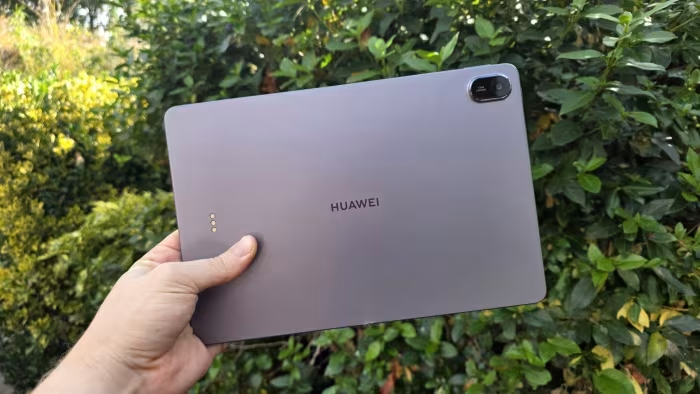
Huawei MatePad 11.5 (2025)
A productivity-focused mid-range tablet featuring a signature PaperMatte anti-glare display and bundled accessory support.
How This Score Is Calculated
- Sources analysed: 6 reviews
- Sentiment-only: 6 sources (weighted 1.0×)
- Split: 3 Positive · 2 Mixed · 1 Negative
- Raw weighted average: 6.8
- Formula: Σ(score × weight) ÷ Σ(weight)
- Final score: 6.8/10 (rounded)
Algorithmically calculated from source data.
- Most reviewed featurePaperMatte Display (6/6)
- Most praisedAnti-glare display
- Most criticisedNo Google Services
- Reviewer consensus levelModerate
The Huawei MatePad 11.5 (2025) is a highly portable, productivity-oriented tablet defined by its standout PaperMatte anti-glare display, which excels for digital art and reading. While it offers solid battery life and a premium-feeling design, the lack of native Google Play Services remains a significant hurdle for many users. It is best suited for those who prioritize a comfortable drawing experience and media consumption over app-ecosystem flexibility.
🔧 Key Specifications
- Display: 11.5-inch PaperMatte anti-glare
- Battery: All-day battery life
- Charging: 40W wired
- Connectivity: Wi-Fi 6
- Accessories: Supports M-Pencil and Smart Keyboard
💲 Price Range
₹27,500 – ₹37,500
Prices sourced from reviews; regional and retailer variations apply.
📊 What Reviewers Say — Feature by Feature
5 features evaluated across 6 sources.
👍 Key Strengths
- Excellent anti-glare PaperMatte display
- Strong all-day battery life
- Lightweight, portable design
- Great for digital art
👎 Key Weaknesses
- No native Google Play Services
- Middling performance for gaming
- Limited Widevine L1 support
- No IP certification
💰 Value for Money Analysis
Reviewers generally consider it a good value proposition, particularly when the M-Pencil and keyboard are bundled. It is positioned as an affordable, productivity-focused alternative to more expensive flagship tablets.
6 of 6 sources commented on price or value.
⚡ Where Reviewers Disagreed
The following areas saw meaningful disagreement across sources.
- Bundled Accessories: 2 sources explicitly state accessories are included in the box for value, while 1 source notes they are sold separately, likely reflecting different regional market bundles.
🎯 Who This Product Is For
Reviewer recommendations for different target audiences and use cases.
🛠️ Best Use Cases
- Digital ArtThe PaperMatte display offers a tactile, paper-like feel that is excellent for sketching and drawing.Great
- Media ConsumptionGood speakers and a comfortable screen make it solid for movies, though limited Widevine support can hinder high-res streaming.Good
- Light ProductivityWith the keyboard, it serves well for typing and basic document editing, provided you don't rely heavily on Google Workspace.Good
🔀 Alternatives Mentioned by Reviewers
The following alternatives were highlighted as superior in specific performance or ecosystem categories.
- Xiaomi Pad 7 — Cited as a direct competitor offering superior Wi-Fi 6E connectivity, higher performance, and better overall value for power users.
- OnePlus Pad 3 — Mentioned as a larger-screen alternative, though the MatePad is noted to be more compact and portable by comparison.
- Apple iPad — Frequently compared as the benchmark for app ecosystem and performance, with reviewers noting the MatePad is cheaper but significantly more limited in software.
Alternatives sourced exclusively from reviewer mentions.
🛒 Buyer's Guide
✅ Buy This If…
- You are a digital artist who values a paper-like drawing surface.
- You need an affordable, portable tablet for reading and light typing.
- You can live without native Google Play Services.
❌ Skip This If…
- You rely heavily on Google apps for work or school.
- You are looking for a high-performance gaming tablet.
- You require official Widevine L1 certification for all streaming services.
⚠️ Things to Check Before Buying
- Confirm if the keyboard and M-Pencil are included in your regional retail bundle, as this varies.
- Verify that your essential work/school apps are available on Huawei AppGallery.
The Huawei MatePad 11.5 (2025) is a specialized tool that succeeds brilliantly in its niche as a drawing and reading tablet. Its PaperMatte display is its greatest asset, providing a premium experience at a mid-range price. However, the software ecosystem limitations and lack of Google services mean it is not for everyone. If you prioritize hardware comfort over app-store convenience, it is a great choice; otherwise, consider a competitor like the Xiaomi Pad 7.
Reviewer Perspectives & Source Breakdown
HUAWEI MatePad 11.5 PaperMatte Edition (2025) Hands-On Review » YugaTech...
Price: Approx. ₹31,800
The HUAWEI MatePad 11.5 PaperMatte Edition (2025) is an excellent value productivity tool that comes bundled with essential accessories. It offers a great laptop-like experience, eye-friendly display, and long battery life for students and creatives.
Pros
- Complete productivity setup included in the box
- PaperMatte display is excellent for drawing and reading
- Reliable daily performance
- All-day battery life
Cons
- YouTube app optimization could be better
- Streaming apps often limited to Widevine L3 playback
Huawei MatePad 11.5 (2025) Review: The same old story - trustedreviews.c...
Price: ₹37,500
The Huawei MatePad 11.5 features excellent hardware, a sleek design, and a standout matte display that makes it a strong mid-range contender. However, the lack of Google Play Services significantly hinders its usability for those reliant on Google apps for work or school.
Pros
- Silky matte-finish display
- Solid battery life
- Lightweight and thin
Cons
- No access to Google Play or related services
- Accessories sold separately
- AppGallery is packed full of random apps
Huawei MatePad 11.5 (2025) review: A great budget tablet for artists | E...
Price: Approximately ₹37,500
The Huawei MatePad 11.5 (2025) is a stylish and portable tablet ideal for digital art and media consumption. While its hardware is excellent for the price, the lack of native Google apps limits its utility as a productivity device.
Pros
- Great for digital art
- Strong battery life
- Light, robust design
Cons
- No Google apps
- Rivals are faster
- Not ideal for gaming
HUAWEI MatePad 11.5 PaperMatte Edition (2025) Hands-On Review » YugaTech...
Price: Approximately 32,000 INR
The HUAWEI MatePad 11.5 PaperMatte Edition (2025) is an excellent productivity-focused tablet that offers great value by including essential accessories. Its unique anti-glare display and robust battery life make it a smart choice for students and creatives on a budget.
Pros
- Includes M-Pencil and Smart Keyboard
- Anti-glare PaperMatte display is great for drawing
- Strong all-day battery life
- Reliable multitasking performance
Cons
- Limited Widevine L1 support for major streaming apps
- YouTube app optimization could be improved
One of the best Android tablets for audiophiles - Huawei MatePad 11.5 (2...
Price: Approximately ₹27,500 to ₹32,000
The MatePad 11.5 (2025) is a strong multimedia tablet featuring excellent build quality, speakers, and battery life. However, it lacks official Google support, competitive brightness, and IP certification.
Pros
- High-quality housing
- No performance throttling under load
- Very good speakers and stylus support
- Great battery life
- Good, matte display
Cons
- SoC performance could be faster
- Display brightness could be higher
- No IP rating
- Weak contrast
- No official update guarantees
- No native Google services
Huawei MatePad 11.5 (2025) review: Matte for work - Can Buy or Not - can...
The Huawei MatePad 11.5 is an affordable, productivity-focused tablet that shines due to its excellent PaperMatte display and useful keyboard accessories. While it requires extra effort to set up Google apps and offers only middling performance, it remains a solid and attractive mid-range choice for entertainment and light work.
Pros
- Excellent anti-glare PaperMatte display
- Slim, light, and portable design
- Great keyboard accessory included
- Good battery life
- Responsive for daily tasks and media
Cons
- Requires extra steps to install Google apps
- Middling performance for a mid-range tablet
- Slower 40W charging speed
- Keyboard lacks a touchpad