Geekom A6 Mini Review

Geekom A6 Mini
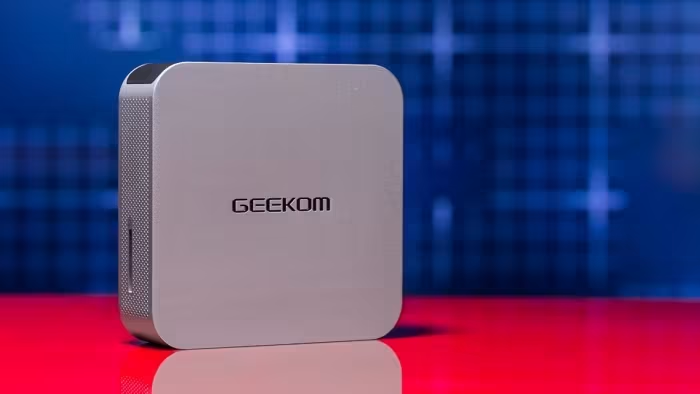
A compact, aluminum-bodied Windows mini PC powered by an AMD Ryzen 7 6800H processor for general productivity.
How This Score Is Calculated
- Sources analysed: 5 reviews
- Sentiment-only: 5 sources (weighted 1.0×)
- Split: 4 Positive · 1 Mixed · 0 Negative
- Raw weighted average: 7.8
- Formula: Σ(score × weight) ÷ Σ(weight)
- Review period: 2025
- Value sources: 5 of 5 mentioned price or value
- Final score: 7.8/10 (clamped, rounded to 1 decimal)
Algorithmically calculated from source data. No manual adjustments.
- Most reviewed featureDesign/Build (5/5)
- Most praisedCompact Form Factor
- Most criticisedFan Noise / No Front USB-C
- Reviewer consensus levelHigh
- Value for moneyGood Value (7.8/10)
The Geekom A6 Mini is a highly capable, premium-feeling workstation that excels in productivity tasks thanks to its AMD Ryzen 7 6800H processor. While it struggles with demanding graphical workloads and exhibits noticeable fan noise, its compact aluminum chassis and generous port selection make it a top-tier choice for budget-conscious office users. It is widely considered a reliable, bloatware-free alternative to larger desktop systems.
🔧 Key Specifications
Specifications sourced from reviewer mentions. Verify with manufacturer for complete details.
- Processor: AMD Ryzen 7 6800H
- RAM: 32GB Dual Channel DDR5 (4800 MT/s)
- Storage: 1TB PCIe 4.0 M.2 SSD
- GPU: Radeon 680M
- Battery: N/A
- OS: Windows 11 Pro
- Networking: 2.5GbE Ethernet, WiFi 6E, Bluetooth 5.3
- Build Materials: Aviation-grade aluminum alloy
- Dimensions: Compact/Small Form Factor
💲 Price Range
Approximately ₹41,500 – ₹54,000
Prices sourced from reviews. Check current retailer pricing.
📊 What Reviewers Say — Feature by Feature
5 features evaluated across 5 sources.
👍 Key Strengths
- Premium aluminum aviation-grade build
- Excellent price-to-performance ratio
- Compact and highly portable design
- Fast WiFi 6E and 2.5GbE
- Bloatware-free Windows experience
👎 Key Weaknesses
- No front-facing USB-C ports
- Loud fan noise under heavy load
- Weak integrated graphics performance
- Limited internal upgrade accessibility
- Single configuration limitation
💰 Value for Money Analysis
Reviewers consistently highlight the A6 as an excellent budget-friendly choice that provides significant performance for the price, often citing it as a better value than more expensive Intel-based alternatives for basic productivity. It is positioned as a mid-range contender that avoids the 'premium tax' of larger brands.
5 of 5 sources commented on price or value.
🎯 Who This Product Is For
Reviewer recommendations for different target audiences and use cases.
🛠️ Best Use Cases
- Office ProductivityIdeal for multitasking, web browsing, and document creation.Great
- Home Media CenterCompact size and multiple display support make it a solid choice for home media.Good
- Heavy GamingIntegrated graphics are insufficient for modern gaming titles.Poor
🔀 Alternatives Mentioned by Reviewers
Maximise this list. Include EVERY single competitor, rival, or alternative product mentioned in any of the source reviews.
- Geekom A7 / A8 — These models share the same chassis and build quality as the A6 but represent newer iterations in the Geekom lineup. Choose these if you require the latest hardware updates.
- Geekom A5 — The A6 serves as a logical successor to this older model. Only consider the A5 if you find it at a significantly lower clearance price.
- Apple Mac mini — A premium alternative that offers superior raw processing and graphical power compared to the A6. Recommended for users who prefer macOS and have a higher budget.
- Asus NUC 14 Pro — A more expensive competitor that remains competitive with the A6 in productivity tasks. Choose this if you prefer the Asus ecosystem and don't mind the higher price.
- ECS Liva Z7 Plus — An older or lower-tier mini PC that the Geekom A6 consistently outperforms in productivity benchmarks.
- Intel Core Ultra-based systems — High-performance alternatives that generally offer better graphics and raw power than the A6's Ryzen 6800H platform.
Alternatives sourced exclusively from reviewer mentions.
🛒 Buyer's Guide
✅ Buy This If…
- You need a compact, reliable workstation for office productivity.
- You value a premium aluminum design and bloatware-free Windows.
- You are a budget-conscious buyer looking for high performance-per-dollar.
❌ Skip This If…
- You are a gamer or professional video editor needing strong GPU power.
- You are sensitive to fan noise during heavy workloads.
- You require easy internal modularity or frequent hardware upgrades.
⚠️ Things to Check Before Buying
- Be aware that internal access is difficult due to delicate wiring.
- Note that there is no front-facing USB-C port for easy peripheral access.
- Verify if your workflow requires a 2.5" SSD, as you will need a specific M.2 to SATA adapter.
The Geekom A6 Mini is a fantastic, premium-feeling workstation that provides excellent productivity performance for its price point. While it is hampered by loud fans under stress and a lack of front-facing connectivity, its compact aluminum build and reliable performance make it a top choice for home or office users. If you need a small, efficient machine for daily tasks, this is a highly recommended buy.
Reviewer Perspectives & Source Breakdown
Geekom A6 Mini - Review 2025 - PCMag UK - uk.pcmag.com...
Price: ₹41,800
The Geekom A6 Mini is an excellent, compact, and budget-friendly Windows mini PC that delivers surprising productivity performance for its price point. While it struggles with heavy graphical tasks and fan noise, it remains a top choice for users seeking a small, capable workstation.
Pros
- Excellent price point
- Competitive productivity performance
- Abundance of ports
- Compact and sturdy aluminum design
Cons
- No front-facing USB-C ports
- Weak integrated graphics performance
- Loud fan noise under heavy workloads
- Limited to a single configuration
Geekom A6 Mini - Review 2025 - PCMag Middle East - me.pcmag.com...
Price: Approximately ₹54,000
The Geekom A6 Mini is a surprisingly fast and compact budget-friendly Windows mini PC. It delivers excellent value for productivity tasks despite its small footprint.
Pros
- Excellent price point
- Competitive productivity performance
- Numerous connection ports
- Compact and portable design
Cons
- No front-facing USB-C ports
- Weak integrated graphics performance
- Loud fan noise under heavy workloads
- Single configuration option
GEEKOM A6 Mini PC review: better memory, more storage, still affordable ...
Price: Approx. 41,500 INR
The GEEKOM A6 is a compact, premium-feeling Mini PC that offers solid performance for everyday tasks and creative work. While it lacks the advertised AI features and Kensington lock, its high-quality aluminum build and bloatware-free experience make it a reliable choice.
Pros
- Premium aviation-grade aluminum alloy build
- No pre-installed bloatware
- Excellent cooling system with minimal noise
- Supports multiple high-resolution displays
- Compact and lightweight design
Cons
- No front USB-C port
- Incorrect marketing regarding AI support and Kensington lock
- Difficult to access internals due to delicate wiring
- Lacks modular design for easy upgrades
GEEKOM A6 Review - Part 2: A sub-$500 mid-range AMD Ryzen 7 6800H mini P...
Price: Under 42,000 INR
The GEEKOM A6 is a capable mid-range mini PC featuring an AMD Ryzen 7 6800H processor. It delivers solid performance for general tasks while maintaining a compact form factor.
Pros
- Powerful AMD Ryzen 7 6800H processor
- Compact and space-saving design
- Supports 2.5GbE Ethernet networking
- Includes fast WiFi 6E and Bluetooth 5.3
Cons
- RAM limited to 4800 MT/s despite 5600 modules
- Performance restricted by 45W TDP
geekom a6 mini pc review amd ryzen 7 power in a small package ProsCons...
GEEKOM's A6 Mini PC under the hood has an AMD Ryzen 7 6800H CPU and the Radeon 680m GPU, which shows. Anyone looking for a very small but powerful Mini PC, look no further than GEEKOM's A6.
Pros
- AMD Ryzen 7 6800H CPU and Radeon 680M GPU
- 32GB Dual Channel DDR5 RAM
- 1TB PCIe 4.0 M.2 SSD
- USB4 connectivity and SD card slot
- Two USB Type-C ports with DisplayPort
Cons
- Must have M.2 to SATA adapter to use an internal 2.5" SSD/HDD