Evoto AI Review
Evoto AI
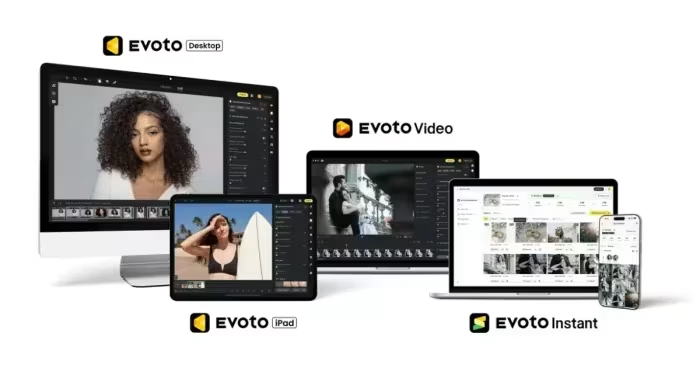
An AI-powered portrait retouching software designed to automate complex editing tasks for high-volume photography workflows.
How This Score Is Calculated
- Sources analysed: 5 reviews
- Explicit scores: 0 sources (weighted 1.5×)
- Sentiment-only: 5 sources (weighted 1.0×)
- Split: 4 Positive · 1 Mixed · 0 Negative
- Raw weighted average: 8.2
- Formula: Σ(score × weight) ÷ Σ(weight)
- Consensus bonus +0.3: 80% sources agreed
- Final score: 8.2/10 (clamped, rounded to 1 decimal)
Algorithmically calculated from source data. No manual adjustments.
- Most reviewed featureAI Retouching (5/5)
- Most praisedWorkflow Efficiency
- Most criticisedCredit-based Pricing
- Reviewer consensus levelHigh
Evoto AI is widely regarded as a 'speed demon' for portrait photographers, capable of reducing hours of manual retouching to mere seconds through intelligent automation. While its pro-grade AI features and intuitive interface make it a transformative tool for high-volume workflows, its credit-based payment model remains a point of friction for some users. It is best utilized as a specialized supplement to traditional editing suites like Adobe Photoshop or Lightroom rather than a complete replacement.
🔧 Key Specifications
Specifications sourced from reviewer mentions. Verify with manufacturer for complete details.
- Platform: Desktop (macOS M3 tested)
- Core Features: AI Retouching, Frequency Separation, Background Removal, RAW Processing, Batch Processing
- Workflow Integration: Lightroom Catalog support
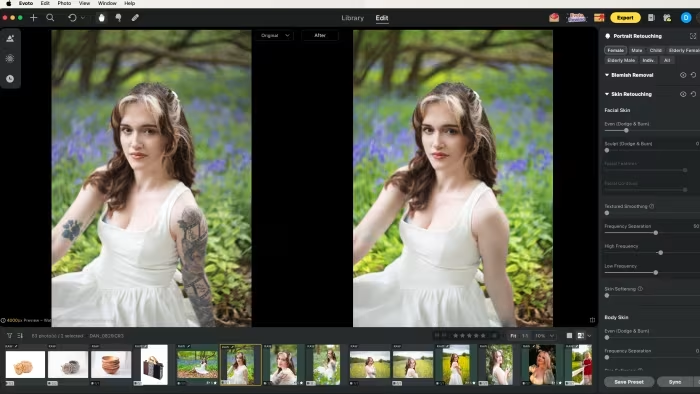
- Interface: Slider-based, similar to Adobe Camera Raw
💲 Price Range
Approx. 585 INR/month to 7,500 INR (plan dependent)
Prices sourced from reviews. Check current retailer pricing.
📊 What Reviewers Say — Feature by Feature
3 features evaluated across 5 sources.
👍 Key Strengths
- Exceptional time-saving automation for portraits
- Intuitive, user-friendly slider-based interface
- Professional-grade natural-looking results
- Seamless Lightroom catalog integration
👎 Key Weaknesses
- Credit-based pricing can lead to overspending
- Lacks advanced layer-based editing
- Not suitable for non-portrait photography
- Watermarks visible on preview images
💰 Value for Money Analysis
Reviewers generally agree that the software provides excellent value for high-volume professionals whose time savings justify the per-export cost. However, hobbyists may find the recurring credit costs difficult to manage compared to flat-fee subscriptions.
4 of 5 sources commented on price or value.
⚡ Where Reviewers Disagreed
The following areas saw meaningful disagreement across sources.
- Pricing Accessibility: 2 sources praise the scalable pay-per-credit model as fair, while 2 sources warn that it is expensive and easy to exceed budget for hobbyists.
🎯 Who This Product Is For
Reviewer recommendations for different target audiences and use cases.
🛠️ Best Use Cases
- High-Volume Portrait RetouchingAutomates frequency separation, skin smoothing, and glare removal perfectly for large batches.Great
- Fast CullingUtilizes AI to quickly cull large image sets before the editing phase.Great
- Complex Retouching for BeginnersSimplifies tasks that usually require advanced Photoshop knowledge into simple slider adjustments.Good
🔀 Alternatives Mentioned by Reviewers
Maximise this list. Include EVERY single competitor, rival, or alternative product mentioned in any of the source reviews. Do not omit any. More alternatives and longer lists are better.
- Adobe Photoshop — Frequently cited as necessary to pair with Evoto AI for layer-based editing and complex compositing, as Evoto lacks these fundamental capabilities.
- Adobe Lightroom Classic — Mentioned as the superior choice for long-term photo organization and management, whereas Evoto is preferred for the actual retouching speed.
Alternatives sourced exclusively from reviewer mentions.
🛒 Buyer's Guide
✅ Buy This If…
- You are a portrait photographer managing high volumes of images.
- You want to automate tedious retouching tasks like frequency separation.
- You prefer a simple, slider-based workflow over manual layer-based editing.
❌ Skip This If…
- You primarily shoot non-portrait genres like landscape or architecture.
- You require advanced layer support for complex compositing or graphic design.
- You prefer a flat-fee subscription model over a pay-per-credit system.
⚠️ Things to Check Before Buying
- Understand the credit system and your projected monthly export volume.
- Ensure you have a secondary editing suite (like Lightroom or Photoshop) for tasks Evoto cannot handle.
- Be aware of the watermark policy on preview files during your editing process.
📈 Sentiment Trends Over Time
Reviews indicate the software is maturing while maintaining its core speed advantage.
- Trust & Ethics — Following the removal of a controversial generative headshot pilot, the company has clarified its stance on not training AI on user data to restore professional trust.
Evoto AI is an exceptionally efficient, specialized tool that provides unmatched speed for portrait photographers. While the credit-based pricing and lack of layer support necessitate using it alongside standard editing software, its ability to automate time-consuming retouching tasks is a game changer for high-volume professionals. It is highly recommended for portrait specialists, provided they can manage the per-export cost.
Top Alternative: Adobe Lightroom Classic — Choose this if you need robust long-term library organization alongside your editing workflow.
Reviewer Perspectives & Source Breakdown
Evoto AI photo editor review: Makes editing images a breeze - nypost.com...
Price: Approx. 585 INR per month
Evoto is a highly intuitive, AI-powered photo editor that streamlines complex retouching and culling tasks. It is an excellent, time-saving solution for both high-volume professionals and hobbyists looking for professional-grade results without a steep learning curve.
Pros
- Extremely fast AI-powered image culling
- Professional retouching without needing to learn layers
- Excellent batch processing capabilities
- Intuitive all-in-one workflow hub
Cons
- Credit-based pricing can be expensive for hobbyists
Evoto AI review: A portrait retouching speed demon with a pay-as-you-go ...
Evoto AI significantly accelerates high-volume retouching workflows by automating complex edits like frequency separation and background removal into simple slider adjustments. While it offers impressive pro-grade features, the credit-based payment model and lack of layer support mean it is best used as a supplement to software like Photoshop.
Pros
- Wide range of photo editing and RAW processing features
- Genuinely speeds up workflow
- Brilliant pro-grade AI features
- Makes advanced edits more accessible
Cons
- Credit system makes it easy to go over budget
- Watermarks on previews
- Questions raised by headshotgate controversy
Evoto AI Review: How good is the AI-supported image editing software? - ...
Price: Approximately ₹4,500 to ₹7,500 (based on starting plans)
Evoto AI is an exceptionally powerful, user-friendly tool that drastically reduces portrait retouching time with precise AI-driven automation. It offers a professional-grade workflow that produces natural, high-quality results for photographers managing high-volume tasks.
Pros
- Intuitive and user-friendly interface
- Innovative and highly effective AI features
- Professional, natural-looking retouching results
- Scalable pay-per-credit pricing model
- Seamless integration into professional workflows
Cons
- Requires payment for every exported image
- Less suitable for non-portrait photography genres
evoto ai review a portrait retouching speed demon with a pay as you go m...
Evoto AI churns through hours of meticulous retouching into seconds. Frequency separation can be performed with a simple slider, while backgrounds, tattoos, and glare on glasses can be removed in a single click. It ran flawlessly on my M3 MacBook, though its credit-based payment system remains its biggest hurdle. And with no layers, you’ll likely need to factor in the cost of Adobe Photoshop (or similar) to cover all of your editing needs. Despite recent trust issues surrounding a now-removed generative headshot pilot, Evoto’s commitment to not training on user data remains firm. For high-volume professionals, Evoto AI is a game changer that will pay for itself via the efficiency it provides.
Pros
- +Wide range of photo editing and RAW processing features
- +Genuinely speeds up workflow
- +Brilliant pro-grade AI features
- +Makes advanced edits more accessible
Cons
- -Credit system makes it easy to go over budget
- -Watermarks on previews
- -Questions raised by ‘headshotgate’ controversy
evoto ai review how good is the ai supported image editing software Pros...
I really liked the functions of Evoto AI during the test. Especially those who work a lot with photos of people or portraits benefit significantly from the advanced retouching tools of the image editing software and save an incredible amount of time in post-processing.
Pros
- Intuitive operation
- Innovative AI features
- Convincing results
- Scalable price
- Unlimited free editing, only the first export must be paid for
Cons
- Every export must be paid for
- Not suitable for all genres