Dell 34 Plus USB-C Monitor Review
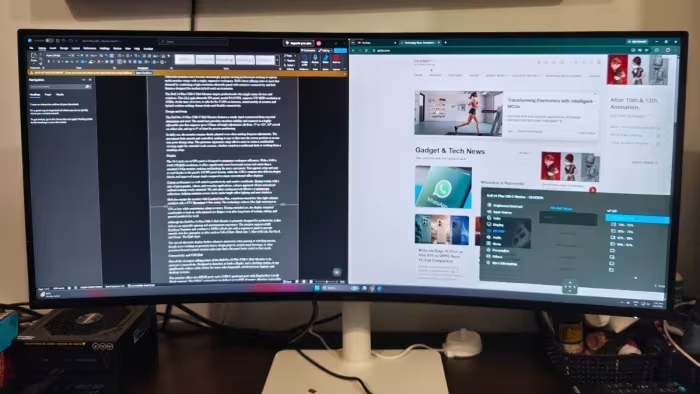
Dell 34 Plus USB-C Monitor
A productivity-focused ultrawide monitor designed to serve as a comprehensive, cable-reducing docking hub for office and hybrid professionals.
How This Score Is Calculated
- Sources analysed: 8 reviews
- Raw weighted average: 7.2
- Value sources: 5 of 8 mentioned price or value
- Final score: 7.2/10 (rounded to 1 decimal)
- Most reviewed featureConnectivity (8/8)
- Most praisedUSB-C Hub / Docking
- Most criticisedImage Quality / Contrast
- Reviewer consensus levelModerate
- Value for moneyGood Value (7.4/10)
The Dell 34 Plus USB-C Monitor is widely regarded as a highly functional, productivity-first display that excels at replacing complex multi-monitor setups with a single, cable-managed workspace. While it impresses with its robust connectivity and built-in KVM features, reviewers are divided regarding its image quality, noting mediocre contrast and a lack of premium features like HDR. It is best suited for office workers and hybrid professionals who prioritize desk organization and workflow efficiency over color-critical creative work.
🔧 Key Specifications
- Display: 34-inch Curved
- Refresh Rate: 100Hz (some sources mention 120Hz)
- Brightness: 350 nits
- Connectivity: USB-C (90W Power Delivery), Ethernet, HDMI, USB-A
- Features: Built-in KVM, PiP support, AMD FreeSync
💲 Price Range
Approx. ₹31,800 – ₹62,700
Prices fluctuate significantly across regional markets and retailer listings.
📊 What Reviewers Say — Feature by Feature
Multiple features evaluated across 8 sources.
👍 Key Strengths
- Excellent USB-C hub connectivity
- Effective KVM and multitasking support
- Clean, aesthetic curved design
- Strong value for office productivity
- Robust 90W power delivery
👎 Key Weaknesses
- Lackluster contrast and HDR performance
- Limited color gamut for creative work
- Stand adjustment limitations
- Not optimized for high-end gaming
💰 Value for Money Analysis
Reviewers generally view this monitor as a budget-friendly alternative to the premium UltraSharp line. While some consider it expensive for mainstream users, its utility as a docking hub often justifies the cost for productivity-focused buyers.
5 of 8 sources commented on price or value.
⚡ Where Reviewers Disagreed
The following areas saw meaningful disagreement across sources.
- Speaker Quality: 1 source praised them as surprisingly high-quality, while another source explicitly noted the lack of internal speakers. This suggests potential confusion regarding specific regional variants or model numbers within the P3425WE/S3425DW series.
🎯 Who This Product Is For
🛠️ Best Use Cases
- Productivity Multitasking The expansive ultrawide screen is ideal for managing multiple spreadsheets and documents simultaneously. Great
- Office Docking Excellent for connecting laptops via single USB-C cable for power and peripheral management. Great
- High-End Gaming Not recommended due to lack of specialized gaming features, despite the 100Hz/120Hz refresh rate. Poor
🔀 Alternatives Mentioned by Reviewers
- Dell UltraSharp Series — Reviewed as the premium alternative; offers superior contrast and resolution but at a higher price point. Choose this if you require professional-grade color accuracy.
- Samsung/Alienware Ultrawides — Cited as superior options specifically for casual and competitive gamers. Choose these if your primary use case is gaming rather than office productivity.
🛒 Buyer's Guide
✅ Buy This If…
- You need a clean, single-cable solution for your laptop workspace.
- You manage multiple devices and need built-in KVM functionality.
- You want to replace a dual-monitor setup with a single curved screen.
❌ Skip This If…
- You are a creative professional requiring high-end color accuracy or HDR.
- You are a gamer looking for a high-performance monitor.
- You have limited desk space, as the ultrawide footprint is significant.
The Dell 34 Plus USB-C Monitor is a standout tool for office productivity, offering excellent connectivity and a seamless docking experience. While it falls short for creative professionals or competitive gamers due to its mediocre contrast and lack of HDR, it remains a high-value choice for those focused on workflow efficiency. If your primary goal is to declutter your desk and streamline multitasking, this is an excellent, dependable investment.
PLG_CONTENT_IMAGEGALLERY_ERROR_NO_IMAGES
Reviewer Perspectives & Source Breakdown
Dell 34 Plus USB-C Monitor Review UK (2026) - Specs, Image Quality & Val...
Price: ₹36,800
The Dell S3425DW is a solid, well-rounded ultrawide monitor offering excellent contrast and productivity features for the price. While it falls short for competitive gaming due to VA panel motion limitations and lacks true HDR performance, it remains a strong choice for mixed work and casual gaming.
Pros
- Superior 3000:1 native contrast beats IPS alternatives
- 90W USB-C power delivery is ideal for laptop users
- 120Hz refresh rate provides smooth desktop and gaming experience
- Effective 1800R curve enhances immersion without distortion
Cons
- 1ms MPRT claim is misleading; real GtG is 4ms
- DisplayHDR 400 implementation is not a true HDR experience
- VA panel exhibits noticeable dark-level smearing
- Viewing angles are inferior to IPS panels
Dell 34 Plus USB-C Monitor Review: A Versatile Ultrawide Monitor for Pro...
Price: Rs 42,000
The Dell 34 Plus USB-C Hub Monitor is a versatile and productivity-focused display that excels at multitasking thanks to its expansive screen, comprehensive port selection, and built-in KVM functionality. It serves as an excellent docking solution for hybrid professionals, balancing sharp display performance with convenient cable management features.
Pros
- Excellent ultrawide multitasking workspace
- Extensive USB-C hub connectivity
- Smooth 100Hz refresh rate with AMD FreeSync
- Built-in KVM and PiP support
- Comfortable ergonomic adjustments
- Useful productivity software features
Cons
- Large desk space required
- Curve not ideal for CAD work
- HDR performance is limited
- Expensive for mainstream users
Dell Pro 34 Plus USB-C Hub Monitor (P3425WE) Review | Fabrice CHEKIREB -...
The Dell Pro 34 Plus is an ideal ultrawide monitor for office professionals seeking expanded screen space and extensive connectivity. It effectively functions as a productivity-focused hub for modern workspaces.
Pros
- Provides extra screen real estate
- Abundance of I/O ports
Cons
Dell 34 Plus USB-C Curved Monitor Review - esquire.com...
Price: Approximately ₹31,800
The Dell 34 Plus is a game-changing productivity tool that replaces dual-monitor setups with a high-quality, immersive curved display. It offers excellent eye comfort, convenient USB-C connectivity, and enough screen real estate to significantly streamline daily workflows.
Pros
- Vivid 120Hz display
- Versatile USB-C and HDMI connectivity
- Integrated USB hub with Power Delivery
- Decent built-in speakers
Cons
- Not optimized for high-end gaming
- Insufficient USB-A ports for multiple peripherals
Dell Pro 34 Plus USB-C Hub Monitor (P3425WE) Review | PCMag - pcmag.com...
Price: Approx. ₹62,700
The Dell Pro 34 Plus is an excellent, dependable ultrawide monitor for office productivity. While it lacks premium features like HDR, its connectivity options and affordable pricing make it a great value.
Pros
- Abundant connectivity including Ethernet and USB-C
- Excellent sRGB color coverage
- Aggressive pricing for the screen size
- Built-in KVM functionality
Cons
- Subpar contrast performance
- Lack of HDR support
- No internal speakers included
Dell Pro 34 Plus USB-C review: A pricey ultrawide monitor built for work...
The Dell Pro 34 Plus USB-C offers excellent connectivity and ergonomics, but its lackluster image quality and high price point make it difficult to recommend.
Pros
- Great USB-C connectivity, Ethernet support, and comfortable ergonomic stand.
Cons
- Unimpressive image quality, lacks IPS Black technology, no HDR.
Dell Pro 34 Plus USB-C Hub Monitor Review: Ultrawide Productivity Hub - ...
The Dell Pro 34 Plus is a capable, highly adjustable ultrawide monitor that excels at reducing cable clutter for hybrid workers. Its robust connectivity, front-facing ports, and eye-comfort features make it a strong productivity hub.
Pros
- Excellent connectivity with 90W USB-C power delivery
- Convenient, accessible front-facing ports
- Highly adjustable stand for ergonomic comfort
Cons
- Limited to 100Hz refresh rate
- Standard 350-nit brightness for the price point
Dell 34 Plus USB-C monitor review: An ultrawide beauty with surprises yo...
The Dell 34 Plus is an excellent budget-friendly ultrawide monitor that balances clean aesthetics with high-performance features. It is a highly practical choice for home offices despite a few minor ergonomic limitations.
Pros
- Lovely build with clever pop-out port
- Great contrast and viewing angles
- Surprisingly high-quality integrated speakers
Cons
- Inadequate stand height adjustment
- Minor backlight uniformity issues
- Limited color coverage
Review: Dell 34 Plus USB-C Monitor (S3425DW) -- a jack of all trades mon...
A reliable, affordable all-rounder that serves as a solid productivity workhorse. While it lacks specialized high-end performance, it offers great value for general office and home use.
Pros
- Affordable price point
- Excellent color accuracy and brightness
- Convenient USB-C connectivity
Cons
- Non-ergonomic, short stand
- Limited color gamut performance
- No stand swivel adjustment