ASUS ProArt B850-Creator Wi-Fi Neo Review

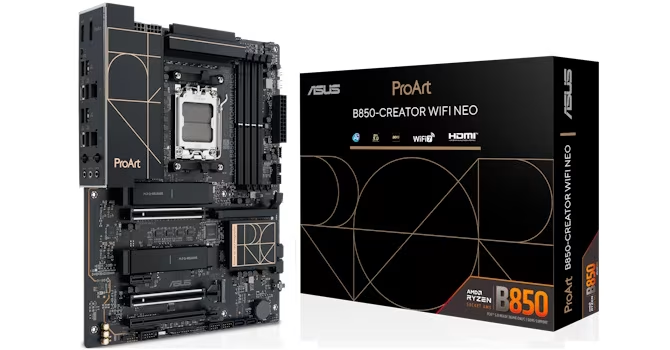
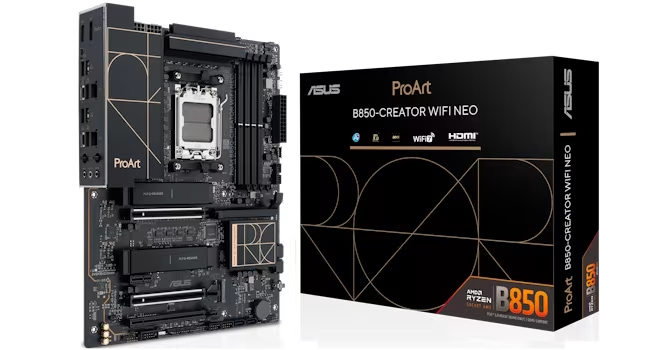
ASUS ProArt B850-Creator Wi-Fi Neo
A workstation-focused motherboard offering robust power delivery and dual PCIe Gen 5 M.2 support at a mid-range price point.
How This Score Is Calculated
- Sources analysed: 5 reviews
- Explicit scores: 0 sources
- Sentiment-only: 5 sources (weighted 1.0×)
- Split: 3 Positive · 1 Mixed · 1 Negative
- Raw weighted average: 7.2
- Formula: Σ(score × weight) ÷ Σ(weight)
- Final score: 7.2/10 (clamped, rounded to 1 decimal)
Algorithmically calculated from source data. No manual adjustments.
- Most reviewed featureThermal Management (2/5)
- Most praisedPCIe Gen 5 M.2 Support
- Most criticisedLack of Thunderbolt/USB4
- Reviewer consensus levelModerate
The ASUS ProArt B850-Creator Wi-Fi Neo is a stylish, feature-rich motherboard designed for workstation users who prioritize PCIe Gen 5 storage speeds over high-end connectivity like Thunderbolt. While it excels in power delivery and aesthetic design, it is limited by a sparse rear I/O and thermal management that requires manual attention under heavy loads. It represents a compelling alternative to flagship boards for users who need specific professional features without the premium cost.
🔧 Key Specifications
Specifications sourced from reviewer mentions. Verify with manufacturer for complete details.
- Power Delivery: 36W per fan header
- Storage: Dual PCIe Gen 5 M.2 slots
- USB Charging: 30W USB-C PD/QC4+
- BIOS: 512 Mbit
- Connectivity: Wi-Fi included (Wi-Fi Neo)
💲 Price Range
Approx. 25,000 INR
Prices sourced from reviews. Check current retailer pricing.
📊 What Reviewers Say — Feature by Feature
5 features evaluated across 5 sources.
👍 Key Strengths
- Dual PCIe Gen 5 M.2 support
- Strong 36W fan header power
- 30W USB-C PD/QC4+ fast charging
- Stylish ProArt aesthetic design
- Upgraded 512 Mbit BIOS
👎 Key Weaknesses
- No Thunderbolt or USB4 connectivity
- Limited rear I/O Type-A ports
- Small heatsinks struggle under heavy load
- Bloatware-heavy Armory Crate software
- Unintuitive EFI/BIOS navigation
💰 Value for Money Analysis
Reviewers view this as a 'budget-friendly' workstation option that avoids the high price points of flagship X870E or Z890 motherboards. While it is considered a premium-priced B850 board, it delivers enough professional-grade features to justify the cost for the target audience.
2 of 5 sources commented on price or value.
⚡ Where Reviewers Disagreed
The following areas saw meaningful disagreement across sources.
- BIOS/EFI Usability: 2 sources praised the granular Q-Fan control while 1 source criticized the unintuitive navigation and inefficient workflow, suggesting a split between feature depth and user experience.
🎯 Who This Product Is For
Reviewer recommendations for different target audiences and use cases.
🛠️ Best Use Cases
- High-Speed Storage WorkflowsExcellent for users leveraging dual PCIe Gen 5 M.2 SSDs, provided manual thermal pad adjustments are made.Great
- Workstation BuildsGood for building a professional rig on a budget, though rear I/O limitations may hinder peripheral-heavy setups.Good
🔀 Alternatives Mentioned by Reviewers
Maximise this list. Include EVERY single competitor, rival, or alternative product mentioned in any of the source reviews. Do not omit any. More alternatives and longer lists are better.
- ASUS X870E Motherboards — These represent the flagship tier; they offer superior high-end connectivity features compared to the B850-Creator but at a significantly higher price point.
- MSI Motherboards — Noted for having a different EFI/BIOS implementation, specifically regarding fan curve customization, which some reviewers found more efficient than the ASUS ProArt implementation.
Alternatives sourced exclusively from reviewer mentions.
🛒 Buyer's Guide
✅ Buy This If…
- You need dual PCIe Gen 5 M.2 slots for professional storage workflows.
- You want a stylish workstation aesthetic without paying flagship X870E/Z890 prices.
- You require robust fan control and high-power fan headers.
❌ Skip This If…
- You rely on Thunderbolt or USB4 for professional peripherals.
- You need a large number of rear I/O Type-A ports.
- You are unwilling to manually adjust thermal pads for M.2 drives.
⚠️ Things to Check Before Buying
- Verify that your M.2 thermal requirements are met by the included heatsinks, as they may struggle with back-to-back heavy loads.
- Be prepared to manage the installation of ASUS Armory Crate, which is described as bloatware-prone.
📈 Sentiment Trends Over Time
Reviews span recent testing cycles. The following changes were detected:
- Software/BIOS — The transition to a 512 Mbit BIOS provides better future-proofing, though the UI/UX remains a point of contention regarding navigation efficiency.
The ASUS ProArt B850-Creator Wi-Fi Neo is a specialized, stylish motherboard that successfully brings workstation-grade storage features to a more accessible price point. While its lack of Thunderbolt and limited rear I/O will disqualify it for some professionals, its power delivery and PCIe Gen 5 support make it a strong contender for creators on a budget. We recommend it for those who prioritize high-speed storage over extensive peripheral connectivity. If you require advanced connectivity, consider moving up to the X870E series instead.
Reviewer Perspectives & Source Breakdown
ASUS ProArt B850-Creator Wi-Fi Neo Review - SSD Performance & Temperatur...
The motherboard provides adequate thermal performance for PCIe Gen 5 SSDs, though its small heatsinks can struggle under heavy loads. It is a solid, functional choice for standard setups, provided users utilize the included thermal supports correctly.
Pros
- Effective thermal management with correct pad adjustment
- Solid performance for PCIe Gen 4 SSDs
- Included rubber supports improve single-sided SSD thermals
Cons
- Small heatsinks struggle with PCIe Gen 5 SSDs
- Throttling observed during heavy back-to-back testing
- Thermal pads require manual adjustment for optimal results
ASUS ProArt B850-Creator Wi-Fi Neo Review - Board Layout | TechPowerUp -...
The ProArt B850-Creator Wi-Fi Neo offers excellent power delivery and dual PCIe Gen 5 M.2 support, making it a compelling, budget-friendly choice. However, it is hampered by a lack of Thunderbolt/USB4 connectivity and a limited rear I/O port selection.
Pros
- Generous 36W power capacity on all fan headers
- Dual PCIe Gen 5 M.2 slots
- Powerful 30W USB-C PD/QC4+ delivery
- Tool-free M.2 heatsink installation
Cons
- Lacks Thunderbolt or USB4 connectivity
- Limited rear I/O Type-A port selection
- M.2 heatsinks may struggle with sustained thermal loads
- No LED POST code display
ASUS ProArt B850-Creator Wi-Fi Neo Review | TechPowerUp - techpowerup.co...
Price: approx. 25,000 INR
The ProArt B850-Creator Wi-Fi Neo offers a stylish design and robust connectivity for users who want premium features without the cost of high-end X870E or Z890 boards. It is a solid, feature-rich option for those needing specialized workstation capabilities.
Pros
- Striking ProArt design aesthetic
- Dual dedicated PCIe Gen 5 M.2 slots
- Upgraded 512 Mbit BIOS for better future-proofing
- Extensive connectivity options
Cons
- Higher price point for a B850 motherboard
ASUS ProArt B850-Creator Wi-Fi Neo Review - BIOS Overview | TechPowerUp ...
The refreshed EFI design aims for accessibility but suffers from unintuitive navigation and inefficient customization workflows. While core features like Q-Fan remain excellent, the overall user experience requires refinement.
Pros
- Clean, granular Q-Fan control functionality
- Effective search function within settings
- Addition of fan grouping capabilities
Cons
- Design lacks intuitiveness in navigation
- Inefficient process for customizing favorite items
- Hidden Q-Dashboard feature is hard to find
- Wasted space in EzMode interface
ASUS ProArt B850-Creator Wi-Fi Neo Review - Board Software | TechPowerUp...
ASUS Armory Crate offers functional control over RGB and fans but is hindered by a tedious, bloatware-prone installation process. While useful, it lacks the depth found in EFI-based configuration tools.
Pros
- Effective control over RGB lighting
- Useful in-Windows fan tuning capabilities
- Provides intuitive fan temperature source switching
Cons
- Installation process is tedious
- Risk of installing unnecessary bloatware
- Requires multiple restarts for updates
- Less feature-rich than motherboard EFI