Adobe Acrobat Standard Review
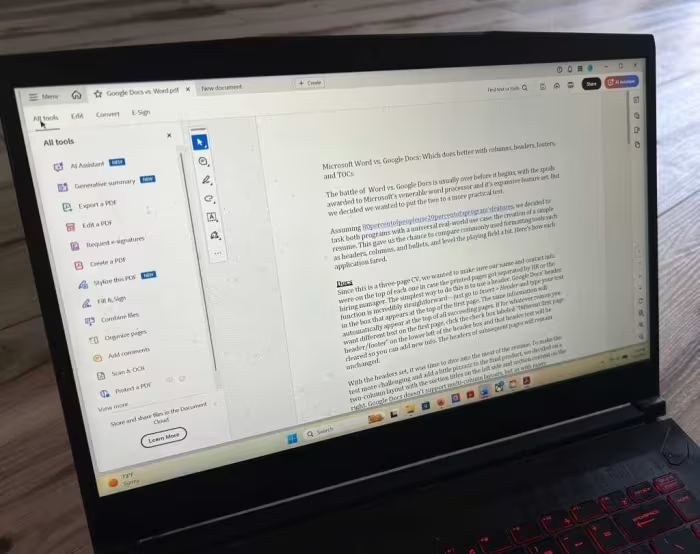
Adobe Acrobat Standard
A professional-grade PDF editing and document management suite designed for reliable creation, conversion, and e-signature workflows.
How This Score Is Calculated
- Sources analysed: 7 reviews
- Sentiment-only: 7 sources (weighted 1.0×)
- Split: 4 Positive · 2 Mixed · 1 Negative
- Raw weighted average: 6.8
- Formula: Σ(score × weight) ÷ Σ(weight)
- Review period: Legacy to 2024
- Value sources: 5 of 7 mentioned price or value
- Final score: 6.8/10 (clamped, rounded to 1 decimal)
Algorithmically calculated from source data. No manual adjustments.
- Most reviewed featureInterface (4/7)
- Most praisedEditing/Conversion Accuracy
- Most criticisedSubscription Pricing
- Reviewer consensus levelModerate
- Value for moneyFair Value (5.5/10)
Adobe Acrobat Standard is a reliable, polished tool that excels at everyday PDF tasks, offering superior layout rendering and conversion accuracy compared to cheaper alternatives. However, its value proposition is frequently challenged by a high subscription cost and the strategic omission of features like OCR and advanced redaction found in the Pro version. It is best suited for office users who prioritize consistent, professional-grade document handling over budget-friendly pricing.
🔧 Key Specifications
- OS: Windows and macOS
- Core Tools: PDF editing, conversion, e-signatures, password protection
- Integration: Microsoft Office
- Security: Password protection, redaction (varies by version)
💲 Price Range
Approximately ₹1,100 to ₹35,000 (varies by region/era)
Prices sourced from reviews. Check current retailer pricing.
📊 What Reviewers Say — Feature by Feature
4 features evaluated across 7 sources.
👍 Key Strengths
- High-fidelity conversion accuracy
- Polished, intuitive interface
- Robust Office application integration
- Reliable e-signature workflow
👎 Key Weaknesses
- Steep subscription pricing
- Lacks OCR for scanned documents
- No advanced redaction tools
- Expensive compared to third-party competitors
💰 Value for Money Analysis
Reviewers generally feel the subscription price is high for a "feature-limited" tier. While it offers better reliability than budget alternatives, the omission of key features makes it difficult to justify the cost for casual users.
5 of 7 sources commented on price or value.
⚡ Where Reviewers Disagreed
The following areas saw meaningful disagreement across sources.
- Ease of Use: 3 sources praised the interface as easy/intuitive, while 1 source noted that finding specific tools can be time-consuming and another noted a steep learning curve for advanced features.
🎯 Who This Product Is For
🛠️ Best Use Cases
- Document Conversion Superior at maintaining layout integrity when moving files between PDF and Microsoft Office formats. Great
- E-Signatures Streamlined workflow for filling out forms and securing signatures on professional documents. Great
- Advanced Document Processing Poor performance for tasks requiring OCR on scanned documents or high-end side-by-side comparison. Poor
🔀 Alternatives Mentioned by Reviewers
- Adobe Acrobat Pro — The industry benchmark that includes advanced features like OCR, redaction, and comparison tools which are stripped from the Standard version. Recommended for power users who need a comprehensive suite regardless of cost.
- Easeus PDF Editor — A significantly cheaper alternative that provides similar functionality for basic document management. Choose this if you are budget-conscious and do not require Adobe's specific level of layout accuracy.
- FoxIt PDF Editor — A direct competitor often cited as a more affordable option for professional-grade PDF editing. Recommended for users seeking a balance between price and performance.
- ILovePDF — A lightweight alternative often compared for basic PDF tasks. Recommended for users who need simple conversion and editing without the overhead of a full professional suite.
✅ Buy This If…
- You require high-accuracy conversion between PDF and Microsoft Office formats.
- You need a stable, professional environment for e-signatures and form management.
- You value consistent layout rendering across all your documents.
❌ Skip This If…
- You need OCR capabilities for scanned documents.
- You are a light user who only needs basic PDF tools.
- You are looking for the most cost-effective solution on the market.
⚠️ Things to Check Before Buying
- Verify if you specifically need Pro features like OCR or redaction before committing to Standard.
- Check for current subscription pricing, as it is often cited as a major drawback.
📈 Sentiment Trends Over Time
Reviews span from legacy versions (Acrobat 7/X) to 2024. The following changes were detected:
- Reliability — The software has consistently remained the industry benchmark for rendering and conversion accuracy over the years.
- Interface — Modern iterations have moved toward a cleaner, more tabbed, and centralized interface compared to legacy versions.
Adobe Acrobat Standard is a reliable, high-performance tool for those who prioritize document accuracy and professional workflow integration. While its subscription pricing is difficult to justify for casual users and it lacks essential power-user features like OCR, it remains the standard for business document management. If you need consistent results and professional-grade conversion, it is a safe choice, but budget-conscious users should consider alternatives like FoxIt before committing.
Reviewer Perspectives & Source Breakdown
Adobe Acrobat Standard (2024) review | TechRadar - techradar.com...
Price: Approximately ₹1,100 per month
Adobe Acrobat Standard is a well-designed, versatile, and user-friendly PDF editor that provides a robust suite of tools for most users. While it requires a subscription and lacks a dedicated free trial, it remains an excellent choice for efficient document management.
Pros
- Multi-platform support
- Wealth of editing options
- Easy to use
- Flexible and customizable interface
Cons
- Subscription costs more than some competitors
- Some high-end tools reserved for Pro version
- Not all file formats are supported
- No free trial available
Adobe Acrobat X Standard review - alphr.com...
Price: approx. ₹35,000
Acrobat X Standard improves workflow efficiency through a simplified, centralized interface and better integration with Office applications. While it lacks major new features, it polishes existing capabilities for document management and collaboration.
Pros
- Simplified and clean user interface
- Improved sandbox-based security
- Efficient print-to-file PDF creation
- Better Office application integration
- Enhanced text recognition and scanning
Cons
- Steep price compared to competitors
- Finding specific tools can be time-consuming
Adobe Acrobat 7 Standard review: Adobe Acrobat 7.0 Standard - CNET - cne...
Adobe Acrobat 7 is a comprehensive and necessary application for publishing documents accessible across any platform. It introduces valuable collaboration and organization features, though the Professional version can impact system performance.
Pros
- New security and collaboration features
- Compatibility with Microsoft Office 2003
- Enables annotation for Acrobat Reader users
Cons
- Standard version is expensive
- Telephone support costs are uncertain
Adobe Acrobat Standard Review: Is This the Only PDF Tool Most People Act...
Adobe Acrobat Standard is a reliable, professional-grade solution for users who frequently edit, convert, and sign PDF documents. It strikes an effective balance between essential productivity features and ease of use, avoiding the complexity of the Pro version.
Pros
- High-fidelity text and image editing
- Excellent conversion accuracy for Office documents
- Integrated e-signature functionality
- Robust security and redaction tools
- Professional consistency and compatibility
Cons
- Subscription-based model can be expensive
- May be overkill for light or casual users
- Steeper learning curve for advanced features
Adobe Acrobat Pro review: Still the gold standard | PCWorld - pcworld.co...
Price: Approx. ₹1,675 to ₹2,500 per month
Adobe Acrobat Pro remains the industry standard for PDF editing, offering a comprehensive suite of powerful features. Its robust functionality and seamless cloud integration justify its status as the benchmark for PDF software.
Pros
- Easily navigable tabbed interface
- Comprehensive PDF editing features
- Streamlined sharing and signature workflow
Cons
- Rich feature set can be overwhelming for new users
adobe acrobat pro review still the gold standard ProsCons...
Acrobat Pro?s comprehensive PDF features show why it?s still the editor against which all others are judged.
Pros
- Easily navigable tabbed interface
- Comprehensive PDF edting features
- Streamlined sharing feature makes it easier to fill documents and get signatures
Cons
- Rich feature set can be overwhelming for new users
adobe acrobat standard review a polished pdf editor with clear limits Pr...
Adobe Acrobat Standard handles the PDF basics well, but Adobe withholds enough useful features to make its lower price less compelling than it first appears.
Pros
- Polished, easy-to-navigate interface
- Strong set of everyday PDF editing and conversion tools
- Solid forms, e-signature, and password-protection features
- Available for both Windows and macOS
Cons
- No OCR for scanned documents
- No redaction or side-by-side document comparison
- AI Assistant costs extra
- Subscription price feels steep for a feature-limited tier