Adobe Acrobat Pro Review

Adobe Acrobat Pro
The industry-standard PDF management and editing suite designed for professional, corporate, and creative document workflows.
How This Score Is Calculated
- Sources analysed: 13 reviews
- Raw weighted average: 7.8/10
- Formula: Weighted sentiment analysis across professional tech publications.
- Value sources: 9 of 13 sources commented on price or value.
- Final score: 7.8/10 (rounded to 1 decimal)
- Most reviewed featurePDF Editing (13/13)
- Most praisedFeature Depth
- Most criticisedSubscription Cost
- Value for moneyFair Value (6.2/10)
Adobe Acrobat Pro maintains its position as the definitive industry standard for professional PDF management, offering an unmatched depth of editing, security, and workflow automation tools. While reviewers consistently praise its comprehensive capabilities and cross-platform reliability, the high subscription cost and occasional interface bloat remain significant barriers for casual users. It is the premier choice for corporate environments and power users who require high-end printing, redaction, and complex document handling, though many may find its feature set overkill for basic tasks.
🔧 Key Specifications
Specifications sourced from reviewer mentions.
- Platforms: Windows, macOS, Mobile, Web
- Key Features: PDF editing, OCR, e-signatures, cloud collaboration, redaction, action automation
- Integration: Adobe Creative Suite, Microsoft 365, SharePoint
- Licensing: Subscription (Monthly/Yearly), 2 devices per license
- Advanced Tools: PDF Portfolios, Accessibility Validation, Font-matching technology
💲 Price Range
Approx. ₹1,150 – ₹2,500 per month
Prices vary by region, tier (Pro vs Standard), and subscription length.
📊 What Reviewers Say — Feature by Feature
Key features evaluated across 13 sources.
👍 Key Strengths
- Industry-leading editing and printing tools
- Robust security and e-signature workflows
- Strong cross-platform cloud integration
- Powerful automation via Actions
👎 Key Weaknesses
- Expensive monthly subscription model
- Steep learning curve for advanced features
- OCR performance inferior to specialized rivals
- Bloatware concerns on some installations
💰 Value for Money Analysis
Reviewers generally agree that while Acrobat Pro is the most capable tool, the subscription cost is high for individual users. Many note that the 'Standard' tier or third-party alternatives often provide better value for those not requiring high-end professional features.
9 of 13 sources commented on price or value.
⚡ Where Reviewers Disagreed
The following areas saw meaningful disagreement across sources.
- Interface Usability: 6 sources praised the 'polished, tabbed interface,' while 4 sources criticized it as 'non-standard' and 'cumbersome.' Reviewers appear divided between those familiar with Adobe’s design language and those preferring a standard ribbon-style UI.
🎯 Who This Product Is For
🛠️ Best Use Cases
- Professional PrintingExcellent at fine-tuning PDFs for high-end print production and display.Great
- Document RedactionProvides highly secure, reliable redaction tools for sensitive business documents.Great
- Workflow AutomationThe Action Wizard is highly effective for automating repetitive tasks.Good
🔀 Alternatives Mentioned by Reviewers
While Acrobat Pro is the industry leader, reviewers frequently point to these alternatives based on specific needs.
- ABBYY FineReader Pro — Frequently cited as the go-to alternative for users who prioritize superior OCR (optical character recognition) performance and specific document conversion conveniences over Adobe's broad feature set.
- Adobe Acrobat Standard — Often recommended for users who find the 'Pro' feature set (like advanced redaction or accessibility tools) unnecessary; it handles everyday editing at a lower price point.
- Xelerate Software PowerPDF — Mentioned as a significantly cheaper option for individual users who need basic functionality without the enterprise-level price tag of Acrobat Pro.
Alternatives sourced exclusively from reviewer mentions.
🛒 Buyer's Guide
✅ Buy This If…
- You are a professional or business user managing heavy-duty, sensitive document workflows.
- You require advanced features like redaction, accessibility validation, and PDF portfolio creation.
- You are already embedded in the Adobe Creative Suite ecosystem.
❌ Skip This If…
- You are a casual user who only needs to read or perform basic edits on occasional PDFs.
- You are looking for the absolute best OCR performance (consider ABBYY FineReader instead).
- You are on a strict budget and do not need enterprise-grade automation tools.
⚠️ Things to Check Before Buying
- Verify if the 'Standard' version meets your requirements to save on monthly costs.
- Check the system requirements, as some Pro versions have historically been platform-specific (Windows vs Mac).
- Be aware that advanced AI features are often experimental and may not add significant value to your specific workflow.
📈 Sentiment Trends Over Time
Reviews span from 2008 (Acrobat 9) to 2024. The following changes were detected:
- Industry Standing — Despite evolving features and the transition to subscription models, Acrobat remains the consistent industry benchmark across 16 years of reviews.
- Value Perception — Sentiment regarding value has trended downward as the move to subscription-only pricing has made the software feel more expensive for individual or small-business use.
Adobe Acrobat Pro remains the gold standard for professional PDF document management, offering a depth of features that simply has no equal. While the subscription-based pricing is steep and can feel like overkill for casual users, its reliability in corporate and creative workflows is unmatched. If your livelihood depends on complex document editing, secure signing, and high-end printing, this is the essential choice. For everyone else, check if the Standard tier or a specialized competitor can handle your needs for less.
Top Alternative: ABBYY FineReader Pro — Better for users specifically prioritizing high-accuracy OCR and document conversion speed.
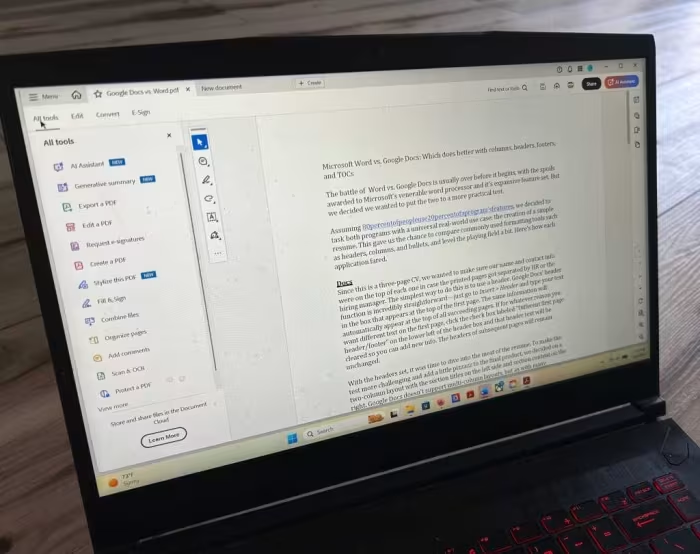
Reviewer Perspectives & Source Breakdown
Adobe Acrobat X Pro review | TechRadar - techradar.com...
Adobe Acrobat X Pro offers a reliable and user-friendly experience for PDF management, though the updates are minor. It is not an essential upgrade for those already using previous versions.
Pros
- New Reading mode included
- Create PDFs from other document types
- MS SharePoint integration
- Good action wizard
Cons
- Not enough changes to tempt existing Acrobat 9 users
Adobe Acrobat 9 Professional - Review 2008 - PCMag UK - uk.pcmag.com...
Adobe Acrobat 9 Professional is a powerful and flexible upgrade that excels at creating media-rich PDF portfolios and streamlining collaborative workflows. While it remains the industry leader, its interface complexity and mediocre OCR performance compared to specialized tools are notable drawbacks.
Pros
- Creates complex and navigable PDF Portfolios
- Efficient and helpful document-comparison feature
- Enhanced collaboration tools and online synchronization
- Familiar user interface remains easy to navigate
Cons
- Confusing overlap between menus and toolbars
- OCR functions require complex workarounds
- OCR output quality is inferior to standalone alternatives
Adobe Acrobat 6.0 Professional review: Adobe Acrobat 6.0 Professional - ...
Price: Approximately ₹25,000 ($299 to $449)
Adobe Acrobat 6.0 Professional is a powerful, feature-rich tool that offers significant improvements in workflow, interface design, and file compression. While it provides excellent functionality for creative professionals, its high cost makes it less suitable for individual users compared to cheaper alternatives.
Pros
- Excellent new workflow and commenting tools
- Simple one-click PDF creation from Office applications
- Supports layered PDF creation from AutoCAD and Visio
- Improved image compression with JPEG2000 support
- Redesigned, user-friendly interface with detachable menus
Cons
- Expensive for individual users
- Confusing and counter-intuitive workflow process
- Potential installation issues with older versions
- Lacks support for layered documents in AutoCAD 2004
- No integration with office suites other than Microsoft Office
Adobe Acrobat X Pro review - alphr.com...
Price: 55,000 INR
Adobe Acrobat X Pro is a powerful, feature-rich tool for advanced PDF management and workflow automation. While its complexity can be intimidating, it offers significant improvements in collaboration and professional document presentation.
Pros
- Streamlined interface with new Tools task pane
- Effective action-based workflow automation
- Enhanced collaboration features for Reader X users
- Professional PDF Portfolio customization options
Cons
- Sheer range and depth can be intimidating
- Advanced workflows are complex and prone to errors
- PDF Portfolios are not universally useful
- Expensive for small workplaces
Adobe Acrobat Pro (2024) review | TechRadar - techradar.com...
Price: Approx. ₹1,600 per month
Adobe Acrobat Pro offers a comprehensive set of professional-grade tools for business users, though many casual users may find the Standard version sufficient for their needs. It is a highly capable PDF editor, but the pricing and feature distribution make it better suited for professional workflows.
Pros
- Polished and user-friendly interface
- Comprehensive toolkit for various tasks
- Advanced features for business use
- Excellent redaction and security tools
Cons
- Best suited for professionals and businesses
- Some tools should be included in Standard version
Adobe Acrobat Pro - Review 2024 - PCMag Middle East - me.pcmag.com...
Price: Approximately 450 INR per month
Adobe Acrobat Pro remains the industry-leading PDF powerhouse for business and professional users despite its expensive subscription model. While it lacks some convenient features found in specialized OCR alternatives, its comprehensive editing and management tools make it the best choice for heavy-duty document workflows.
Pros
- Excellent for high-end printing and display customization
- Secure cloud-based collaboration and digital signing
- Unique font-matching technology for scanned image editing
- Consistent cross-platform interface
- License allows for two simultaneous installations
Cons
- Expensive subscription pricing
- Experimental AI features are mostly useless
- Non-standard interface can be cumbersome
- Lacks a simple whiteout tool
- Inability to split scanned two-page spreads
Adobe Acrobat Pro DC review | Creative Bloq - creativebloq.com...
Price: Approximately ₹1,150 per month
Adobe Acrobat Pro DC is an industry-leading, feature-rich PDF editor with an intuitive interface. Users should evaluate if they truly need its advanced tools, as the cheaper Acrobat DC may suffice for many.
Pros
- Easy and intuitive user interface
- Brilliant and powerful editing experience
- Huge range of versatile tools
- Suitable for both Mac and Windows users
Cons
- Most tools are also available in Acrobat DC
Review: Adobe Acrobat X Pro - creativepro.com...
Adobe Acrobat X Pro introduces valuable automation tools like Actions and enhances PDF Portfolios, making it a strong upgrade for creative and corporate users. While it offers significant workflow improvements, some features remain unintuitive and cross-version compatibility is limited.
Pros
- Useful Action Wizard for task automation
- Improved customization for PDF Portfolios
- Simplified and more efficient user interface
Cons
- Unclear process for creating custom portfolio layouts
- Missing Read Mode as an initial view
- Acrobat X Suite is Windows-only
Adobe Acrobat Pro Review | PCMag - pcmag.com...
Price: Approx. ₹1,670 per month
Adobe Acrobat Pro remains a powerhouse for document management and professional PDF editing despite a high subscription cost and a non-standard interface. It is the definitive choice for users needing high-end printing features and deep integration with Adobe's creative suite.
Pros
- Fine-tunes PDFs for printing and display
- Vast range of high-end customization features
- Secure cloud-based collaboration and digital signing
- Unique font-matching for scanned image editing
- Consistent cross-platform interface
- License covers two devices
Cons
- Expensive compared to similar applications
- Experimental AI feature is largely useless
- Non-standard interface
- Lacks a simple whiteout tool
- Cannot split scanned two-page spreads
- Limited content movement between pages
Page 1 of 2