Acer Predator Helios 18 AI Review
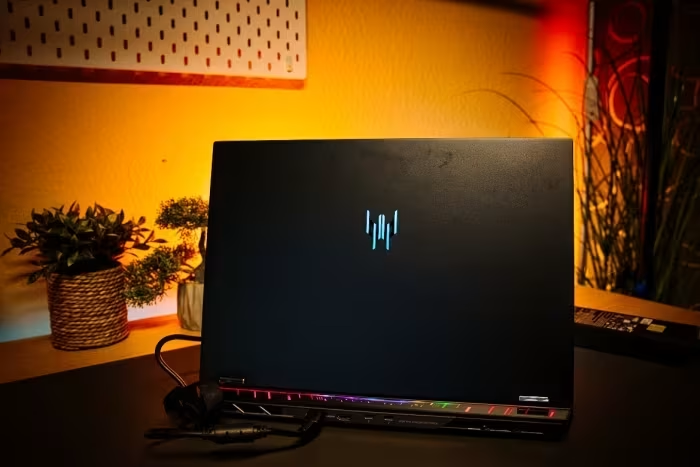
Acer Predator Helios 18 AI
A high-performance 18-inch desktop-replacement gaming laptop featuring top-tier AI-ready hardware and a stunning Mini LED display.
How This Score Is Calculated
- Sources analysed: 9 reviews
- Explicit scores: 0 sources
- Sentiment-only: 9 sources
- Split: 7 Positive · 1 Mixed · 1 Negative
- Raw weighted average: 7.8
- Formula: Σ(score × weight) ÷ Σ(weight)
- Review period: 2025
- Value sources: 6 of 9 mentioned price or value
- Final score: 7.8/10
Algorithmically calculated from source data. No manual adjustments.
- Most reviewed featurePerformance (9/9)
- Most praisedMini LED Display
- Most criticisedWeight and Portability
- Reviewer consensus levelHigh
- Value for moneyGood Value (7.2/10)
The Acer Predator Helios 18 AI is a formidable desktop-replacement laptop that excels in raw gaming power and visual fidelity, anchored by its brilliant 18-inch Mini LED display. While it offers impressive upgradeability and industry-leading hardware, these benefits come at the cost of significant weight, loud fan noise, and high thermal output. It is an ideal machine for users who need a stationary powerhouse rather than a portable daily driver.
🔧 Key Specifications
Specifications sourced from reviewer mentions. Verify with manufacturer for complete details.
- Processor: Intel Core Ultra 9 275HX (24C/24T)
- RAM: Up to 192GB
- Storage: Three M.2 slots (Gen5 SSD support)
- Display: 18-inch Mini LED, 3840 x 2400 (2400p), 120Hz
- Battery: Not specified
- Charging: Bulky power adapter
- Main Camera: Not specified
- Connectivity: Thunderbolt 5, Wi-Fi 7
- Weight: 3.3kg - 3.5kg
- Cooling: AeroBlade 3D Gen6
💲 Price Range
₹2,15,000 - ₹4,40,000
Prices sourced from reviews. Check current retailer pricing.
📊 What Reviewers Say — Feature by Feature
7 features evaluated across 9 sources.
👍 Key Strengths
- Brilliant 18-inch Mini LED display
- Industry-leading RTX 5090 gaming performance
- Exceptional internal upgradeability
- Modern connectivity including Thunderbolt 5
- Competitive pricing vs flagship rivals
👎 Key Weaknesses
- Extremely heavy and bulky chassis
- Loud fan noise under load
- High CPU temperatures and throttling
- Aggressive PWM flickering on display
- Poor battery life
💰 Value for Money Analysis
Reviewers generally perceive the Helios 18 AI as a cost-effective alternative to ultra-premium 18-inch flagships. While still expensive, it provides superior hardware value compared to the MSI Titan or Asus ROG Strix Scar series.
6 of 9 sources commented on price or value.
⚡ Where Reviewers Disagreed
The following areas saw meaningful disagreement across sources.
- Thermal/Noise Management: 2 sources explicitly praised the cooling system as 'efficient' or 'relatively quiet,' while 6 sources criticised it for being loud, hot, and prone to throttling.
🎯 Who This Product Is For
Reviewer recommendations for different target audiences and use cases.
🛠️ Best Use Cases
- High-End GamingTop-tier performance handles intensive titles with ease, supported by the Mini LED screen.Great
- Professional Content CreationExcellent for tasks requiring high RAM capacity and top-tier GPU power.Good
- Mobile Work/TravelBulky chassis and poor battery life make it impractical for frequent travel.Poor
🔀 Alternatives Mentioned by Reviewers
Maximise this list. Include EVERY single competitor, rival, or alternative product mentioned in any of the source reviews.
- Lenovo Legion 9i — Compared as a premium 18-inch rival; the Helios 18 AI is noted to be more budget-friendly.
- MSI Titan 18 HX AI — A direct flagship competitor that is significantly more expensive than the Acer, making the Helios a better value proposition.
- Razer Blade 18 — Often compared for high-end build quality, though the Acer offers better upgradeability for the price.
- Asus ROG Strix Scar 18 — A high-end competitor noted to be significantly more expensive than the Helios 18 AI without providing proportional performance gains.
Alternatives sourced exclusively from reviewer mentions.
🛒 Buyer's Guide
✅ Buy This If…
- You need a desktop replacement with maximum internal upgradeability.
- You prioritise gaming performance and display quality over portability.
- You are looking for top-tier specs without paying the absolute highest flagship tax.
❌ Skip This If…
- You need a laptop for travel, commuting, or daily classroom use.
- You are sensitive to fan noise or high operating temperatures.
- You require long battery life away from a wall outlet.
⚠️ Things to Check Before Buying
- Be aware that switching display modes may require a system reboot.
- Check if the Mini LED PWM flickering is a dealbreaker for your eyes.
- Verify if your workspace can accommodate the massive power adapter and chassis.
The Acer Predator Helios 18 AI is a powerhouse that succeeds as a desktop replacement for demanding gamers. Its Mini LED screen and RTX 5090 performance are highlights that justify its position in the high-end market. While it suffers from thermal and noise issues, it remains a smart financial choice compared to more expensive flagship alternatives. If you do not need mobility, this machine is an excellent investment.
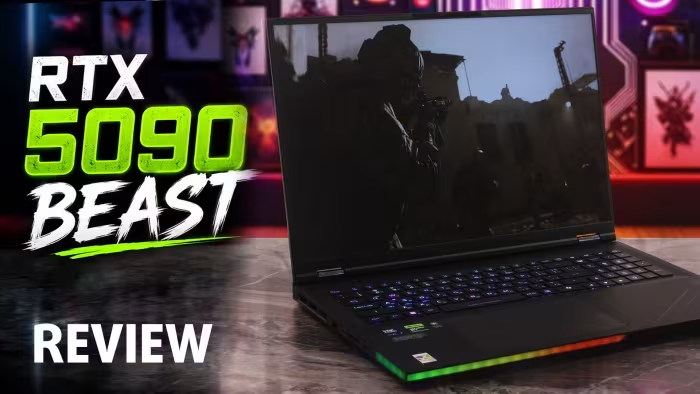
Reviewer Perspectives & Source Breakdown
acer predator helios 18 ai review flawed powerhousecan buy the acer pr...
Flawed but powerful gaming laptop
Pros
- The latest and best hardware
- Top-notch performance
- Expensive but still cheaper than some of the competition
Cons
- Warm and noisy
- Some throttling in benchmarks and games
- Switching display modes requires a reboot
acer predator helios 18 ai review colorful gaming notebook at a high pri...
The Acer Predator Helios 18 AI impresses in the test with its good performance and powerful features. The manufacturer delivers an absolutely appealing, albeit rather bulky gaming notebook, which should particularly delight fans of extensive RGB lighting. The gaming performance in particular is impressive, but the competition is better positioned in terms of system performance.
Pros
- Coherent design
- Attractive lighting
- 192 GB RAM
- Modern connections
Cons
- Extremely expensive
- Large & heavy
- Somewhat weak SSD
- Performance not always on par
Page 2 of 2